Gathering Realms & Travel
Location-aware gathering lets a GM describe campaign geography as first-class realms, group actors into Fabricate-managed parties, and make gathering environments available or unavailable based on where the party currently is. This page covers realms, parties, the GM Travel route, manual current-realm overrides, actor-scoped realm discovery, and location-gated environment availability. Token-driven realm sensing from the travel actor’s placed token, and realm modifiers applied to gathering calculations, are planned, not yet available.
The whole realm and travel subsystem is off by default and is enabled per crafting system with the Enable Travel & Realms toggle in gathering Settings (see Enabling Travel & Realms). Only GMs can manage realms and parties and set current-realm overrides. Players experience locations through the gathering app’s blocked reasons and the redaction-safe location API.
A Gathering Realm is the Fabricate gathering-geography concept. It is not a Foundry scene region drawn on the canvas. That is the distinct Foundry object a realm maps onto. Several Foundry scene regions can map onto one realm through the realm’s scene mappings, so a single realm can span several drawn map areas. A realm never decides which tasks or events belong to an environment (that is biome, plus danger for events). It only decides location availability. See Concepts below.
Concepts
| Concept | What it is |
|---|---|
| Realm | Named geography (such as The Verdant Expanse) scoped to one crafting system. The single Fabricate geography concept, geography only. Distinct from a Foundry Scene Region |
| Biome | A descriptive terrain or ecology trait carried by a realm, such as forest, swamp, or coastal |
| Environment | A reusable gathering place that can belong to one or more realms and declare location-availability rules |
| Party | A world-level Fabricate record with actor members and exactly one travel actor |
Realms are geography, not environment containers. Environments declare which realms they belong to and keep owning their own availability rules.
Enabling Travel & Realms
The realm/travel/availability subsystem is disabled by default for every crafting system. Enable it per system with the Enable Travel & Realms toggle on the Gathering Settings tab in the Crafting System Manager.
While the toggle is off, the system behaves as a non-location-aware system:
- The Travel nav item is hidden, and if Travel was the open tab it falls back to Environments.
- The environment editor shows no realm selectors.
- No current-realm, availability, party, or discovery surfaces appear.
- Every environment is available. Composition (biome and danger) is unaffected.
The Settings tab itself stays visible while disabled, since it hosts the toggle. Turning the toggle on reveals the Travel tab (where realms are authored), the environment editor’s multi-realm selector, and the rest of the location-aware surfaces described below.
The Travel Route
With Enable Travel & Realms turned on, open the Crafting System Manager, select the crafting system, and choose the Travel tab in the Gathering section. The center column shows the party list, the selected party’s editor (name, enabled state, members, travel actor, and current-realm override), and the Realms authoring surface (a realm list and detail editor). The right-hand inspector echoes the selected party’s read-only current-realm evidence. When no parties exist yet, the panel shows a setup checklist: create a realm, create a party, add members, assign a travel actor, then set the party’s current realm.
The Travel tab is hidden whenever the toggle is off. Create realms here before assigning environments to them.
Realms
Each realm belongs to one crafting system and stores:
| Field | Description |
|---|---|
| Name | Realm name shown to the GM, and to players once disclosed |
| Description | Free text shown to the GM |
| Image | Optional realm image |
| Enabled | Disabled realms are flagged in the UI. A manual override that includes a disabled realm still resolves it (marked Disabled) so GMs can preview or diagnose |
| Secret | A secret realm is never disclosed to players (not even its name) until the actor discovers it (see Secret realms and discovery) |
| Biomes | Biome tags (from the system’s biome list) used by environment biome availability rules |
| Scene mappings | Links from the realm to one or more Foundry scene regions, reserved for the scene-automation phase |
| Modifiers | Adjustments to event chance, drop rate, yield, difficulty, stamina cost, and attempt limit (plus custom adjustments) are stored and checked now, and applied to gathering calculations in a later phase |
Realms vs Foundry Regions
A Gathering Realm is the Fabricate concept. A Foundry region is a distinct canvas object that Foundry itself owns. The two are bridged but not the same:
- A realm’s scene mappings point a realm at one or more Foundry scene regions. Several scene regions can map onto one realm, so a single realm can span multiple drawn map areas.
- Scene region automation (sensing which realm a travel marker is in from the scene regions it occupies) is planned, not yet available.
Authoring realms (Travel tab)
Realm create, edit, and delete all live in the Travel tab, as a realm list with a detail editor:
- Create a realm, then edit its name, description, image, enabled state, secret flag, and biomes (chosen from the system biome vocabulary).
- Delete realm goes through the standard confirmation dialog. If environments or party overrides still reference the realm, the confirmation surfaces referenced-by evidence (how many) before you confirm. Deletion never blocks. Dangling references become stale repair evidence instead.
Scene mappings and modifiers are planned, not yet available: they normalize, validate, and round-trip, but are not yet authored in the UI or applied at runtime, and existing values on a realm are preserved untouched.
Realm settings (per system)
Each crafting system stores a few realm behavior settings. The Enable Travel & Realms toggle (off by default) is set from the Settings tab. The remaining settings are set through the API (see API):
| Setting | Values | Effect |
|---|---|---|
| Travel & Realms | off (default), on | Gates the whole realm, travel, and availability subsystem for the system. Set from the Settings tab Enable Travel & Realms toggle (see Enabling Travel & Realms) |
| Reveal mode | manual (default), on party token entry, always visible | “Always visible” discloses realm names to players even when secret and undiscovered. “On party token entry” is reserved for the scene-automation phase |
| Modifier visibility | visible (default), GM only | Default disclosure for realm modifiers once modifiers apply during play |
Parties
Parties are world-level records shared across every crafting system. Only the current-realm override is per system. A party stores a name, an enabled flag, member actor UUIDs, one optional travel actor UUID, and per-system current-realm overrides.
- Members can be added through the searchable picker, removed, or moved to another party. A move is a single persisted update, so a member never momentarily belongs to two parties mid-move.
- Travel actor is the actor that represents the party on a campaign map (for example, a banner or caravan actor whose token sits on an overworld or hexcrawl scene). In this slice it is an identity slot and an enablement requirement. A later phase senses the party’s realm presence from its placed token. Set or clear it from the Travel route.
- Enabling a party is only possible once it has a travel actor assigned. The toggle stays disabled (with a hint) until one is set.
- One enabled party per actor means an actor may be associated with at most one enabled party in total, whether as a member, as the travel actor, or both (and when both, the same party). Disabled parties never count toward this limit. Violations are rejected at save time and shown inline next to the control that caused them.
- Deleting a party removes its members, travel actor, and current-realm overrides for every crafting system, after confirmation.
Stale references
Members or travel actors whose actor no longer exists, and override realm ids whose realm was deleted, are preserved verbatim rather than silently dropped. The party row shows a Needs repair badge and the panel lists each stale reference with a one-click repair action (remove the stale member, clear the stale travel actor, drop the stale override realm).
Setting A Party’s Current Realm
A party’s current realm is resolved per crafting system, in this order:
- GM manual override is set from the Travel route.
- Travel actor token sensing is planned, not yet available. The inspector already reserves the Travel actor source label with an “Automation not yet available” note.
- Unresolved means no current realm.
To set the override, select one or more realm chips in the Current realm override section and click Set current realm (a party can be in several realms at once, e.g. overlapping geography). Clear current realm records an explicit “no override”. Both writes are stamped with the updating user and time. Including a disabled realm still resolves it (the UI marks it Disabled), and override ids referencing deleted realms surface as stale repair evidence and do not resolve.
The inspector echoes the resulting evidence: the resolution source (GM override, Travel actor, or No current realm) and the resolved realm list.
Environment Realm Membership
An environment declares which realms it belongs to, and it can belong to multiple realms. When Enable Travel & Realms is on, the environment editor shows a multi-select chip control (like the biome selector) listing the system’s realms. When the toggle is on but no realms exist yet, the selector shows an empty state pointing you to the Travel tab to create realms first. The selector is hidden while the toggle is off.
Environment Location Rules
On top of realm membership, environments can declare explicit location availability rules. All four are optional lists. An empty (or absent) list means “no rule”:
| Rule | Effect |
|---|---|
| Included realms | Available only when a current realm is one of these realms |
| Excluded realms | Blocked while any current realm is one of these realms |
| Included biomes | Available when any current realm carries one of these biomes |
| Excluded biomes | Blocked when any current realm carries one of these biomes |
Included realms are chosen in the environment editor’s multi-realm selector (toggle on). The biome and exclusion rules are authored through the API or by system import and export. Saving checks that the chosen realms exist on the owning crafting system. These rules gate location availability only. The old single free-text region on an environment is inert. It is not a composition or availability input and is no longer shown in the editor. The migration moves it into the environment’s included realms.
Availability is only evaluated when Enable Travel & Realms is on. While the toggle is off, every environment is available regardless of these fields. When on, availability follows these rules:
- An environment with no location rules is never location-blocked. Existing environments behave exactly as before.
- Exclusions win. A realm or biome exclusion matched by any current realm blocks the environment, even when an inclusion also matches.
- An environment with inclusions is available when any current realm’s id is included or any current realm carries an included biome.
- An environment with inclusions and no resolved current realm is blocked with a no current realm reason.
- An exclusion-only environment with no resolved current realm is available.
At attempt time the engine re-resolves location fresh. A stale listing (for example, an override cleared between listing and clicking Attempt) can never start a location-gated attempt.
What Players See
Location-gated environments stay listed but blocked, with a localized reason:
- “Not available in the party’s current realm.” when the environment is excluded or no inclusion matches.
- “No party realm is set. Ask the GM to set the party’s current realm.” when the environment requires a realm and none is resolved.
Each listed environment also carries redaction-safe location information (whether it is gated, whether it is available, why, and disclosure-safe current-realm labels) and, on blocked rows, travel guidance. That guidance covers the destination realms the viewer is allowed to see (non-secret or already discovered), plus a count of secret undiscovered destinations. Macros and future player UI can use this to show travel goals such as “Travel to Ashen March” without leaking secret geography.
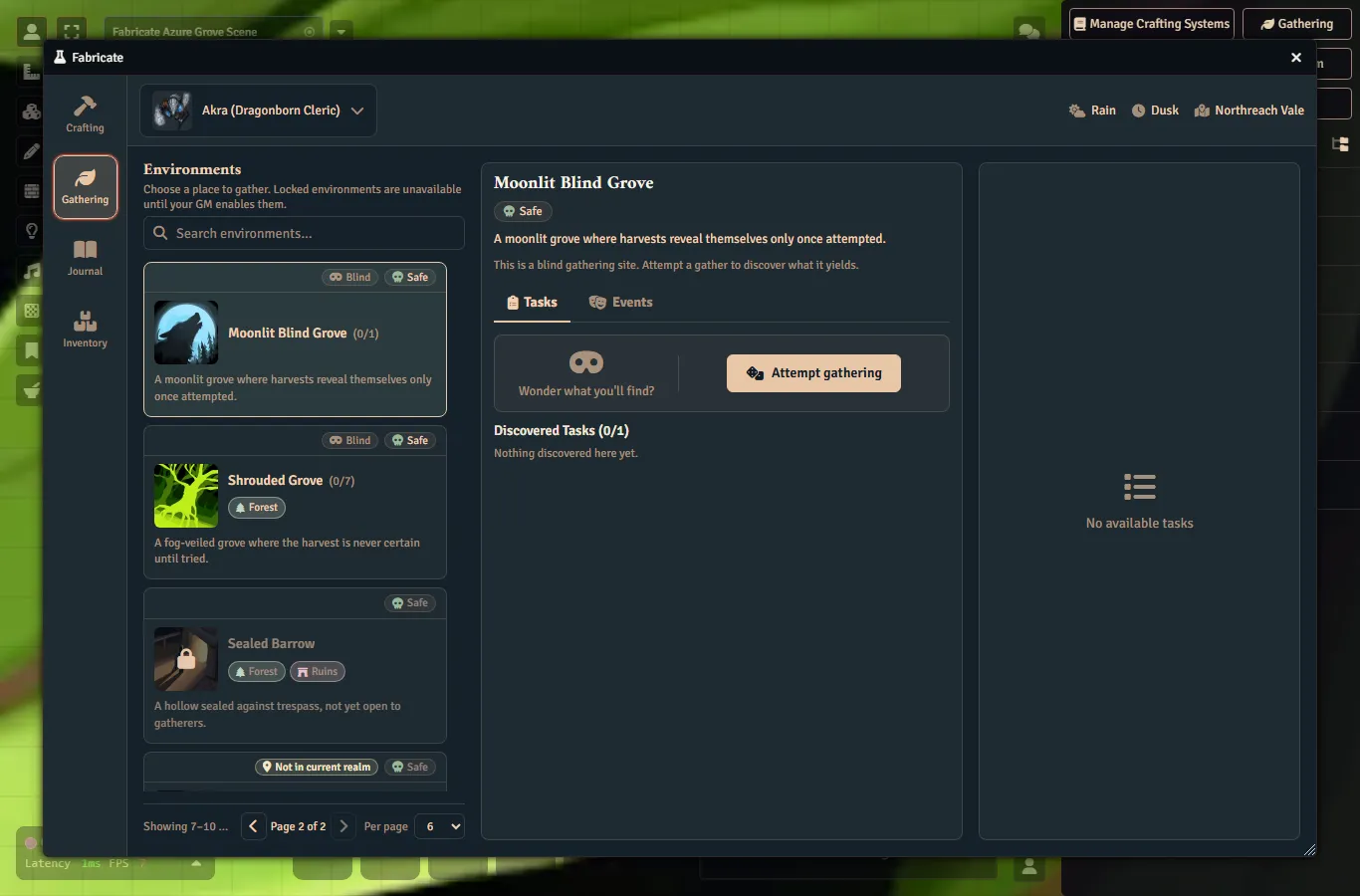
The actor bar’s current-realm chip
The gathering app’s actor selection bar carries a current-realm chip alongside the weather and time-of-day context. The chip’s current realm belongs to the party and system, not to any one environment, so it is shown for the selected actor’s active realm-enabled gathering system whether or not an environment is selected. The chip therefore appears whenever the realm subsystem is enabled, including when every environment is locked and none is selectable. It shows “No current realm” when the party has no resolved current realm, giving the player a diagnostic signal explaining why every environment is locked. When a current realm is resolved, the chip shows the realm name(s) with the same redaction behavior as everywhere else. A secret, undiscovered realm reads as Undiscovered realm, and the chip never fabricates a realm name. The chip carries an accessible name (“Realm:
Secret realms and discovery
Realm knowledge is actor-scoped: it follows the character across party changes and is stored on the actor. For a non-GM viewer, a secret, undiscovered realm never exposes its name anywhere. It reads as Undiscovered realm. GMs always see real names, non-secret realms are always disclosed, and the “always visible” reveal mode discloses every realm name.
GMs reveal or hide a realm for an actor through the API (see below). Revealing a realm checks that it belongs to the right crafting system, and each discovery records when and how it was learned.
API
Most realm and travel work is done in the UI described above. For macro authors, Fabricate also exposes the same capabilities programmatically. GM-facing entry points cover party management (members, travel actor, current-realm overrides) and per-system realm management and settings, including the few realm settings not surfaced in the UI. A player-callable lookup returns a redaction-safe current-realm summary for an actor: a non-GM caller never receives a secret undiscovered realm’s name. GM-only calls set or clear a party’s current-realm override and reveal or hide a realm’s discovery for an actor. Older macros that used the pre-rename names keep working.
See the API Reference for exact signatures.
Data Persistence
| What | Where it lives | Contents |
|---|---|---|
| Realms and realm settings | On each crafting system | The realms and realm behavior settings for that system |
| Parties | At the world level | Fabricate-managed parties, members, travel actors, and per-system overrides |
| Realm discovery | On each actor | Which realms that character has discovered, per system |
Because realms live on the crafting system, they travel with the system when you export and import it (through the import dialog and the export API), automatically. Import checks the realm data, warns about unnamed realms, accepts older exports, and re-homes each imported realm to the system you are importing into.