Tools
Tools are reusable items that an actor must have for crafting, salvage, or gathering. They can grant a check bonus, wear out, break, or turn into a damaged item.
Each crafting system owns one shared Tools library. Recipes, steps, named routed-by-ingredients sets, salvage configurations, and gathering tasks all select Tools from that library.
Open the Tool Studio
Open the Crafting System Manager and select a crafting system. Choose the top-level Tools entry between Essences and Gathering.
The library shows each Tool’s image, display name, enabled state, breakage summary, and validation state. Select a row to inspect it. Choose Edit Tool to open its editor.
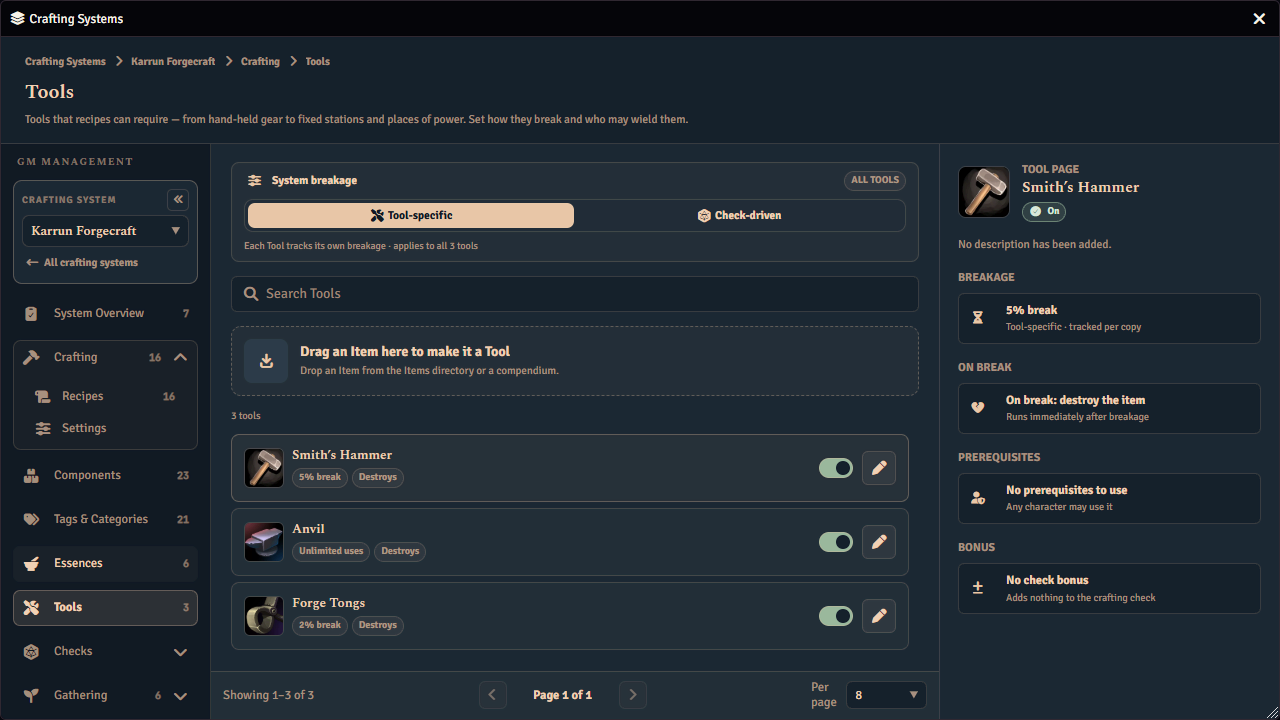
Ready means the Tool passes every validation check. Needs attention means the Tool has one or more issues. The inspector shows the issue count before you open the editor.
The library also owns the system-wide Tool breakage source setting. Changing this setting takes effect immediately and does not erase the inactive Tool settings.
Create or link a Tool
Create a Tool by dragging a world or compendium Item onto the creation area. The Tool Studio has no browse button or blank Tool shortcut.
Fabricate records the linked Item’s name, image, and description when you create or relink the Tool. Later changes to the source Item do not refresh that stored display automatically. Open the Tool’s entry in the world Tools Catalogue and drop another Item onto its linked source card when you want a new source and a fresh display snapshot. A crafting system’s Tool rules editor cannot change which Item a Tool is.
A Display label overrides the stored source name in Fabricate without changing the Item. The source name and description are read-only in the Tool Studio. Unlinking the Item preserves the draft, but the Tool cannot be saved until it has a linked Item or managed Component.
Edit a Tool
The editor has three tabs:
- Breakage controls whether this system is enabled for the Tool, its display label here, wear, check-driven immunity, on-break behavior, replacement, and repair materials.
- Requirements controls shared character prerequisites and the Tool check bonus.
- Validation lists every issue that blocks saving. Selecting an issue’s View button jumps to the tab it concerns and highlights the part of it the issue is about.
A Tool’s identity — the linked Item, its art and its description — is not editable here. It belongs to the world Tool, which the header’s World Tool button opens.
Each behavior section states whether this system inherits the world Tool’s answer or overrides it, and the switch at the card’s right edge moves between the two. While a section inherits, the card shows the world value and the controls are not offered; turning the switch off opens them on that value.
The behavior preview summarizes the draft while you work. The Unsaved state appears after a change. Leaving the editor with unsaved changes offers Save, Discard, and Keep editing.
Choose Save rules when the Tool’s rules are ready. An invalid or failed save keeps the editor open and moves attention to Validation. Validation and operation failures use safe descriptions instead of technical error details. Changing **Enabled in
Because the library is a draft-and-save surface, your edits are held until you save, leaving with unsaved edits prompts before discarding, and a notice appears if someone else changed the Tool list while you were editing it.
A Tool is invalid if it has neither a source item nor a component, names the same component as its replacement, has a breakage chance outside the allowed range, or has an empty dice formula. The Save button stays disabled until every Tool is valid; hover it to see the first failing reason. Tools belong to the crafting system that owns them and cannot be shared across systems. A gathering task, recipe, or salvage configuration only references them. See Tools for how a gathering task does that.
Presence and prerequisites
Every referenced Tool must be enabled and present before the activity can begin. The acting actor must own a non-broken matching Item unless a Tool station provides virtual presence.
Presence matching accepts familiar copies so players can use Items copied from the Tool’s source. Usage and breakage require a durable identity match because those actions can change or delete an Item. A loosely recognized copy can satisfy presence while being spared from usage and breakage.
Use Repair Item Data or issue a fresh copy from the source Item when a Tool is present but does not track use or break. See Tools Not Breaking or Tracking Usage.
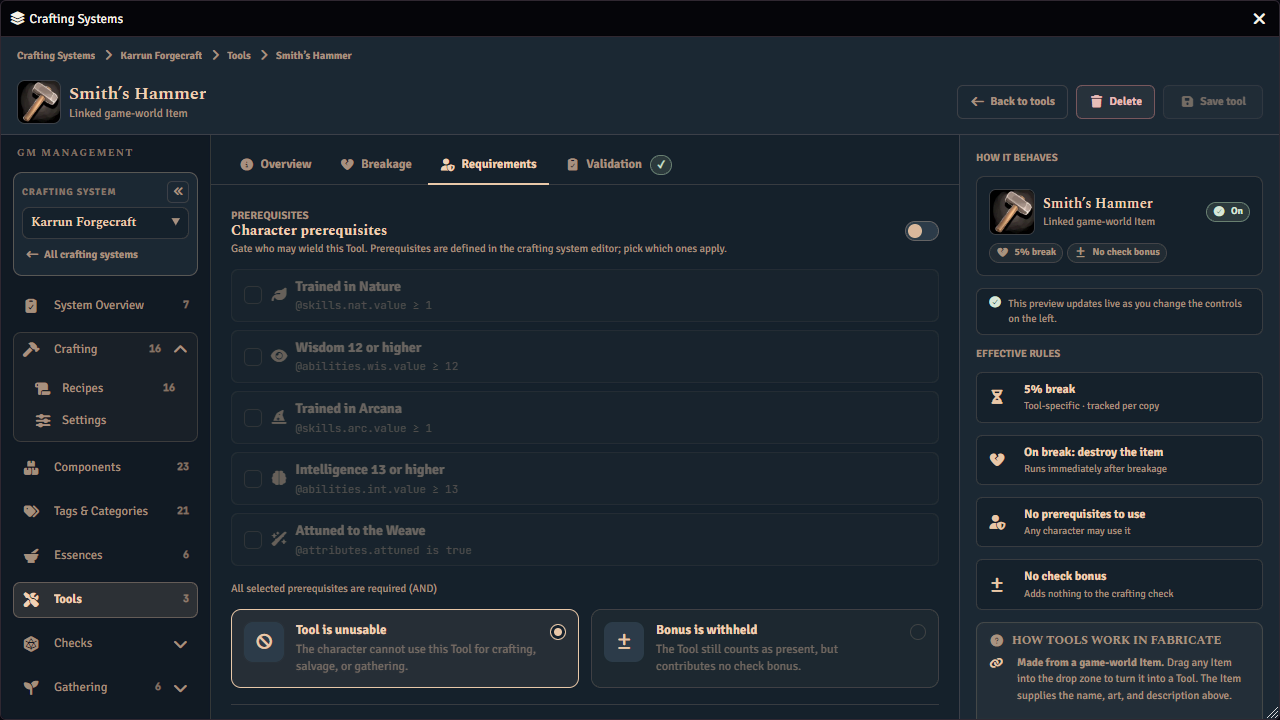
The Requirements tab can apply shared character prerequisites defined for the crafting system. Every selected prerequisite is required. The same actor that supplies the owned Tool must satisfy them. A Tool provided by a Tool station evaluates its prerequisites and bonus against the primary acting or check actor.
Choose what happens when those prerequisites fail:
- Tool is unusable blocks crafting, salvage, and gathering as though the Tool were missing.
- Bonus is withheld keeps the Tool usable but suppresses its numeric bonus.
Tool check bonuses
A Tool’s bonus is a roll expression. See Expressions for the syntax, and for the one respect in which this field differs from every other expression field in Fabricate.
Enable Tool check bonus in the Requirements tab and enter a bonus expression. The expression is evaluated against the actor who supplies the Tool. Enter a roll-data path without its leading @. Fabricate adds the @ when it stores the path. Numeric and dice expressions are stored as entered.
Crafting and salvage add every distinct eligible Tool bonus to the check. Recipes store only which Tools they require; bonus behavior is configured on the Tool itself. Gathering checks do not apply numeric Tool bonuses.
Tool breakage source
The library’s Tool breakage source setting decides what determines whether a required Tool breaks.
| Source | Behaviour |
|---|---|
| Tool-specific | Each Tool’s own Limited uses, Breakage chance, or Dice expression configuration decides whether it breaks. |
| Check-driven | The active check’s breakage settings decide whether required Tools break. The Tool-specific configuration is retained but not evaluated. |
Under Check-driven, each Tool also has a separate Breakable or Immune choice. An Immune Tool is excluded when the check breaks other required Tools. This choice does not replace or erase the Tool’s retained Tool-specific breakage configuration. Retained limited-use counters do not change while check-driven authority is active.
Authority decides whether Tool-specific settings or the active check controls breakage. The Tool’s Breakable or Immune choice decides whether it participates in check-driven breakage. The On-break action decides what happens after a break.
See Tool breakage triggers for check-driven setup.
Tool-specific breakage mechanics
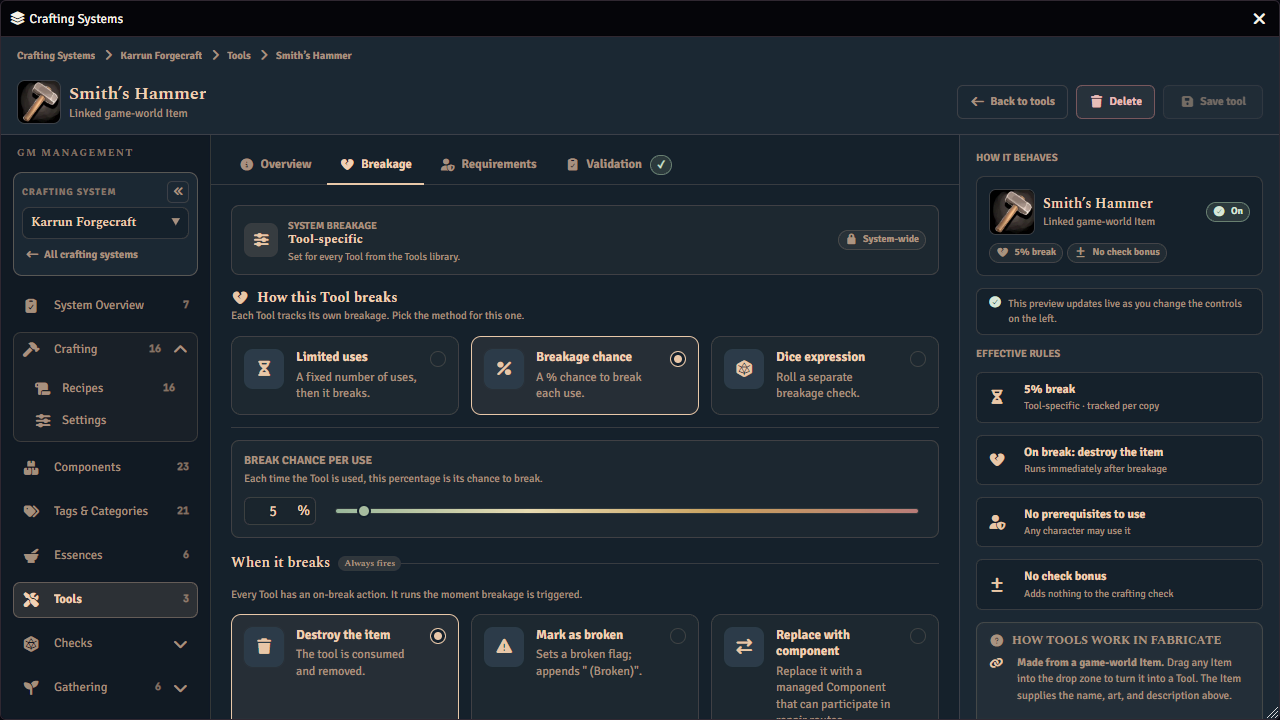
Under Tool-specific, choose one breakage mechanic:
| Mechanic | Behaviour |
|---|---|
| Limited uses | The Item’s usage counter increases on each attempt. The Tool breaks after the chosen maximum has been reached. A blank maximum means unlimited use while still tracking usage. |
| Breakage chance | A percentage from 0 to 100 is tested on each attempt. Zero never breaks and 100 always breaks. |
| Dice expression | Fabricate rolls the expression against the acting actor and breaks the Tool when the result is below Break below. |
Only Limited uses stores an Item usage counter. Switching to Check-driven retains the configured mechanic for a later switch back. For Breakage chance, the number field and slider stay synchronized. The control moves continuously from green through yellow and amber to red as the chance increases.
On-break actions
Choose one On-break action:
| Action | Behaviour |
|---|---|
| Destroy item | Removes the owned Tool Item. |
| Mark as broken | Keeps the Item, marks it broken, and appends “ (broken)” to its name. The broken Item cannot satisfy future Tool requirements until a GM clears the mark and restores its name. |
| Replace with component | Creates one Item from the selected managed Component and then removes the original Tool. |
Replacement is lossless when the target cannot be resolved or created. Fabricate keeps the original Tool rather than deleting it without a replacement.
Select a managed Component so the damaged item can participate in Fabricate recipes, repair routes, and Component matching.
Tools saved by an older Fabricate version can still carry a direct Item replacement. That legacy replacement continues to run, but the Tool Studio does not offer direct Item replacement for new authoring.
Repair materials
Choose Mark as broken to author optional Repair materials. Repair materials use the same structure as recipe ingredients. Every required group must be satisfied, and any one option inside a group can satisfy that group.
You can add requirements for Components, tags, essences, and currency. Every added group must be complete and every option must have a positive quantity before the Tool can be saved.
Repair execution is planned and is not yet available. The Tool Studio saves and validates the repair materials now, but it does not provide a repair action.
Reference a Tool
After saving the Tool, select it wherever it is required.
- A recipe-level Tool applies to the whole recipe and every step.
- A step-level Tool applies only to that step.
- An ingredient-set Tool applies only when that set is selected.
- A salvage Tool is required for that salvage setup.
- A gathering Tool is required for that gathering task.
Crafting combines the applicable recipe, step, and ingredient-set Tools for the attempt. A missing, disabled, broken, or unusable Tool blocks the activity.
Failure behavior
Crafting and salvage each have their own Break tools on a failed check policy. These policies decide whether otherwise applicable Tool breakage can run after a failed check.
Gathering uses Tool breakage outcome under Gathering Rules. This setting decides whether a broken Tool fails the whole attempt or whether rewards are still awarded. It does not decide whether the Tool breaks.
What results show
Activity results record what happened to each required Tool. Chat cards show the Tools involved and any breakage.
Migration from Catalysts
Fabricate converts retired Catalysts into system-owned Tools when older data is upgraded. The conversion preserves required references, limited-use counters, and the previous destroy or retain behavior. Gathering Tools stored by early versions are also reconciled into the system library.
See Also
- Recipes. Configure recipe Tool requirements and bonus modes.
- Degrading Tools. Build a Tool that wears out through repeated crafting.
- Breakable Gathering Tools. Apply the shared Tool setup to gathering.
- Canvas Interactables. Provide virtual Tool presence from a Scene Region station.