Checks
Checks in the Crafting Admin panel’s left rail is where you author the rolls that gate what an activity produces. Each activity has its own page, and this page covers what they all share: the shape of the editor, which way a roll is measured, and the named-modifier library every one of them selects from.
For an activity’s own rules, see Crafting, Salvage, or Gathering.
The Checks screen
Checks in the Crafting Admin panel’s left rail opens into one page per activity. Select Checks to expand it, then choose Crafting, Salvage, Gathering, or Validation. Salvage and Gathering appear only while those features are switched on for the system.
Each activity page is a single editor divided into five sections, which you move between along the strip across the top of the page.
| Section | What it holds |
|---|---|
| The roll | The formula that is rolled, and the difficulty it is measured against. |
| Outcomes | What each result of the roll produces. On a routed check that is the outcome tiers, on a simple check the two pass or fail outcomes, and on a progressive check the award mode. |
| Triggers | Conditions that override what the roll would otherwise produce. |
| Modifiers | Which of the system’s named modifiers this check adds to the roll, and how they combine. |
| On failure | What a failed check costs the character. |
A section that cannot apply in the current resolution mode says so in place of its controls, rather than disappearing. When an optional check is switched off, the page collapses to a single section offering Turn this check on.
Issue counts and unsaved edits
Fabricate checks each activity page as you edit it. A section with something to fix carries a dot on the strip, and the same issue is counted on that activity’s entry in the rail. Open that section and it opens with an amber notice for each of its own issues, blocking issues listed above warnings. Each notice shows a short title and, beneath it, the same sentence the Validation page states for that issue, so a dot never leaves you to go looking for what it meant. A notice’s Review button takes you to the field it names, or to the section itself when no single field is at fault. The one exception is the mode description that opens The roll: that stays a plain note about how the mode works, because it is not reporting a problem. The Checks entry itself totals the counts of the activity pages it is showing you, so a hidden feature’s stale issues never badge a page you cannot open to clear them. Validation restates that same total, so it is never added on top of it.
Those counts and dots read your unsaved edits, so you can see what an edit would fix before committing to it. Enabling a crafting system reads what is saved instead, so save the checks before enabling the system. The Validation page says so in as many words when your edits are clean but not yet saved.
One Save checks button saves every activity you edited, not only the one you are looking at. Your edits survive moving between the four Checks pages. Leaving Checks for another screen with unsaved edits asks first, names which activities are affected, and offers to save them, discard them, or stay where you are.
The Validation page
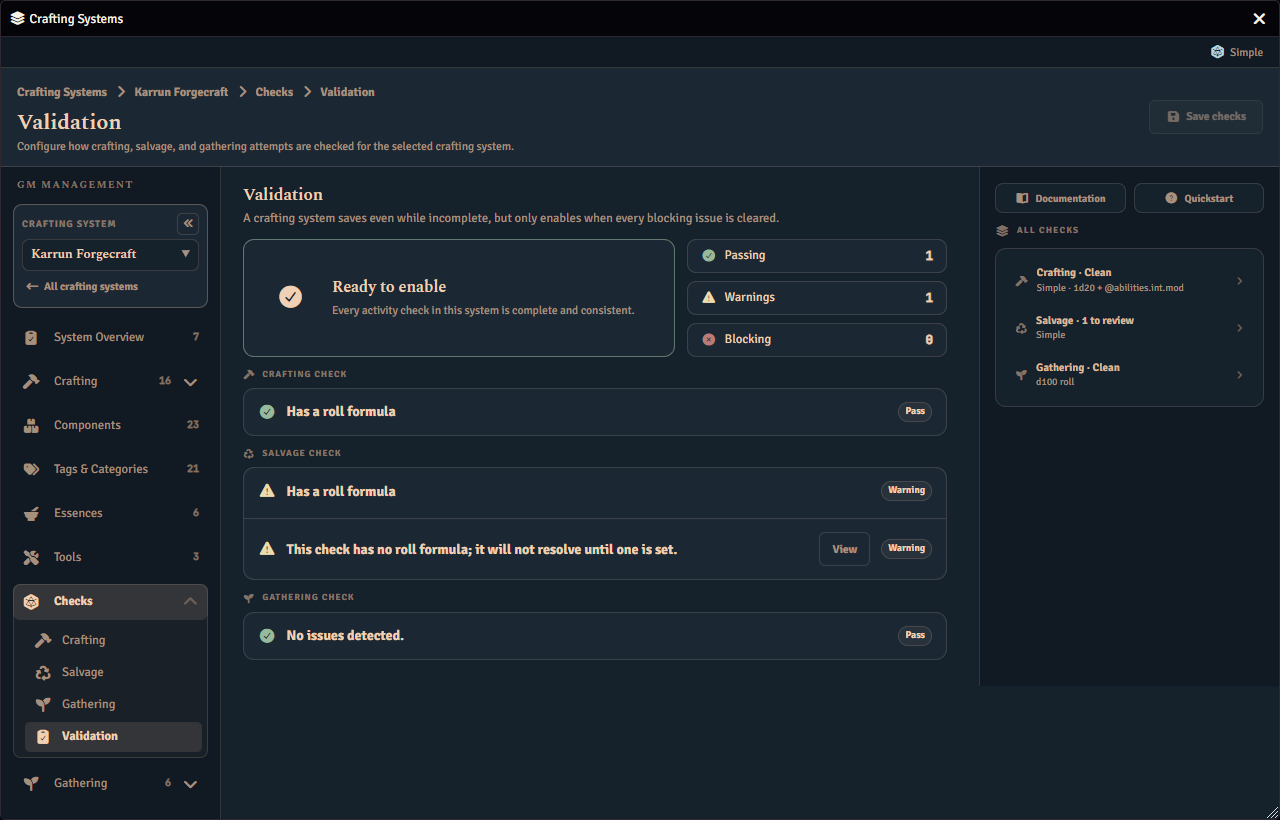
Validation gathers every issue across the crafting, salvage, and gathering checks into one list, grouped by activity and rated Pass, Warning, or Blocks enable. Each issue shows a short title over the sentence explaining it, the same title and sentence its section’s own notice shows. Selecting an issue takes you to the page and section that raised it, and highlights the specific field when the issue is about one. A blocking issue never stops you saving, only enabling the system.
The panel beside the page
The panel to the right of each activity page carries links to this documentation and to the quickstart, the check’s on or off switch, and a This check summary of its formula, outcome tiers, triggers, and applied modifiers. It also carries Preview as, Outcome preview, and Chance per outcome. Preview as picks a character, and, where the check has one, a difficulty record, to try the check against. Outcome preview then rolls a test check against that choice and announces the whole result together, never posting to chat and never costing the character anything. A rolled number sits in a medallion, captioned with what it is, such as the die that decided a difficulty check or the total or net successes otherwise. Under it, a breakdown line states the dice and modifiers behind that number and the character it was rolled for, and beside the number sits a line stating what it was measured against, such as a difficulty, a target and margin, or how many successes were needed. A card below states the outcome and what it does, tinted for success or failure, and often carries a note explaining the margin or a trigger that changed the result. A What happens list closes the readout, naming exactly what the outcome produces, consumes, and whether it breaks the required Tools. Chance per outcome works out the exact odds for the chosen character rather than estimating them, and shows each outcome’s percentage. When a formula cannot be charted exactly, it explains why in place of a chart. See What the previews will tell you for a worked example.
What the roll produces
Every check’s The roll section opens with a What the roll produces setting, choosing between Add the dice, the classic check every other section on this page describes, and Count successes, where the check rolls a pool of dice and counts how many of them individually clear a threshold instead of adding them into one total. It appears on every check that rolls, except gathering’s immediate d100 mode and an Alchemy check switched off, neither of which rolls a check at all. Switching between the two keeps everything you authored on both sides, so trying Count successes and switching back costs you nothing. See Success-counting checks for the full guide to authoring one, and Additional dice for letting a player spend a resource to roll more dice than a counting check’s pool alone would give them.
Which way is better
A pass-or-fail or routed check’s The roll section carries a Which way is better setting, next to What the roll produces. Higher is better is the classic roll-over-a-difficulty check, and Lower is better instead requires the roll to stay at or under the difficulty. A progressive check shows the setting too, but only Higher is better can drive it, because it spends its roll as a budget; Lower is better raises a blocking issue on Validation. Below it, What the roll is measured against picks a Fixed difficulty, the same number for every character, or a Character value read from the crafting, salvage, or gathering character, which a Difficulty adjustment adjusts rather than replaces. Switching between Higher is better and Lower is better, or between the two target sources, keeps everything you authored on every side, so trying one and switching back costs you nothing. See Roll-under and character-value checks for the full guide, including a character-value target’s adjustment, the salvage and gathering task overrides, and what a player’s roll prompt, chat card, and result box show.
Check modifiers
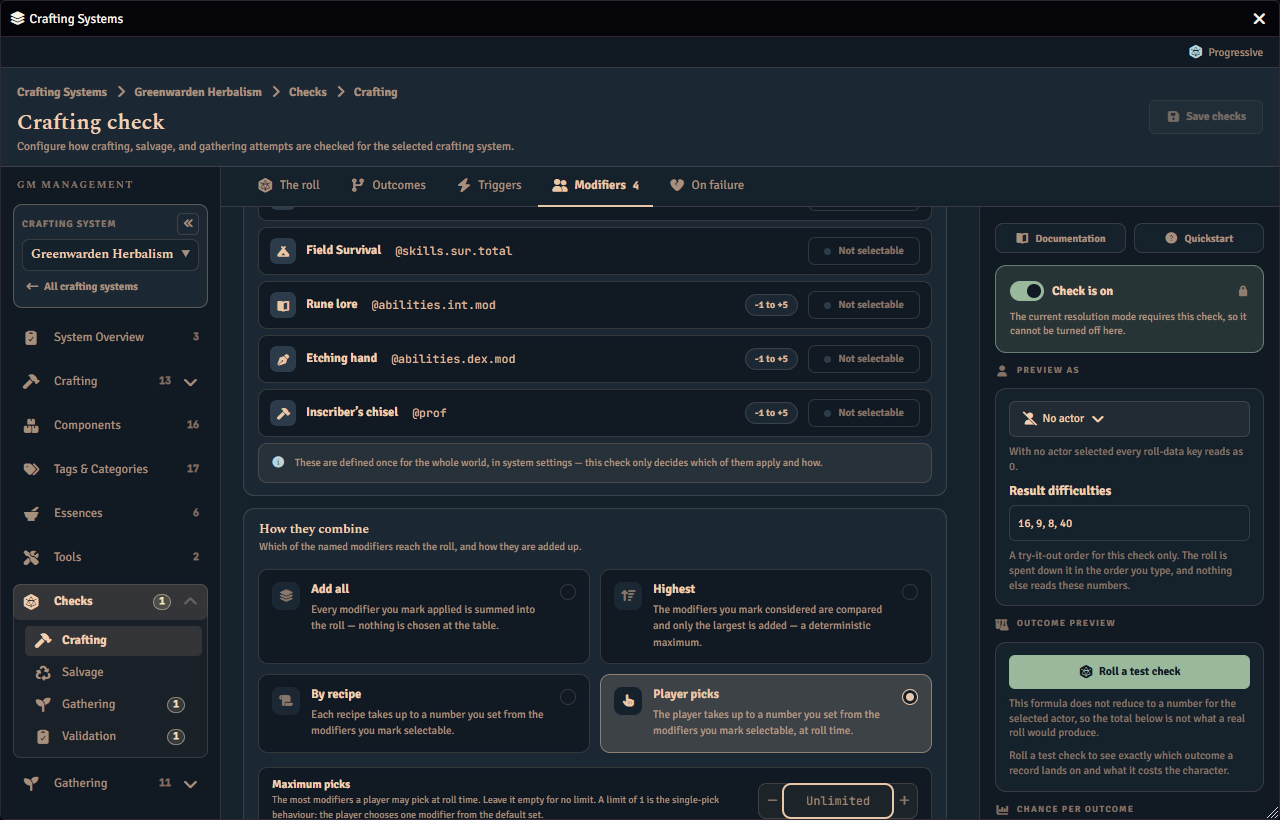
A crafting check can add in named modifiers read from the crafter — a Medicine bonus, a Herbalism kit — without you writing anything into the roll formula. Fabricate adds the eligible modifiers to the roll itself, each labelled so the chat card shows where the numbers came from. The ones that work out to a plain number are summed into one term, so a roll of 1d20 + 2 with a +3 modifier is rolled and reported as 1d20 + 2 + 3[Modifiers]. Each modifier that rolls dice is added as its own term beside it, so its dice stay attributable to it. A +3 modifier and a 1d4 one together give 1d20 + 2 + 3[Modifiers] + (1d4)[Modifiers]. The modifiers themselves live in one world library, at World > Rules & Resources > Modifiers. The Modifiers section of each Checks page then decides which of them that activity applies and how they combine. Its Named modifiers card lists the library and carries the switch that marks an entry eligible. Its How they combine card carries the combination rule and the pick limit. Every decision in that section is a system-level one. A recipe never overrides it. The most a recipe can do is pick which modifiers apply, and only when the system’s combination rule asks it to. The section renders in every resolution mode, whether or not the system’s active check can use the library yet. When it cannot, the section explains why instead of hiding, so a modifier you authored is never silently doing nothing with no indication. Check modifiers are not a crafting-only feature. Crafting, Salvage and Gathering select over the same library, each with its own rule, its own default set and its own pick cap. See One library, three activities. No Checks page edits an entry, Crafting included. Each shows the library read-only and links to World › Rules & Resources › Modifiers.
Because an eligible modifier never appears in the formula you type, The roll section restates it for you. Under the formula field, a row of term buttons adds a term to the formula, and What actually gets rolled shows the same formula with each applied modifier beside it and names the rule that combines them. A term button inserts its term where the cursor is, joined with ` + ` to the operand beside it, and joins it to the end when the cursor is inside a term or the whole formula is selected.
What a check rolls today
For an active check, Fabricate builds the roll in this order: your authored formula, with Advantage or Disadvantage already rolled into its first dice group where that mode is chosen, then eligible Tool bonuses, the selected named modifiers, a valid situational bonus, and finally an Advantage or Disadvantage bonus die where that mode is chosen instead. See Advantage and disadvantage for the three modes a check can offer. Under Lower is better, the Tool bonus and the named modifiers raise the target instead of joining the roll, as Which way is better describes. Flat named modifiers share one labelled term, while each named modifier that rolls dice keeps its own labelled term.
A Tool bonus that rolls dice is rolled once before the main check, and its total joins the check as a labelled number. Fabricate does not roll that Tool bonus again when it posts the check.
Defining modifiers
A modifier’s expression is an ordinary roll expression. See Expressions for the syntax, the per-game-system data paths, and how bounds clamp what an entry contributes.
Open World > Rules & Resources > Modifiers, then choose Add modifier. Each entry has an Icon, a Label such as Medicine or Herbalism, and an Expression. Write a character-data path with its leading @ — for example @abilities.med.mod — because the field supplies nothing for you. A number or a dice expression takes no @ at all: write 2 or 1d4 as they stand, and @abilities.med.mod + 1d4 mixes the two. Under the field, a row of term buttons offers your world’s suggested character-data paths, 2 and 1d4, and each inserts its term where the cursor is, the same way the formula’s term buttons do. There is nothing to add to the roll formula: an entry that is eligible applies automatically.
This is the same library gathering drop rows and events reference for their d100 chances, so a modifier is defined once and used wherever it makes sense.
The two read it differently. A drop row works the expression out and shifts the chance by the result, while an active check adds it to the roll. An expression that rolls dice is welcome in both. A check appends the dice to its own roll formula, so a 1d4 modifier is rolled once together with the check, animates like any other die, and shows on the chat card.
Two consequences are worth knowing.
- A modifier’s minimum and maximum clamp the RESULT of its roll, not the formula. A
1d8capped at+6contributes 6 on a roll of 7 and 3 on a roll of 3, and the die still shows. - Where modifiers compete, they are ranked by their AVERAGE. Under Highest, and under Player picks when nothing prompts,
1d4is worth 2.5 and beats a flat+2. The same winner is chosen every time, with no hidden roll to decide it, and the winner is then added as dice. A modifier whose dice total is transformed rather than summed, such as one written with a counting suffix likecsorcf, or withevenorodd, has no average to rank by. It ranks after every modifier that does have one, keeping the order you listed it in among other such modifiers, and it still rolls exactly as written whenever a competing rule has a place left over for it.
Upgrading from a version before 1.21.0
Check modifiers used to reach the roll only if you ALSO typed a Fabricate-specific placeholder, @craftingmod, into the check’s roll formula. That placeholder is retired. On first load after upgrading, Fabricate removes it from every stored crafting, salvage and gathering roll formula, and posts a one-time notice to the GM naming the systems it changed. It is named here because Fabricate names it on screen too, in the message it shows against any formula still carrying it.
Three things are worth knowing before you upgrade.
- A library you authored but never referenced now applies. If you built one and deliberately never spent the placeholder, those modifiers were doing nothing and now add to every crafting roll. To keep the previous total, switch every entry off on that system, or choose a combination rule whose set resolves to 0.
- A formula that SUBTRACTED the placeholder now adds it. A check written as
1d20 - @craftingmodrolled1d20 - 3with a+3modifier. It now rolls1d20 + 3[Modifiers]. A formula that spent the placeholder twice counted it twice and now counts it once. - A placeholder Fabricate cannot lift out of the formula is left alone and reported. The modifier is now added at the end of the roll, so the placeholder can only be removed where the end of the formula is the same answer as the spot you put it in. That is true of
1d20 + @craftingmodand not of much else. It is not true of a placeholder inside a multiplication, a function argument such asmax(...), a dice count, or any brackets at all, nor of one written with two signs in front of it or left with a dangling operator behind it. In every one of those cases Fabricate leaves the formula exactly as you authored it, names the system in the upgrade notice, and treats that check as having no roll formula until you rewrite it. Fabricate’s Checks Validation page flags any formula still containing the retired placeholder, and says which of the two happened, so a placeholder typed after the upgrade is never removed silently.
Downgrading back to 1.20.0 loses no data — your formulas and libraries are intact — but that version resolves check modifiers only through the placeholder it no longer finds, so they stop contributing until you type it back in by hand.
Where the modifier library moved
The library used to belong to the crafting check, which made it crafting’s alone. Upgrading moves it up to the crafting system, so salvage and gathering can select over the same entries. Upgrading again merges it with the gathering character-modifier library, so one Modifiers library serves checks, drop rows, events and stamina costs alike. Upgrading once more moves that library out of the crafting system entirely, to World > Rules & Resources > Modifiers, because a modifier resolves against a character rather than against a crafting system. Every move is automatic and needs nothing from you.
Where a gathering modifier shared an id with a check modifier, Fabricate keeps both, renames the gathering one, repoints every reference to it, and tells you which systems were affected so you can review the names.
Where two crafting systems had modifiers that shared an id but were defined differently, only one definition survives the move to the world library, and Fabricate names them so you can check. Nothing breaks visibly in that case — the reference still resolves — but it now resolves to the other system’s version of the rule.
Downgrading past either move loses the library, and this one is worth reading twice. An older version does not know where the library now lives, so it drops it on first read. Every check modifier stops contributing to every roll, and after the merge every gathering drop row, event and stamina cost loses the entry it referenced, until you author them again. Export the system first if you intend to move a world back.
When check modifiers do nothing
The library only changes a roll when the activity’s active check rolls a formula a modifier can be added to. When it cannot, and the library holds at least one entry, the Modifiers section keeps its controls and adds a notice naming which of these applies:
- The current resolution mode rolls no check at all, so there is nothing for a modifier to add to.
- The active check would roll a formula, but none is authored yet.
- The mode does roll a check, but that roll cannot take check modifiers.
The first two are fixed on the check itself. Change the resolution mode to one that rolls a check, or author a roll formula for the mode you are on.
The third is gathering’s d100 mode, and only gathering’s d100 mode. The d100 rolled against each drop’s chance is that mode’s check, so the mode does roll. What it has no room for is a modifier added to that roll, so the notice states the reason rather than pointing you at a setting that would not help.
Combination rule
The Combination rule setting on the How they combine card decides how the eligible modifiers combine into what is added to the roll. It also decides who chooses them, and when.
| Combination rule | Who chooses | What it does | When you would want it |
|---|---|---|---|
| Apply all | Nobody. The system’s default set applies as it stands. | Sums every modifier in the default set. | The recipe rewards stacking every relevant skill or tool bonus at once. |
| Highest | Nobody. The system’s default set applies as it stands. | Adds only the single best modifier in the default set. Best means highest on average, so a 1d4 beats a flat +2, and a winner that rolls dice is added as dice. A modifier with no average, because its dice total is transformed rather than summed, is added only when nothing else in the set has an average. It is not a keep-highest dice roll across the set. | Several skills can substitute for each other, and only the best should count. |
| By recipe / By component / By gathering task | You do, per record, on that record’s own editor. | Sums the modifiers that record picked. | Different recipes (or components, or gathering tasks) in one system draw on different skills, and you want to decide that once, while authoring the record. |
| Player picks | The player does, at roll time. | Sums the modifiers the player picked. | You want the player to decide, in the moment, which of their skills they are relying on for that attempt. |
The combination rule is always the system’s. Neither a recipe nor a player can change it, and neither can pick modifiers under a rule that does not ask them to. Choosing the by-record rule or Player picks hands out the selection, never the rule.
Each of the three activities — Crafting, Salvage and Gathering — carries its own combination rule, default set and pick cap, over one shared library. The library is authored once, in World › Rules & Resources › Modifiers. All three Modifiers sections show the same entries read-only and let you decide which of them apply there and how they combine. The by-record rule is one rule with three labels: it reads By recipe on Crafting, By component on Salvage and By gathering task on Gathering, because the record doing the picking is different on each.
The default eligible set
There is no separate “Default modifiers” picker: each library entry carries its own switch, on its own row, and the entries you switch on ARE the activity’s default set. The switch’s word changes with the combination rule, because the rule is what “on” means, and its off word answers it:
- Under Apply all an entry reads Applied or Not applied — the set that applies, to every attempt in the system.
- Under Highest it reads Considered or Not considered — the entries compared, of which only the largest is added.
- Under Player picks it reads Selectable or Not selectable — the menu the player chooses from at roll time.
- Under the by-record rule it reads Selectable or Not selectable as well, because both rules mark the entries someone else may choose from. Here that someone is the record, choosing on its own editor, and the entries you mark are also what a record uses until it picks its own.
A sentence above the entries states which reading is in force, and it changes the moment you change the rule.
Least and most a modifier may add
Each library entry may carry a Minimum and a Maximum, in World › Rules & Resources › Modifiers where the library is authored. They clamp what that one modifier contributes, after its expression is worked out and before the modifiers are combined — so a maximum of +5 caps that entry at +5 whether the rule sums the eligible set or takes the largest of it.
Leave either field empty for no bound on that side. An empty field is a real setting, not an unanswered question, exactly as Maximum picks is; a bound of 0 is a real bound and is kept.
If you set a minimum above the maximum, that modifier contributes nothing at all until you fix the two values, and the Validation page of Checks reports it as a blocking issue. Fabricate deliberately does not quietly swap them round: that would roll a number you never asked for.
A bound that is too large or too small to appear in a dice formula — anything Foundry would have to write in exponent notation, such as 1e21 — is blocked the same way, with its own message, and the row says so where you typed it. Only that entry is refused; the other modifiers on the roll are unaffected.
One library, three activities
Crafting, Salvage and Gathering all select over the same library. Each Named modifiers card shows every entry read-only — its name, its expression and a bounds chip such as -1 to +6 — with a link to World › Rules & Resources › Modifiers to edit them. What each activity does own is fully editable there: which entries apply, how they combine, and the pick cap.
Gathering check modifiers apply to Check gathering. A task resolved by Check rolls the system’s gathering check, and the modifiers you select on the Gathering check add to that roll. A d100 task rolls the d100 against each drop’s chance, and that roll cannot take check modifiers. Progressive is a legacy mode that is not offered for new tasks, and a legacy Progressive task rolls the gathering check, so the same modifiers add to its roll.
A gathering check modifier and a gathering character modifier now come from the same library, but they are applied differently and one does not stand in for the other. A character modifier is attached to a drop row or an event and shifts that drop’s percentage chance in d100 gathering; a check modifier is selected here and adds to a rolled formula in Check gathering and in legacy Progressive gathering. Neither applies where the other does.
Maximum picks
Under the by-record rule and Player picks, the Maximum picks field caps how many modifiers the chooser may take. It appears only under those two rules, because the other two have nobody to cap.
Leave it empty for no limit. An empty field is a real setting, not an unanswered question: it means the recipe author, or the player, may take every eligible modifier. Set it to 1 to get a single pick, which is the classic “choose one skill” behaviour.
Whichever rule is in force, the picks are summed. A cap of 1 therefore behaves exactly like picking one modifier and using its value alone.
Lowering the cap never deletes a recipe’s picks. A recipe that already picked more modifiers than the new cap allows keeps all of them stored, and rolls only the first few, up to the cap. Raise the cap again and the rest count once more, with nothing to re-enter.
If you are upgrading an existing world: systems already set to Player picks are given a Maximum picks of 1, which is the single pick that rule always meant, so nothing about them changes. Systems on the other three rules are left with no limit. Systems previously set to the by-record rule keep every modifier their recipes had picked.
Picking per record
Under the by-record rule, each recipe’s Overview tab gains an Eligible modifiers control with three choices:
- Inherit system default uses the entries the system has switched on. This is what a recipe does until you change it, and the tab names the set it is inheriting.
- Custom set lets the recipe pick its own modifiers, up to Maximum picks. It starts from whatever the recipe was already using, so customising begins from the inherited set rather than from nothing.
- No modifiers means exactly that: nothing is added to that recipe’s check roll. It is a deliberate choice, distinct from inheriting an empty set.
The picks are summed at roll time, and nothing is asked of the player.
If a modifier a recipe picked is later deleted from the Modifiers library, the picker hides it and a note says that the chosen modifier no longer exists, so it is hidden and does nothing. Nothing brings a deleted modifier back, which is different from a pick the system has simply stopped marking selectable. That pick is hidden too, but it returns as soon as the system marks the modifier selectable again. To clear a deleted pick on a recipe, set Eligible modifiers to Inherit system default or No modifiers, which also resets the recipe’s other picks. A component’s Salvage section and a gathering task’s editor show the same note, and there you clear it by unticking the Pick check modifiers checkbox and ticking it again, which also resets the other picks.
If a recipe’s Eligible modifiers control is not on its Overview tab, this section is almost always why. The control appears only when the system’s combination rule is By recipe and the system has at least one entry in its Modifiers library. Salvage and Gathering have the same control on the component editor’s Salvage section and in the gathering task editor, under their own activity’s rule. Under Apply all, Highest, or Player picks the recipe has nothing to choose, so the tab shows nothing at all rather than a control the system would ignore. Open Checks › Crafting for that recipe’s system and look at the Combination rule on the Modifiers section. If the rule is already By recipe and the control is still missing, the recipe’s Overview tab shows a banner in its place naming which of the causes in When check modifiers do nothing applies.
Switching the system away from the by-record rule does not delete anything a record picked. The picks stay stored and simply stop being consulted; switch back and they apply again immediately.
Player picks
Player picks is the only combination rule that is not decided until the dice are about to be rolled. It only prompts the player when all of the following are true for that attempt: the roll happens through the interactive dialog described above, the active check has a roll formula, the system’s combination rule is Player picks, and at least two modifiers are eligible. When any of those is not true, for example a system with only one eligible modifier, or a Macro rolling the check directly, the check resolves without a prompt to the best selection the player could legally have made. A bulk salvage is one of those cases. Its single batch prompt never asks for modifiers, so every roll in the batch applies that same best selection.
Crafting and salvage prompt, and gathering does not. A gathering check under Player picks applies the best selection the player could legally have made and does not prompt for one.
When the player is prompted, the roll dialog adds a Check modifier choice below the formula, listing each eligible modifier by icon and label. A modifier that works out to a plain number shows that number. A modifier that rolls dice shows the dice it will roll instead, bounds included, because that is not a number the roll can produce, whether or not the modifier has an average to rank by. With a Maximum picks of 1 it is a one-of list. Above 1 it is a tick list whose heading says how many may be ticked, and further ticks are refused once the cap is reached. The best allowed selection is pre-chosen. Modifiers with an ordinary average fill the cap first, best average first, and a modifier whose dice total is transformed and has no average fills whatever places are left over, in the order you listed it. A player who just clicks Roll without changing anything gets the same result an unprompted craft would have produced. The prompt shows the prepared formula, and lists every contribution that is already resolved as a chip beneath it rather than as a term in it. Rolled from the crafting or inventory screen, the formula ends in a placeholder + (modifier)[Modifiers] term where the picked modifiers will go; a Journal check shows its prepared formula and offers the choice beneath it. A deferred Player picks contribution and a Situational bonus join the roll only after the player confirms. The chat card names the modifiers that were picked.
If a transformed modifier, one with no average, is eligible alongside others under Highest, or under Player picks with a Maximum picks below how many are eligible, the Validation page raises a warning naming it. That warning does not block saving or enabling the system. The modifier stays eligible and selectable, and it still rolls exactly as written whenever a pick is free for it.
A visible interactive check prompt names the activity and, when available, the character and its subject; a hidden Journal check keeps generic copy and omits protected identity and formula. The prompt opens over the Fabricate window you rolled from, or over the page when a macro or another module opens it, and closing that window cancels the roll. Clicking outside it does not cancel the roll; Escape pressed inside the prompt or its close button does, and pressing Enter rolls normally. Outside the prompt, Escape keeps its usual Foundry meaning. It offers Situational bonus and Roll mode, plus Advantage and Disadvantage when the check’s own advantage rule offers them. See Advantage and disadvantage. It shows a DC or Target chip only when the check has one target to show. For an entitled visible Journal check, the prepared modifier contributions stay fixed while the prompt is open. Changing character data or the modifier library after preparation cannot change those captured modifier terms; other actor-dependent formula terms are resolved when the authority evaluates the roll.