Access
Access appears in the Crafting menu only while the system’s visibility mode is Restricted. See Settings for the other modes.
Granting a recipe
The GM grants each recipe to specific characters and players. Only the characters and players you grant a recipe to can see it.
- GMs always see all recipes.
- A recipe with no grants is hidden from every player. This is useful while you are drafting a recipe before deciding who should have it.
- A player sees a recipe when you grant it to them directly, or when you grant it to a character they control.
Open Access, pick a recipe, then grant it to characters or players in the inspector on the right. Each list has its own search box, and a chip on each recipe row summarises how many characters and players it is granted to, or shows No access when it is granted to no one. Past six characters or six players, each list also shows page controls so you can page through the rest. Grants apply as soon as you make them, so there is no separate save step.
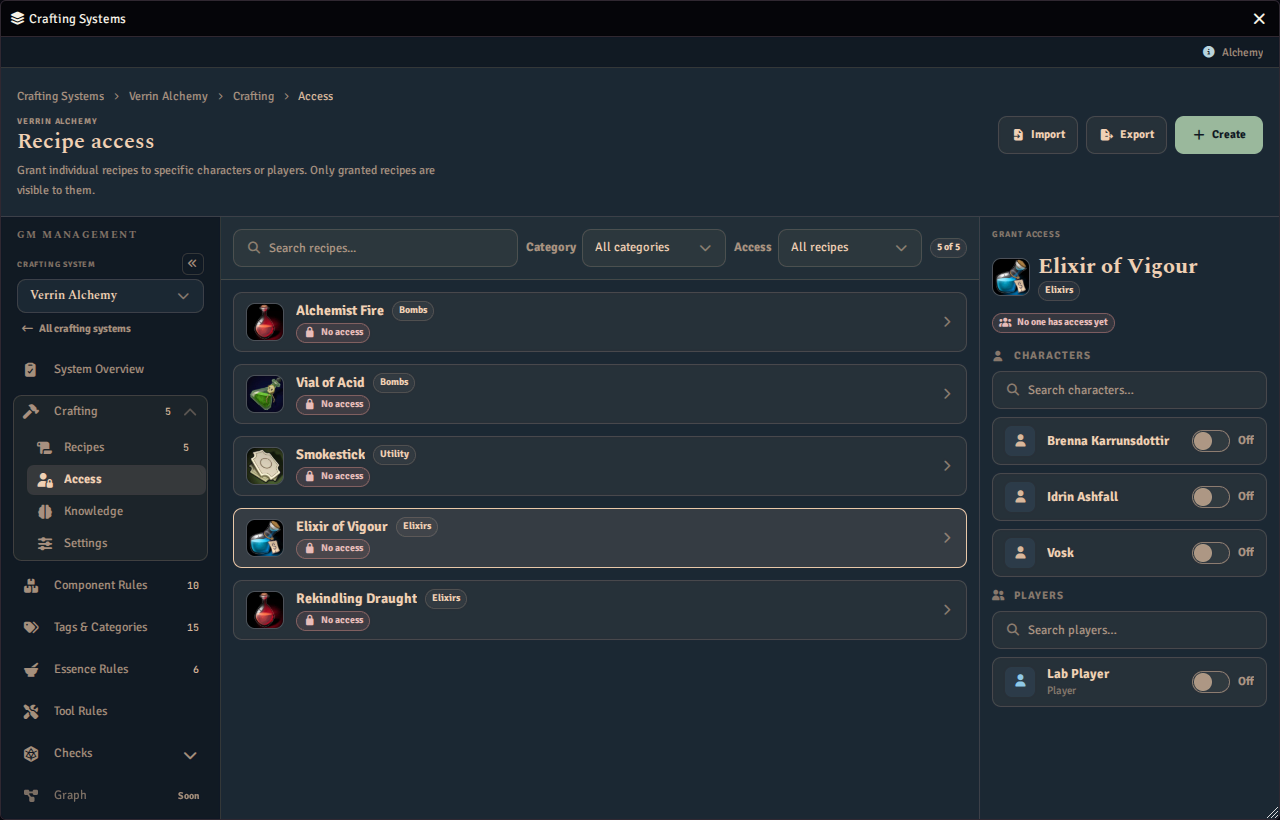
Simple and explicit. Good for smaller recipe sets where you want direct control over who can see what.
Locked Recipes
Any recipe can be locked, regardless of visibility mode. Locked recipes:
- Are visible to all players, so they know the recipe exists
- Cannot be crafted by anyone other than the GM
- Show a Locked state in the player Crafting tab, so players can see the recipe is held back by the GM