Complications
A complication’s condition and effect are both roll expressions. See Expressions for the syntax.
A complication is a consequence you author on a component, for the moment that component is produced as a stage of a progressive result. It fires during progressive salvage and progressive crafting today, and it is stored but does nothing yet for progressive gathering, which is planned and not yet available as a player-facing surface. A complication never fires for a component that is itself being salvaged or spent as an ingredient, only for one being produced.
Complications are separate from Gathering Events. An event is authored on the gathering side and can trigger during any gather attempt. A complication is authored on a component and only ever fires from a progressive result.
Authoring a Complication
Open the Items tab of the Crafting Admin panel, open a component, and scroll to Complications. The section only appears once at least one activity in your crafting system uses progressive resolution, because a complication has nothing to fire from otherwise.
Select Add complication to create one, then fill in:
- Name, a short label for what goes wrong.
- Severity, one of Minor, Major, or Severe. This is a narrative weight for your own reference and for the players who see it, and it changes nothing about whether or how the complication fires.
- Tell the player, a toggle that decides whether Fabricate shows this complication to the players when it fires. Leaving it off keeps a complication for your eyes and the linked macro only. See Disclosure, Not Secrecy before relying on this for anything you need kept truly hidden.
- What happens, a read-aloud line or a private GM note for the moment the complication fires.
- Applies to, which of Crafting, Salvage, and Gathering this complication is active for. An activity your system does not resolve progressively is still shown here, so you can prepare a complication ahead of a mode change, but it is stored and never fires until that activity does use progressive resolution.
When It Fires
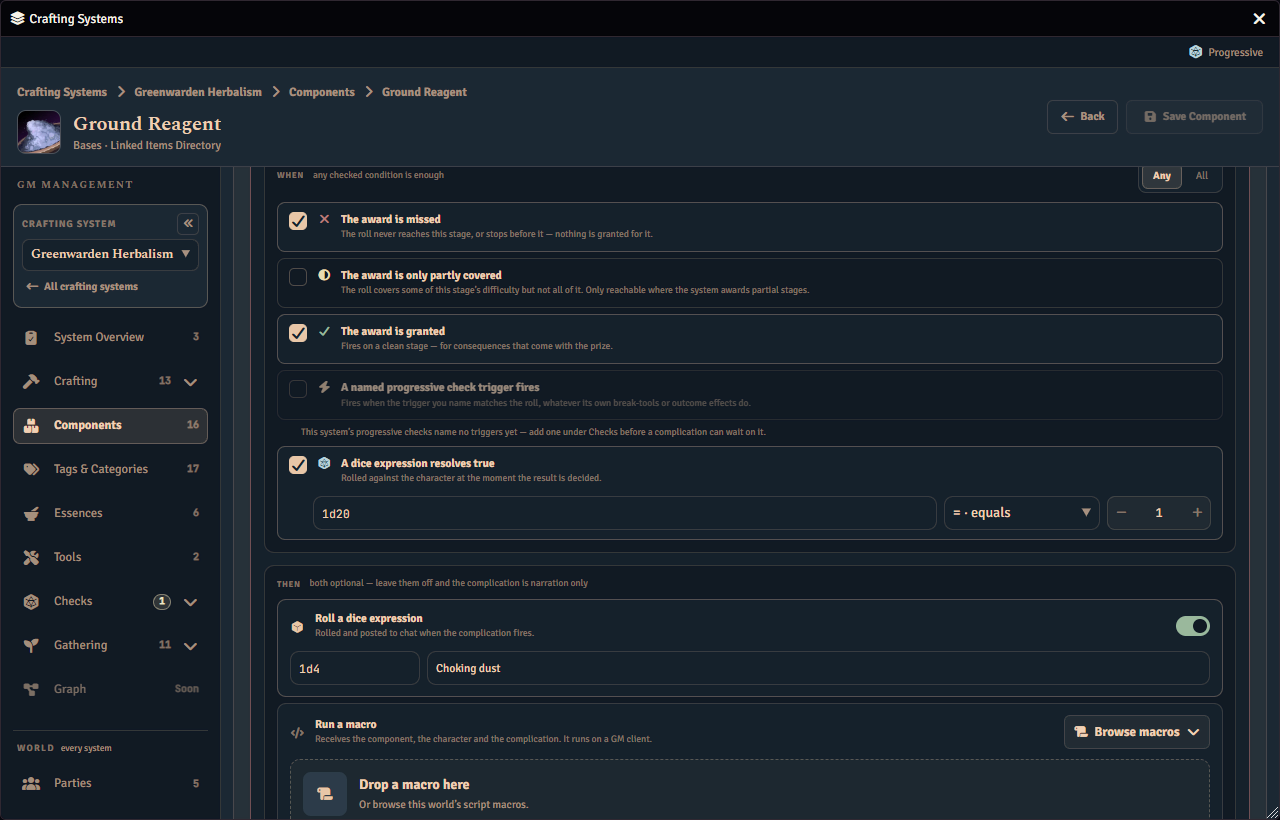
The When card lists the conditions a complication can watch, and how they combine. Tick any of:
- The award is missed, when the roll never reaches this stage or stops before it.
- The award is only partly covered, when the roll covers part of this stage’s difficulty but not all of it. This only ever matches on a system whose progressive award mode grants partial credit.
- The award is granted, when the stage is awarded cleanly, for a consequence that rides along with the prize.
- A named progressive check trigger fires, when a trigger you name from the active progressive check matches the roll, whatever that trigger’s own tool-breakage or outcome effects do. See Tool breakage triggers for how a trigger’s own condition is authored.
- A dice expression resolves true, a comparison rolled against the acting character at the moment the stage is decided, with a comparison operator and a value to compare against.
Set How the conditions combine to Any, so one ticked condition is enough, or All, so every ticked condition must be true. A complication with nothing ticked never fires. Each complication’s row shows a short, automatically written sentence summarising its conditions and effects, so you can read what it does at a glance without opening it.
A condition your system cannot satisfy yet is shown but greyed, with a line saying what is missing.
What It Does
The Then card holds two optional effects, and a complication can carry either, both, or neither and still be a complete, narration-only entry:
- Roll a dice expression, rolled and posted to chat when the complication fires.
- Run a macro, which you set by dragging a script macro onto the drop zone or by using Browse macros. When that macro no longer resolves, the zone says so and offers Relink, which opens the same list as Browse macros. A macro that no longer resolves shows its stored address under the drop zone, so you can find or relink it. A macro linked here runs on one of your own connected GM clients rather than on the acting player’s client, so it always runs with your authority. It receives the component, the acting character, and details of the complication that fired. Fabricate only ever runs a script macro this way. If the one you linked is not a script macro, or if it can no longer be found, Fabricate tells you so on the spot and again on the private report described below.
Author a complication’s macro so it tolerates being run more than once for the same event. If you have the same GM account open in more than one browser tab, Fabricate may run it once per tab. If no GM is connected at all when a complication fires, its macro does not run, and does not run later when a GM reconnects.
Editing a complication marks the component’s draft dirty like any other change, and your edits are kept only once you save the component. Remove complication deletes it immediately from the draft.
Disclosure, Not Secrecy
Tell the player decides whether Fabricate’s own chat cards and per-stage displays show a complication to the players it happens to. It is not a way to keep the complication’s name and description secret from every player in every circumstance. Crafting system data is shared with every connected player’s game client behind the scenes, so a player determined enough to go looking through their own game files could still find what you authored, whether or not you told them to. Treat the toggle as a storytelling choice about what Fabricate volunteers, not as a security boundary for information you cannot afford a player to see at all.
Relatedly, if a complication you kept off is also set to roll a dice expression, the players still see a plain notice that you rolled privately, even though they cannot see what the roll said.
Where You See Complications Elsewhere
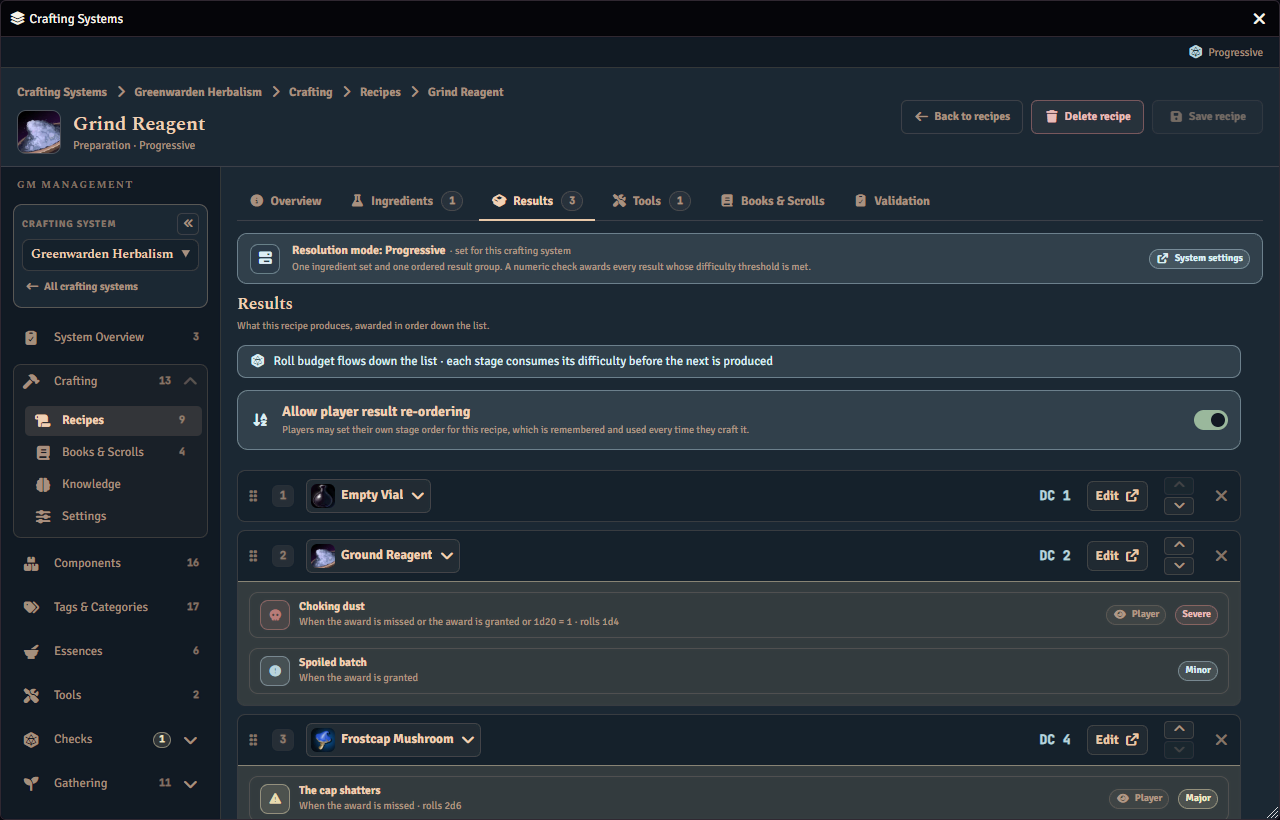
Fabricate shows your authored complications, read-only, everywhere else that component appears as a progressive result, so you do not have to remember which component you last edited.
- The component editor’s own Salvage panel lists, read-only, the salvage complications of the component each progressive stage produces, inside that stage’s row.
- The recipe editor’s progressive stages list the crafting complications of each stage’s component the same way.
Each list sits under a quiet Complications label, one row per complication: its name over a one-line summary of when it fires and what it does, a Player tag when you chose to tell the player, and its severity. Hover a summary that is cut short to read it in full. A list shows only the complications enabled for that activity, so one you enabled only for crafting does not appear under a salvage stage. Nothing in the list can be changed there: use the stage row’s Edit control, which opens the component the complications belong to. These lists always show every complication you authored for that activity, whatever Tell the player says, because they are for you.
Your Private Report
Whenever a complication you kept off the player’s view fires, or one that also links a macro fires, Fabricate posts you a private chat card titled Complications (GM only), visible only to GMs. It names the acting character, the stage the complication fired on, and one of Awarded, Partly awarded, Stopped here, or Never reached for that stage’s outcome. It also reports whether any linked effect roll or macro ran, was skipped, or failed, and it marks whether that same complication was also shown to the players. The outcome facts on this card come from the connected player’s own client rather than from a roll you can independently verify, so treat them as a report of what happened rather than as proof.
This report, and any linked macro, reaches only one connected GM at a time, and only while a GM is signed in at the moment the complication fires. If nobody is signed in as a GM in the world right then, the private report and the macro are both silently skipped, and neither is delivered later once a GM signs back in. Nothing about the players’ own results, or anything you chose to tell them, is affected either way.
What Players See
Before a Roll
While browsing a progressive salvage or a progressive crafting stage list, before making any roll, each stage that could produce a complication you chose to tell the player about shows a strip reading This can go wrong, naming the complication and its severity. A stage that could trigger several complications shows the first and a +N more note for the rest. A complication that could never actually happen, because none of its conditions can ever be met for this activity, is left out, so the forecast never overstates what could go wrong.
Before committing a bulk salvage batch, the panel also shows a What could go wrong card for each queued component that carries a forecast, naming how many complications could fire and listing the affected results by their position in the order they will be spent, together with each one’s difficulty. Each card also states whose order those positions follow: the player’s own saved order, the GM’s order that the player can still rearrange, or an order the GM has fixed.
After a Roll
Once a progressive salvage resolves, its per-stage strip updates to read either This happened or This didn’t happen for every complication it forecast, matching what actually happened on that stage. A runless or not-yet-rolled salvage, and progressive crafting’s own strip, always show the forecast state, because crafting keeps no record to look back on the way a completed salvage run does.
If the same component is produced more than once by one progressive result, each occurrence is checked and reported on its own. A complication that matches three of those occurrences fires three times, once for each, with its own roll and its own outcome each time, so seeing the same consequence more than once for the same item is expected rather than a mistake.
See Also
- Crafting Systems. Open a component to author its complications.
- Salvage. Progressive salvage is one of the two activities complications can fire from today.
- Progressive Mode. Progressive crafting is the other.
- Crafting Checks. Author the check triggers a complication can watch for.