Knowledge
Knowledge is a GM surface for auditing and correcting what each character actually carries and has learned during play. Where Books & Scrolls edits the recipe items themselves, and Access grants who is allowed to see a recipe, Knowledge works on a per-character basis. It shows the owned copies a character is carrying right now, and the recipes they have learned, and gives you levers to fix either when the story calls for it.
Opening Knowledge
The Crafting Admin panel’s left menu shows an expandable Crafting group whenever a crafting system is selected. Expand the group and open Knowledge from it. Knowledge appears whenever Books & Scrolls does, and it also appears for a system whose recipe resolution mode is set to Alchemy, even when the visibility mode alone would not show Books & Scrolls. This means the surface can appear on a system where the Recipe items tab is always empty, because that system reveals recipes only through what a character has learned. See The Crafting Menu for the rest of the group.
What It Shows
Knowledge has a searchable roster of player characters down the middle, and a detail pane on the right for whichever character is selected. The roster lists player characters only. A character with nothing tracked shows a dimmed Nothing tracked row. The detail pane has two tabs, Recipe items and Learned recipes. Knowledge opens on Recipe items, unless the selected system has no recipe items registered at all, in which case it opens on Learned recipes instead.
Knowledge briefly shows a loading state in the roster and the detail pane while Fabricate reads each player character’s recipe items and learned recipes, such as when you first open it or switch crafting systems. If that read fails, the detail pane shows a notice that character knowledge could not be loaded. Open another section from the left menu, then return to Knowledge, to try again.
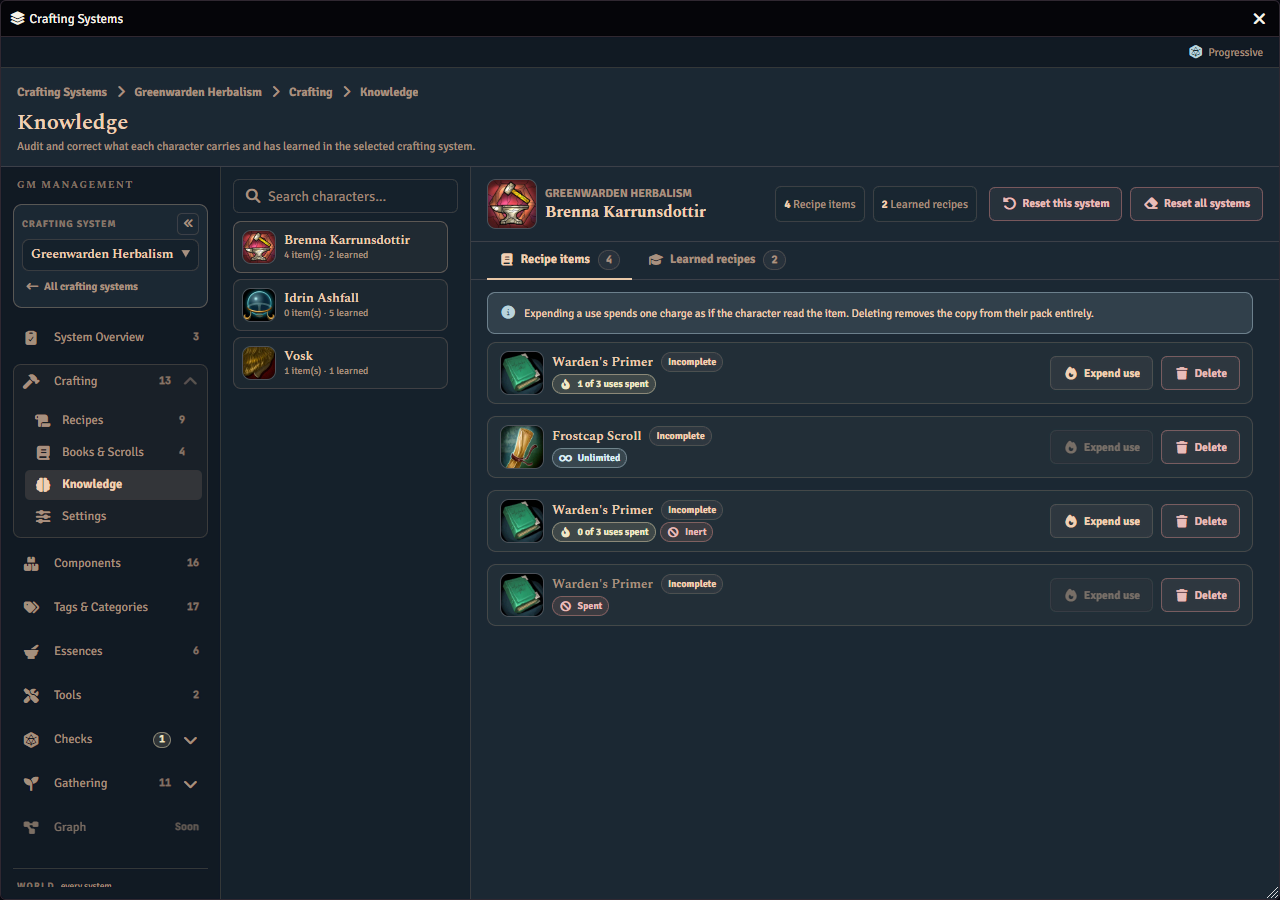
At the top of the detail pane, a reset control lets you clear a character’s knowledge outright. See Resetting a Character’s Knowledge below.
Recipe Items Tab
This tab lists every copy of a recipe item the selected character is carrying, one row per copy. Each row shows the item’s image and name, its type, a chip for its remaining uses, and how many recipes it teaches. A copy that has run out of uses shows a Spent chip. A copy that ran out of uses while set to Becomes inert, rather than Destroyed, also shows a separate Inert chip alongside its uses chip. That marker is a record of the moment the copy ran out, and it does not by itself change whether the copy still has charges. If you later raise the copy’s use limit, it can show the Inert marker alongside a chip that says it still has charges left. Fabricate does not currently offer a way to clear the Inert marker.
Each row has two actions.
- Expend use spends one use of the copy immediately, exactly as if the character had spent it during play. There is no confirmation step, so a click takes effect at once. Spending a copy’s last use applies the book’s When the last use is spent setting right away, which can delete the copy. The button is disabled once the copy is spent, and disabled for a copy with unlimited uses, because there is nothing to spend.
- Delete removes the copy entirely. It asks you to confirm first: click once to arm the button, then click again to confirm, or click elsewhere to back out. For a stacked copy, deleting removes the whole stack, not one unit at a time, and the arm-and-click is followed by a full dialog naming the quantity before anything is removed. Deleting a copy never touches anything the character has already learned from it. When deleting this copy would strand a shared learning budget, the tab shows a warning explaining why, so you know to erase memory first. See Erase Memory Before Delete below.
Learned Recipes Tab
The tab opens with a short note, in the same neutral style as the note on the Recipe items tab, explaining that erasing a memory frees a learning slot only when the copy it was learned from is still owned. It is a standing explanation of how the tab behaves, not a warning about something at risk: the amber warning style is reserved for a hazard you can still avoid, such as the shared-learning-budget ordering described below.
This tab lists every recipe the selected character has learned, one row per recipe, independently of which copies they currently own. A learned recipe is never removed just because its source copy is gone. Each row shows the recipe’s image, name, and category, and a line naming where it was learned from. When the source copy is gone, the line still names the book or scroll it came from.
Each row has one action, Erase memory, which un-learns the recipe for this character. It asks you to confirm first, the same click-to-arm, click-to-confirm pattern as Delete on the Recipe items tab. Erasing frees up a learning slot on the source book only when that book still has a copy this character owns, and only when that book’s Limited learning is on. An automatically learned recipe, one whose source copy is gone, or one whose source book has no learning limit, all free nothing when erased. Such a row says so at the end of its Learned from line, naming the reason — no owned copy to refund, no source copy to refund, or no learn limit to refund — so you know what to expect before you act. Erasing leaves the character’s discovery progress on that recipe untouched, unlike the reset control below.
Erase Memory Before Delete
Some books share one learning budget across every copy in the world, rather than giving each copy its own. For this kind of book, the order of your actions matters. Erase the character’s memory of a recipe learned from the book before you delete their copy of it, not after. Deleting the copy first strands that shared learning slot permanently, because erasing afterwards can no longer find a copy to credit the slot back to. Erasing first, then deleting, reclaims the slot correctly. The surface warns you on a character’s Recipe items tab whenever this ordering matters for them.
Resetting a Character’s Knowledge
The reset control in the detail header clears a character’s learned recipes outright, along with their discovery progress on those recipes. It offers two grains.
- This system clears the character’s learned recipes for the selected crafting system only.
- All systems clears every learned recipe for the character, across every crafting system, including any leftover entries for recipes that no longer exist. Only this grain can clear those leftover entries.
Both grains ask you to confirm before acting, and the confirmation explains that a reset also clears discovery progress, unlike erasing a single recipe. The same reset is also available to macros and the console through the Fabricate API. See the Recipe Visibility Service API.