Travel
Location-aware gathering lets a GM describe campaign geography as first-class realms, group actors into Fabricate-managed parties, and make gathering environments available or unavailable based on where the party currently is.
Token-driven realm sensing from the travel actor’s placed token is available. Realm modifiers applied to gathering calculations remain planned.
Travel has two destinations: Realms, the realm library itself, and Map Region Links, which pairs a realm with the Foundry Scene Regions that stand for it. The group is initially collapsed when the Crafting System Manager opens.
A Gathering Realm is the Fabricate gathering-geography concept. It is not a Foundry Scene Region drawn on the canvas. That is the distinct Foundry object a realm maps onto. Several Foundry Scene Regions can map onto one realm through the realm’s scene mappings, so a single realm can span several drawn map areas. A realm never decides which tasks or events belong to an environment (that is biome, plus danger for events). It only decides location availability.
Realm-aware travel is off by default per crafting system and is enabled with the Enable Travel & Realms toggle in gathering Settings (see Enabling Travel & Realms). Only GMs can manage realms and set current-realm overrides. Players experience locations through the gathering app’s blocked reasons and the redaction-safe location API.
Concepts
| Concept | What it is |
|---|---|
| Realm | Named geography (such as The Verdant Expanse) shared by every crafting system that enables Travel & Realms. The single Fabricate geography concept, geography only. Distinct from a Foundry Scene Region |
| Biome | A descriptive terrain or ecology trait carried by a realm, such as forest, swamp, or coastal |
| Environment | A reusable gathering place that can belong to one or more realms and declare location-availability rules |
| Party | A world-level Fabricate record with actor members and exactly one travel actor |
Realms are geography, not environment containers. Environments declare which realms they belong to and keep owning their own availability rules.
Enabling Travel & Realms
The realm/travel/availability subsystem is disabled by default for every crafting system. Enable it per system with the Enable Travel & Realms toggle on the Gathering Settings tab in the Crafting System Manager.
While the toggle is off, the system behaves as a non-location-aware system:
- World > Parties remains available for global Party management; current-realm overrides are unavailable.
- World > Travel also remains available: realms are world geography, so the toggle never hides the place you author them.
- The environment editor shows no realm selectors.
- No current-realm, availability, or discovery surfaces appear for that system.
- Every environment is available. Composition (biome and danger) is unaffected.
Turning the toggle on enables the selected system’s current-realm override on World > Parties and reveals the environment editor’s multi-realm selector. It does not reveal a navigation destination: World > Travel is there whether or not any system has opted in.
Environment Realm Membership
An environment declares which realms it belongs to, and it can belong to multiple realms. When Enable Travel & Realms is on, the environment editor shows a multi-select chip control (like the biome selector) listing the world’s realms. When the toggle is on but no realms exist yet, the selector shows an empty state pointing you to World > Travel to create realms first. The selector is hidden while the toggle is off.
Environment Location Rules
On top of realm membership, environments can declare explicit location availability rules. All four are optional lists. An empty (or absent) list means “no rule”:
| Rule | Effect |
|---|---|
| Included realms | Available only when a current realm is one of these realms |
| Excluded realms | Blocked while any current realm is one of these realms |
| Included biomes | Available when any current realm carries one of these biomes |
| Excluded biomes | Blocked when any current realm carries one of these biomes |
Included realms are chosen in the environment editor’s multi-realm selector (toggle on). The biome and exclusion rules are authored through the API or by system import and export. Saving checks that the chosen realms exist in the world realm library. A realm id an environment already carried whose realm has since been deleted is dropped from it on the next save rather than blocking that save. These rules gate location availability only. The old single free-text region on an environment is inert. It is not a composition or availability input and is no longer shown in the editor. The migration moves it into the environment’s included realms.
Availability is only evaluated when Enable Travel & Realms is on. While the toggle is off, every environment is available regardless of these fields. When on, availability follows these rules:
- An environment with no location rules is never location-blocked. Existing environments behave exactly as before.
- Exclusions win. A realm or biome exclusion matched by any current realm blocks the environment, even when an inclusion also matches.
- An environment with inclusions is available when any current realm’s id is included or any current realm carries an included biome.
- An environment with inclusions and no resolved current realm is blocked with a no current realm reason.
- An exclusion-only environment with no resolved current realm is available.
At attempt time the engine re-resolves location fresh. A stale listing (for example, an override cleared between listing and clicking Attempt) can never start a location-gated attempt.
What Players See
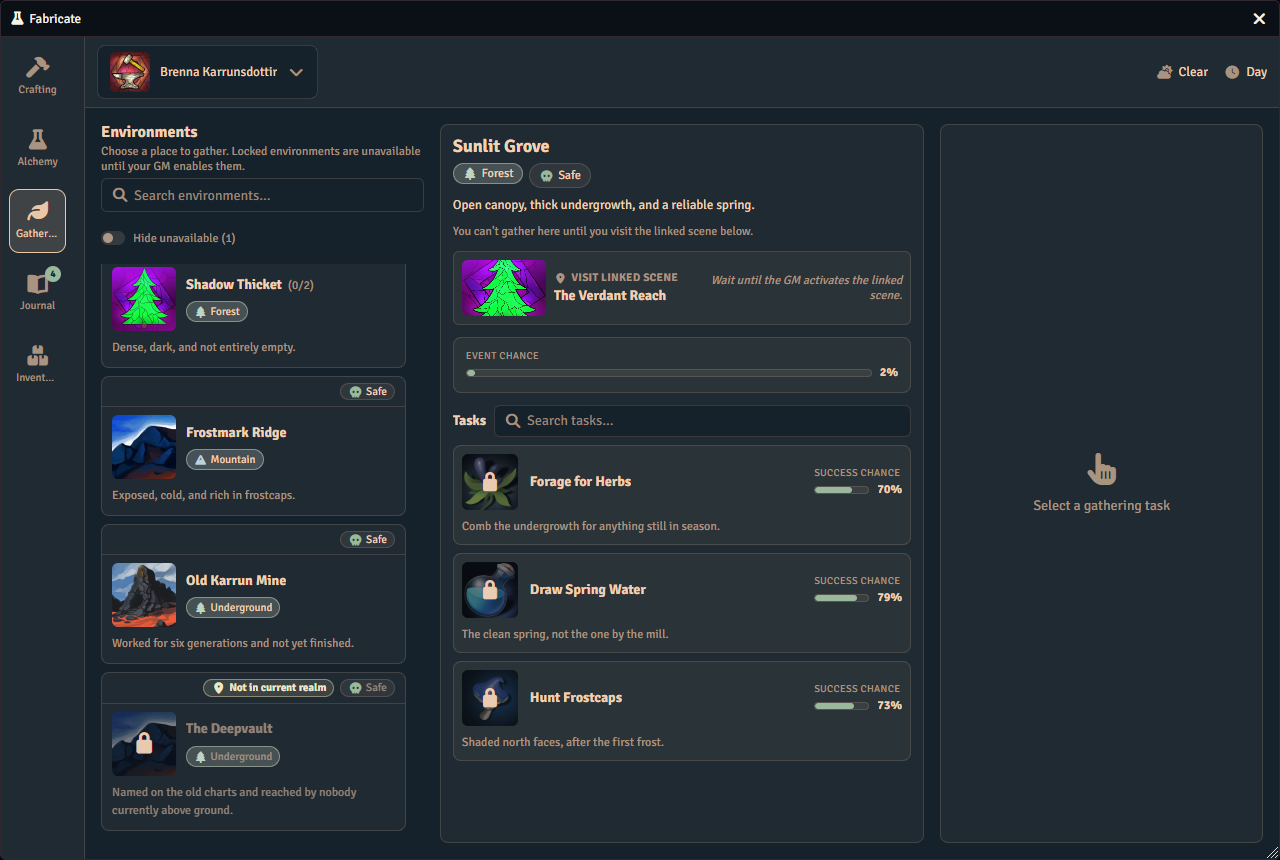
Location-gated environments stay listed but blocked, with a localized reason:
- “Not available in the party’s current realm.” when the environment is excluded or no inclusion matches.
- “No party realm is set. Ask the GM to set the party’s current realm.” when the environment requires a realm and none is resolved.
Each listed environment also carries redaction-safe location information (whether it is gated, whether it is available, why, and disclosure-safe current-realm labels) and, on blocked rows, travel guidance. That guidance covers the destination realms the viewer is allowed to see (non-secret or already discovered), plus a count of secret undiscovered destinations. Macros and future player UI can use this to show travel goals such as “Travel to Ashen March” without leaking secret geography.
The actor bar’s current-realm chip
The gathering app’s actor selection bar carries a current-realm chip alongside the weather and time-of-day context. The chip’s current realm belongs to the party and system, not to any one environment, so it is shown for the selected actor’s active realm-enabled gathering system whether or not an environment is selected. The chip therefore appears whenever the realm subsystem is enabled, including when every environment is locked and none is selectable. It shows “No current realm” when the party has no resolved current realm, giving the player a diagnostic signal explaining why every environment is locked. When a current realm is resolved, the chip shows the realm name(s) with the same redaction behavior as everywhere else. A secret, undiscovered realm reads as Undiscovered realm, and the chip never fabricates a realm name. The chip carries an accessible name (“Realm:
Secret realms and discovery
Realm knowledge is actor-scoped: it follows the character across party changes and is stored on the actor. For a non-GM viewer, a secret, undiscovered realm never exposes its name anywhere. It reads as Undiscovered realm. GMs always see real names, non-secret realms are always disclosed, and the “always visible” reveal mode discloses every realm name.
GMs reveal or hide a realm for an actor through the API (see below). Revealing a realm checks that it belongs to the right crafting system, and each discovery records when and how it was learned.
API
Most realm and travel work is done in the UI described above. For macro authors, Fabricate also exposes the same capabilities programmatically. GM-facing entry points cover party management (members, travel actor, current-realm override) and world realm management and settings, including the few realm settings not surfaced in the UI. A player-callable lookup returns a redaction-safe current-realm summary for an actor: a non-GM caller never receives a secret undiscovered realm’s name. GM-only calls set or clear a party’s current-realm override and reveal or hide a realm’s discovery for an actor. Older macros that used the pre-rename names keep working.
See the API Reference for exact signatures.
Data Persistence
| What | Where it lives | Contents |
|---|---|---|
| Realm library, reveal mode, and modifier visibility | At the world level | The realms and realm-disclosure settings shared by every crafting system that enables Travel & Realms |
| Enable Travel & Realms toggle | On each crafting system | Whether that system’s environments are gated by realm (see Enabling Travel & Realms) |
| Parties | At the world level | Fabricate-managed parties, members, travel actors, and per-system overrides |
| Realm discovery | On each actor | Which realms that character has discovered; discovery is world-wide, so a place a character has found stays found whichever crafting system they were serving |
Because the realm library is a world setting, it travels along with any crafting-system export as that export’s own travel configuration, and merges into the destination world when you import (through the import dialog and the export API), automatically. Importing into a world with no realms of its own adopts the whole library, its reveal mode, and its modifier visibility. Importing into a world that already has realms only adds a realm it does not already have, by id, so an existing realm is never replaced, and the destination keeps its own reveal mode and modifier visibility. See Import & Export for the rest of what an export carries.