Gathering Tasks
The task library
The selected crafting system’s Gathering Tasks are managed from the Gathering Tasks tab. The task browser supports search, status/biome/availability filters, paging, row selection, enable toggles, duplicate and delete actions, and a right-side inspector with availability, a matching-environment count, and drop summaries. The row Edit action opens the Gathering Task editor, which splits identity, availability, drop rules, and per-drop modifier tuning across four tabs. See Editor tabs.
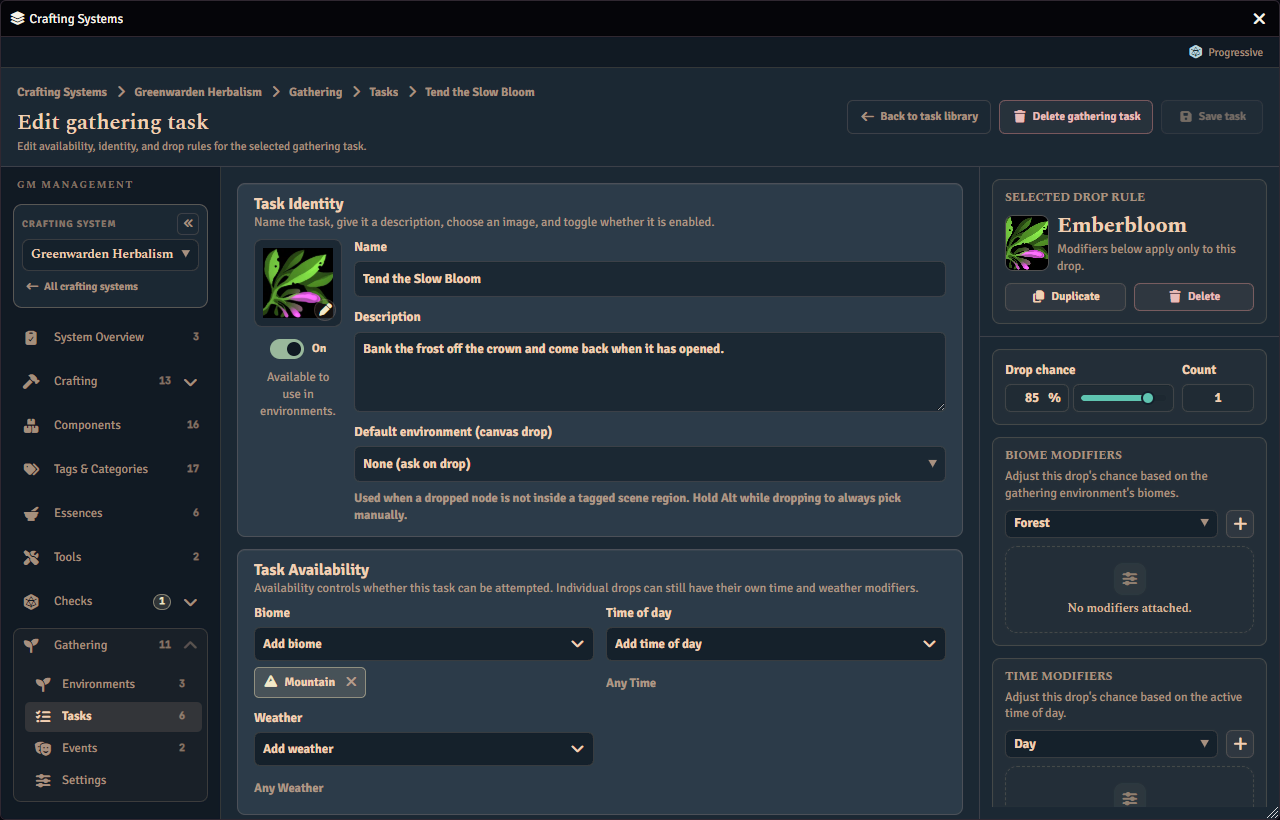
Environment authoring composes Gathering Tasks and reusable events by matching environment biome (and danger for events) only. Geography (the realm) is not a composition axis. Weather and time of day stay visible as current condition context. They do not decide whether a task or event belongs to the environment. GMs can toggle matched task and event records on or off per environment.
Gathering Task records support:
| Field | Description |
|---|---|
| Name, description, image, enabled | GM-authored task identity and availability |
| Biomes | Optional environment composition match tags. Empty means any |
| Weather, time of day | Optional runtime availability gates. Empty means any |
| Drop rows | Ordered item/component rows with a quantity, a drop rate from 0 to 100, and optional per-drop time/weather modifiers. The order you author them in is the rank used by the system’s Gathering Rules. |
| Stamina and modifiers | Optional stamina cost and a gathering roll modifier formula |
| Required tools | Optional references to the system’s Gathering Tools library. All referenced tools are required. |
Stamina maximums, starting stamina, regeneration amounts, costs, and character modifiers all accept formulas (a number, an ability modifier, dice, and more). See Expressions for ready-to-use examples.
Disabled Gathering Tasks never match for player gathering.
Reusable events are authored separately. See Events.
Editor tabs
The Gathering Task editor has four tabs: Overview, Requirements, Results and Validation. The tab bar stays fixed while the selected tab’s panel scrolls. The editor opens on Overview, and returns to it when you open a different task.
| Tab | What lives there |
|---|---|
| Overview | Task identity, the Gathering resolution card, and the nodes card. A legacy Progressive task also shows a warning here. |
| Requirements | Availability, stamina, the check modifier, the check override and Required tools. |
| Results | The result sets (or, for a d100 task, the component browser and the Drops table) and the notices about them. A d100 task’s selected-drop rail appears only here. |
| Validation | The readiness rows for the whole task, grouped by Overview and Results, with a verdict that says whether the task can be saved. |
Overview, Requirements and Validation use the full width of the window. So does Results on a straight (Direct) or routed (Check) task.
The Validation tab
The Validation tab lists a row for each check the task passes or fails, so you can see why Save is disabled. The rows are grouped under Overview (the task name) and Results (drop rules and result sets, plus the outcome-tier and reward-rule checks when they apply). A check that does not apply to the task’s mode draws no row. Requirements has no checks, so it draws no group.
A row that blocks saving carries the status word “Blocks save”. The verdict at the top then reads “Cannot be saved”, and Save stays disabled until every blocking row is cleared. These rows block saving:
- A task with no name.
- A drop rule that is incomplete.
- Result sets that are incomplete.
- A result repeated within the task’s result sets.
A row that only warns lets the task save. The verdict then reads “Saves with warnings”. These rows warn:
- A
routed(Check) task whose gathering check defines no outcome tiers. - A d100 task with the same component on more than one drop row, when the system’s reward rule may award only one of them.
When every row passes, the verdict says that every check passes and the task is ready to save.
Each failing row has a View action. It opens the tab that holds the problem and focuses the field that fixes it: the name input on Overview for a missing name, or the Results panel for a result problem.
The Validation tab itself carries a red count of blocking rows and an amber count of warnings, so you can see from any tab whether the task can be saved. The Results tab no longer carries issue marks. Instead, when Results holds rows that block saving, a notice on the Results tab shows how many there are, with a Review in Validation action that opens the Validation tab. The Results tab still shows the notices for the two warnings above.
A d100 task’s Drop rules card is a table. Its caption carries the heading, a count of rules and a search field. The columns are the rank (ranked mode only), the drop component, the drop chance (a slider and a number), the count and the modifiers. The page scrolls rather than the card, and the pager appears only when there are more rules than the smallest page size. Click a row, or tab into any control in it, to select that drop rule for the inspector rail.
A legacy Progressive task keeps its own results, so its Results tab shows an empty state titled “Results are not authored here”. It points you to the Gathering resolution card on Overview, where you can choose another mode to author results.
How Drops Are Rolled
Each Gathering Task is resolved by rolling against its drop rows. The task’s own weather and time-of-day gates decide whether it can be attempted at all. For each enabled item row, Fabricate works out a final drop chance from the row’s drop rate plus any environment adjustment and any matching per-drop time/weather modifiers (kept between 0 and 100), then rolls for it. A task’s gathering modifier improves or worsens the roll, not the final drop chance. Matched, enabled events that pass their condition gates roll separately, each with its own modifier and trigger rate.
Environment-local task and event drop-rate adjustments can be kept on file but switched off by their apply toggles. When an adjustment is switched off, its saved value is preserved but counts as zero while gathering.
Per-drop modifiers do not make an unavailable task available. They only adjust an individual row’s chance after the task already matches. Multiple rows can reference the same component with different quantities and chances. Each row rolls on its own before the system’s Gathering Rules choose which rows are awarded.
In the player Gathering window, a task’s possible drops are listed as rows in the order you authored them, each with its current chance. The order never changes with the chance, and a drop with no name of its own shows its component’s name. Open the Chance breakdown beneath the list to see, for every drop, what makes up its chance, such as its base rate and any weather, time of day, biome, or character modifier contributing to it. Open it again to close it.
Every drop row must point at a real reward, either a component from the system’s component library or a resolvable world item. Fabricate rejects rows that point at a component or item that no longer exists, and rows with no target, before saving the task.
After rolling, the system’s Gathering Rules choose which reward and event rows are kept. Rewards can be the highest ranked successful row (by authored order), every successful row, or the first few successful rows by authored order. A triggered event can either be recorded while the gathering still succeeds, or make the attempt fail (in which case no rewards are awarded). If no events are enabled or matched, the environment is mechanically safe even when it has a danger level.
Task Authoring
An environment contains one or more Environment Tasks. The task editor lets you set:
| Area | What you set |
|---|---|
| Task basics | Name, description, image, whether it is enabled, and how it is resolved |
| Visibility gate | Turn task visibility on or off, then set its formula and required threshold |
| Time requirement | Leave clear for immediate tasks, or enter a duration in minutes, hours, days, months, or years |
| Failure outcome | Leave clear for Fabricate’s default failure feedback, or set custom text or a macro |
| Result sets | Add, rename, delete, and reorder sets |
| Results | Add, edit, delete, and reorder component results, each with a component and a quantity |
| Required tools | Reference the system’s Tools library. The tools themselves (their source item or component, optional requirement, breakage mechanic, and on-break action) are authored on the system’s Tools page, not on the task. |
Progressive task result difficulty comes from the chosen component’s own difficulty. Result rows do not store their own difficulty.
Each task result row has the same Fixed and Rolled amount choice as a recipe result. See Result Amounts for how a rolled amount is written, checked and refused. A task’s results have no amount when the task is resolved progressively.
New environments start as disabled drafts. Library-backed automatic environments can be set up without a placeholder task. Once a task is enabled, saving requires complete configuration for the way it is resolved. For a task resolved progressively that means one result set carrying at least one result.
Task images can be typed directly or chosen with Foundry’s image file picker when it is available. Cancelling the picker leaves the current path unchanged.
Visibility Gates
A visibility gate controls whether a gathering task is visible to a particular character before an attempt starts. It has just two parts:
| Field | Notes |
|---|---|
| Formula | A roll expression evaluated against the viewing character’s roll data. |
| Threshold | The value the formula must meet for the task to be visible. |
The editor keeps incomplete input aside until both the formula and the threshold are present. For example, entering a formula without a threshold does not change the saved task yet. Clearing visibility removes the gate only when the task already had one saved.
Routed Result Selection
A task uses these rules when you choose Check on its Gathering resolution card.
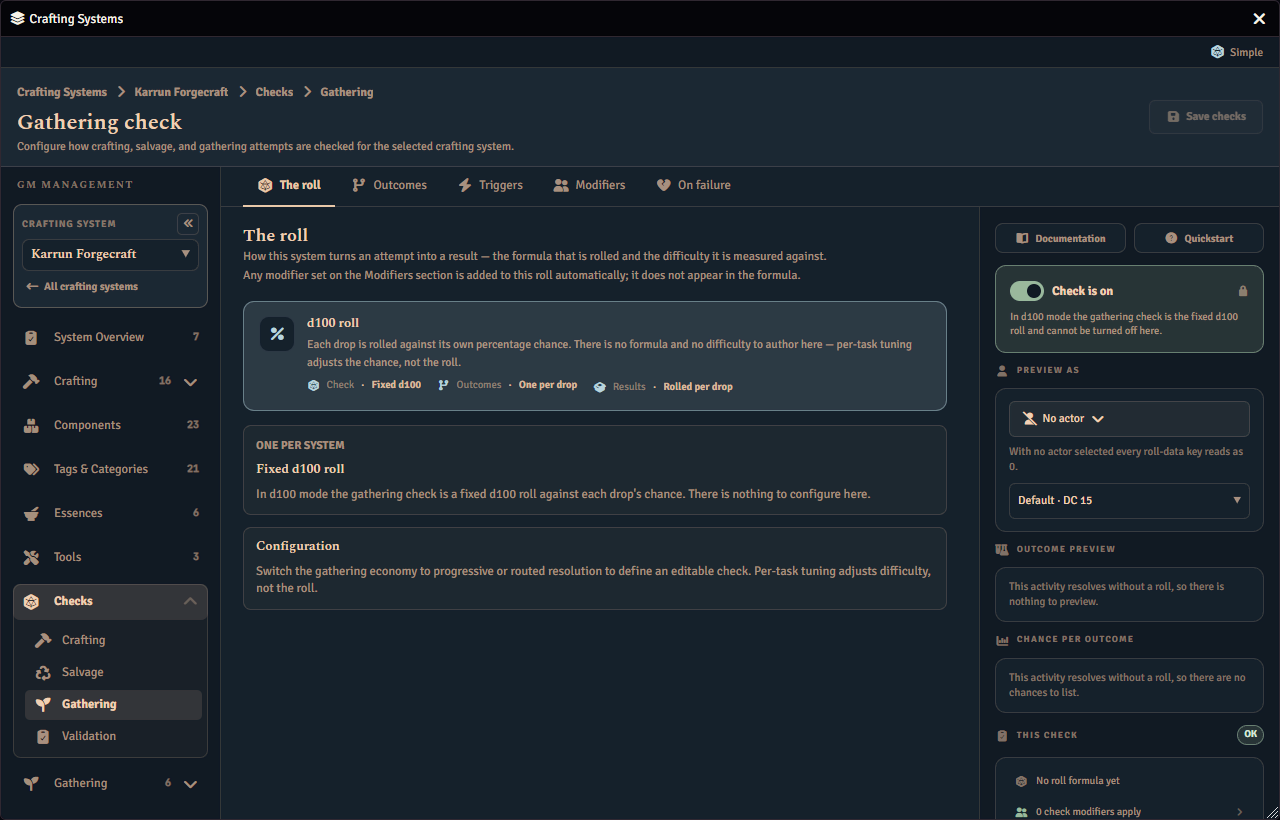
Check tasks do not carry their own result-selection setting. They are resolved by the system’s gathering check, which is authored on Checks › Gathering. Known limitation: Checks › Gathering still chooses its editor from a system-level gathering mode that no screen can set any more, so on a system left at the default it shows a read-only Fixed d100 roll and the gathering check’s roll cannot be authored there (issue #2696). When a Check task is attempted, the gathering check rolls and produces a named outcome. That outcome name is matched to a result set by name, and the matching set is awarded.
A few outcome names are reserved and take the failure path instead of awarding a result set. Because the match is by name, give each result set a name that lines up with one of your gathering check’s outcomes. Names are matched ignoring upper and lower case and surrounding spaces, so each result set needs a name that is unique once case is ignored.
If the outcome is a success but matches none of your result sets, the attempt fails and no result set is awarded. A Check task whose system has no gathering check formula reports a setup problem for the GM to fix rather than resolving.
A Check task can override the gathering check’s own difficulty for that task alone, with a single field and a System default placeholder. The field is labelled DC when the check rolls over a fixed difficulty, Target when it rolls under one, or Adjustment when it is measured against a character value instead. There are no presets to pick from here, because gathering’s routed outcome tiers are crafting-only and cannot be authored as presets. See Salvage and gathering task overrides and Successes-needed overrides for the full guide, including what a switch between them keeps.
Legacy Progressive Tasks
Progressive is not offered for new tasks. The Gathering resolution card offers only Direct, d100 and Check. A task that was already Progressive keeps its Progressive behavior, and shows a warning on its Overview tab, until you choose another mode. Once you choose another mode, Progressive is no longer a choice for that task.
A legacy Progressive task spends a value from the system’s gathering check, not from the task. The award mode (equal, partial, or exceed) is the system’s too, and a task contributes only its results. Both belong to Checks › Gathering, beside the crafting and salvage checks. Known limitation: Checks › Gathering still chooses its editor from a system-level gathering mode that no screen can set any more, so on a system left at the default it shows a read-only Fixed d100 roll and the gathering check’s roll cannot be authored there (issue #2696). See Gathering Checks.
Time Requirements
Gathering tasks are immediate by default. To keep a task immediate, leave its time requirement clear.
To make a task take time, enter a positive duration across any of these fields:
| Field | Description |
|---|---|
| Minutes | Minutes to wait |
| Hours | Hours to wait |
| Days | Days to wait |
| Months | Months to wait |
| Years | Years to wait |
You cannot save a negative, non-numeric, or all-zero time requirement. Clearing the time requirement makes the task immediate again.
Failure Outcomes
If a task has no custom failure outcome, Fabricate shows its default failure message. GMs can set a custom failure outcome when a task should explain failure differently or run its own automation.
| Mode | What you set | Notes |
|---|---|---|
| Text | Custom text | Shows your custom failure text. |
| Macro | A Foundry script macro | Runs the selected macro when the attempt fails. |
Switching between text and macro keeps only the one you are currently using. Clearing the failure outcome returns the task to the default failure message.
Failed attempts rely on the failure feedback above, including custom failure text or a macro when you have set one.
Tools
Gathering tasks declare their required equipment as Tools. There is no separate catalyst concept on gathering tasks. A task simply references the system’s Tools library. The tools themselves are authored on the system’s Tools page. Every referenced tool must be an enabled library entry, and the character must have all of them in their inventory and pass each tool’s requirement before the attempt may start.
A library tool carries:
| Field | Description |
|---|---|
| Source | The item the tool is. Either its own source item or a managed component from the system’s component library. See Tools |
| Requirement | Optional. A roll expression that must hold true for the character to use the tool |
| Breakage mechanic | One of limited uses, breakage chance, or a dice expression |
| Check-driven eligibility | Immune excludes the tool from check-driven breakage. It does not remove its retained tool-specific breakage mechanic. |
| Maximum uses | For limited uses: a positive number, or blank for unlimited |
| Breakage chance | For breakage chance: a whole percent from 0 to 100 |
| Dice expression and threshold | For a dice expression: a roll formula and a number it must reach to avoid breaking |
| On-break action | One of destroy the item, mark it as broken, or replace it with another item |
| Replacement | For replace: a different managed Component given to the character when the Tool breaks |
The system-level Gathering Rules setting Tool breakage outcome controls what happens when any tool breaks. By default a break makes the attempt fail and clears its drops. You can instead let the attempt keep its success. Either way, the on-break action always happens.
Whether a tool breaks in the first place follows the system’s Tool breakage source setting on the Tools page. With the default Tool-specific source, each tool’s own breakage mechanic decides. With the Check-driven source, the gathering check decides whether every required tool that is not Immune breaks, the same way it does for crafting and salvage. Each Tool retains its own mechanic, but that mechanic is not evaluated while this source is active. Retained limited-use counters also remain unchanged while check-driven authority is active. This applies to a task resolved by Check and to a legacy Progressive task, because each rolls a gathering check for the breakage triggers to read. A Direct or d100 task rolls no check, so check-driven breakage cannot fire for it and its required tools are never force-broken under this source. This is separate from the Tool breakage outcome setting above. The source decides whether a tool breaks. The outcome setting decides what a broken tool does to the gather.
A missing or disabled library tool blocks the attempt before Fabricate even checks the character’s inventory, as does a tool the character does not own, a tool the character owns that is broken, and a failed tool requirement.
A tool is recognised whether the character owns the tool’s own source item directly or owns a copy dragged or duplicated from it. Fabricate matches the owned item against the tool’s own source references, so dropping a copy of the source item onto the character still satisfies the requirement.
In the player app, a tool the character does not own shows as Missing. A tool the character holds but cannot use shows as Broken. This covers both an item the character owns that is already broken and an owned broken-variant component for that tool. The Broken state is for display only. The attempt stays blocked either way, and holding a working copy of the tool alongside a broken one still reads as available.
See the Breakable Gathering Tools how-to for a worked example.