Realms
A realm belongs to the world rather than to a crafting system — Northreach Vale is the same valley whether a character is there to gather herbs or to quarry stone — and every crafting system that enables Travel & Realms shares the same library. Each realm stores:
| Field | Description |
|---|---|
| Name | Realm name shown to the GM, and to players once disclosed |
| Description | Free text shown to the GM |
| Image | Optional realm image |
| Enabled | Disabled realms are flagged in the UI. A manual override that includes a disabled realm still resolves it (marked Disabled) so GMs can preview or diagnose |
| Secret | A secret realm is never disclosed to players (not even its name) until the actor discovers it (see Secret realms and discovery) |
| Biomes | Biome tags (from the system’s biome list) used by environment biome availability rules |
| Scene mappings | Links from the realm to one or more Foundry Scene Regions, authored from World > Travel > Map Region Links and used by live token sensing |
| Modifiers | Adjustments to event chance, drop rate, yield, difficulty, stamina cost, and attempt limit (plus custom adjustments) are stored and checked now, and applied to gathering calculations in a later phase |
Realms vs Foundry Regions
A Gathering Realm is the Fabricate concept. A Foundry Scene Region is a distinct canvas object that Foundry itself owns. The two are bridged but not the same:
- A realm’s scene mappings connect it to one or more Foundry Scene Regions. Several Foundry Scene Regions can map onto one realm, so a single realm can span multiple drawn map areas.
- Scene region automation senses which realm a travel actor occupies from its placed token’s Region membership, with a position hit-test fallback.
Authoring realms
Realm create, edit, and delete live under World > Travel > Realms, as a realm list with a detail editor:
- Create a realm, then edit its name, description, image, enabled state, secret flag, and biomes (chosen from the system biome vocabulary).
- Delete realm goes through the standard confirmation dialog. If environments or party overrides still reference the realm, the confirmation surfaces referenced-by evidence (how many) before you confirm. Deletion never blocks. Deleting the realm also removes it from the realm membership of every environment that listed it, so no environment is left naming a realm that is gone. An environment the delete leaves with no realms is simply no longer restricted to a realm; it is not disabled or deleted. Party overrides are not rewritten: a party that named the deleted realm keeps the id and shows it as Unknown realm until you clear the override from its party card, which is what makes the leftover reference visible for repair. If a realm was deleted before 1.9.7 and environments will no longer save, see Environments will not save after a realm was deleted.
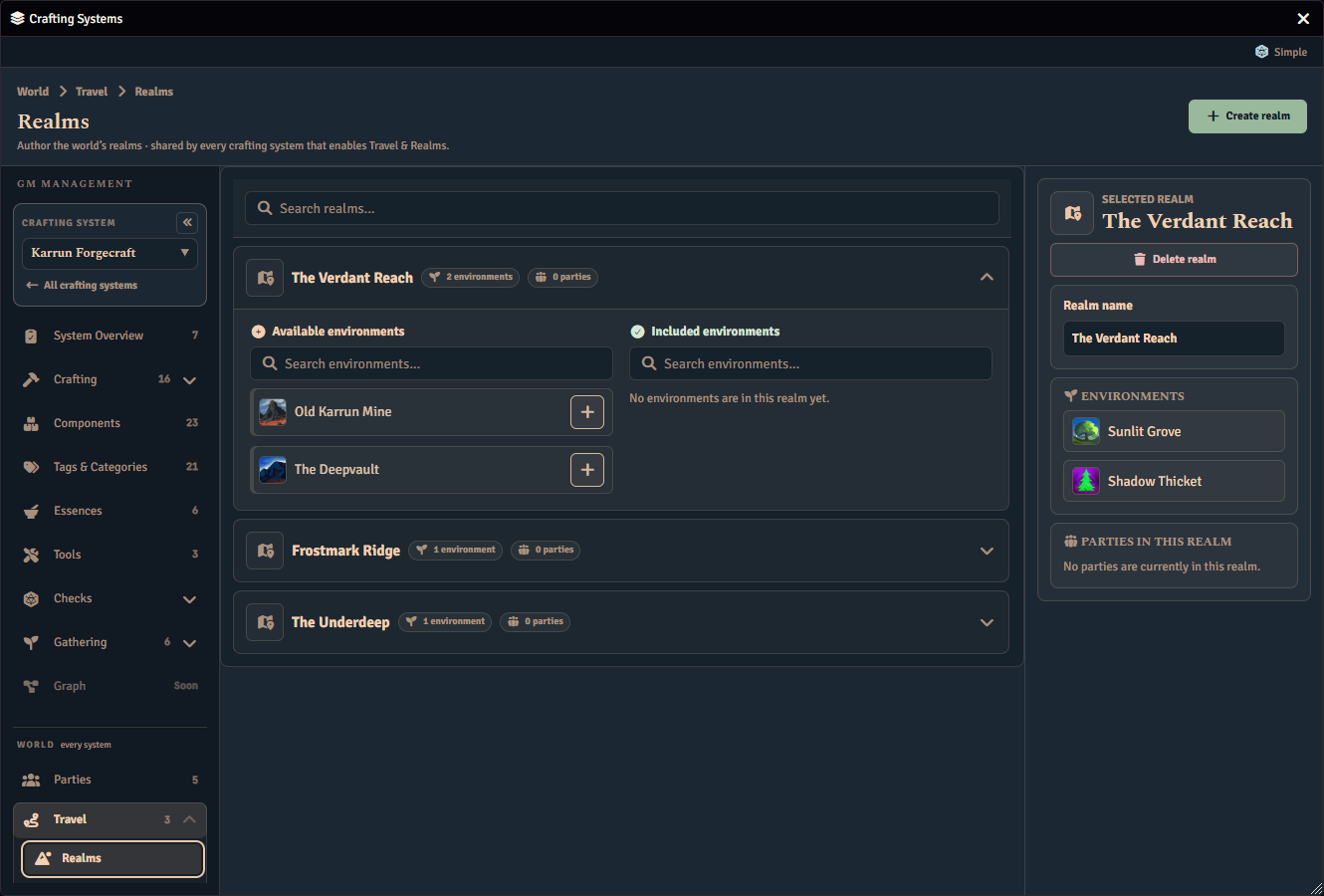
Scene mappings are authored on their own page, and drive live token sensing. See Map Region Links.
Realm modifiers normalize, validate, and round-trip but are not yet authored in the UI or applied at runtime. Existing modifier values are preserved untouched.
Realm settings
The reveal mode and modifier visibility are world settings, shared by every crafting system, and are set through the API (see API). Only the Enable Travel & Realms toggle (off by default) is per system, set from that system’s Settings tab:
| Setting | Values | Effect |
|---|---|---|
| Travel & Realms (per system) | off (default), on | Whether this system’s environments are gated on where the party is, and whether they offer realm controls. Set from the Settings tab Enable Travel & Realms toggle (see Enabling Travel & Realms) |
| Reveal mode | manual (default), on party token entry, always visible | “Always visible” discloses realm names to players even when secret and undiscovered. Automatic discovery on party-token entry remains a follow-up. Live realm sensing itself is already shipped |
| Modifier visibility | visible (default), GM only | Default disclosure for realm modifiers once modifiers apply during play |