Routed Modes
Routed crafting lets one recipe produce different results, with the result chosen at the moment of crafting. Use it whenever a single crafting process can lead to more than one outcome.
A routed recipe has one or more ingredient sets and one or more result sets, and exactly one result set is produced per craft. There are two routed resolution modes, and you pick one as the system’s Recipe resolution mode.
- Routed by ingredients selects the result from the ingredients the player uses.
- Routed by check selects the result from a crafting-check outcome.
The choice is a property of the whole crafting system, not of each recipe. Every recipe in the system follows the system’s mode.
Routed by ingredients
The player’s choice of ingredients decides the result. Each ingredient set is tied to a result set, so changing the materials changes what is produced. In a multi-step recipe, this applies to the step the player is on. The choice decides what that step’s own result set produces, but the recipe’s headline Produces row still shows the final product made on its last step. See Multi-Step Recipes for how the Produces row and its routing hint work across steps.
Use this when different materials should make different things. For example, the same gold band could become a Ring of Fire Resistance with a ruby, or a Ring of Frost Resistance with a sapphire.
The crafting check is optional in this mode, the same as Simple mode. It is authored in The roll section of Checks › Crafting with the same pass or fail editor Simple mode uses: a roll formula, a DC, a meet or exceed comparison, a static or dynamic difficulty, and per-recipe check tiers. If you configure a roll formula, the check still rolls when a player crafts, but it never changes which result set is produced. If you configure no roll formula, the craft proceeds with no check. Because it uses the same pass or fail check as Simple mode, a Routed by ingredients recipe can pick a per-recipe Check tier to shift its DC (but not the outcome-tier controls used by Routed by check).
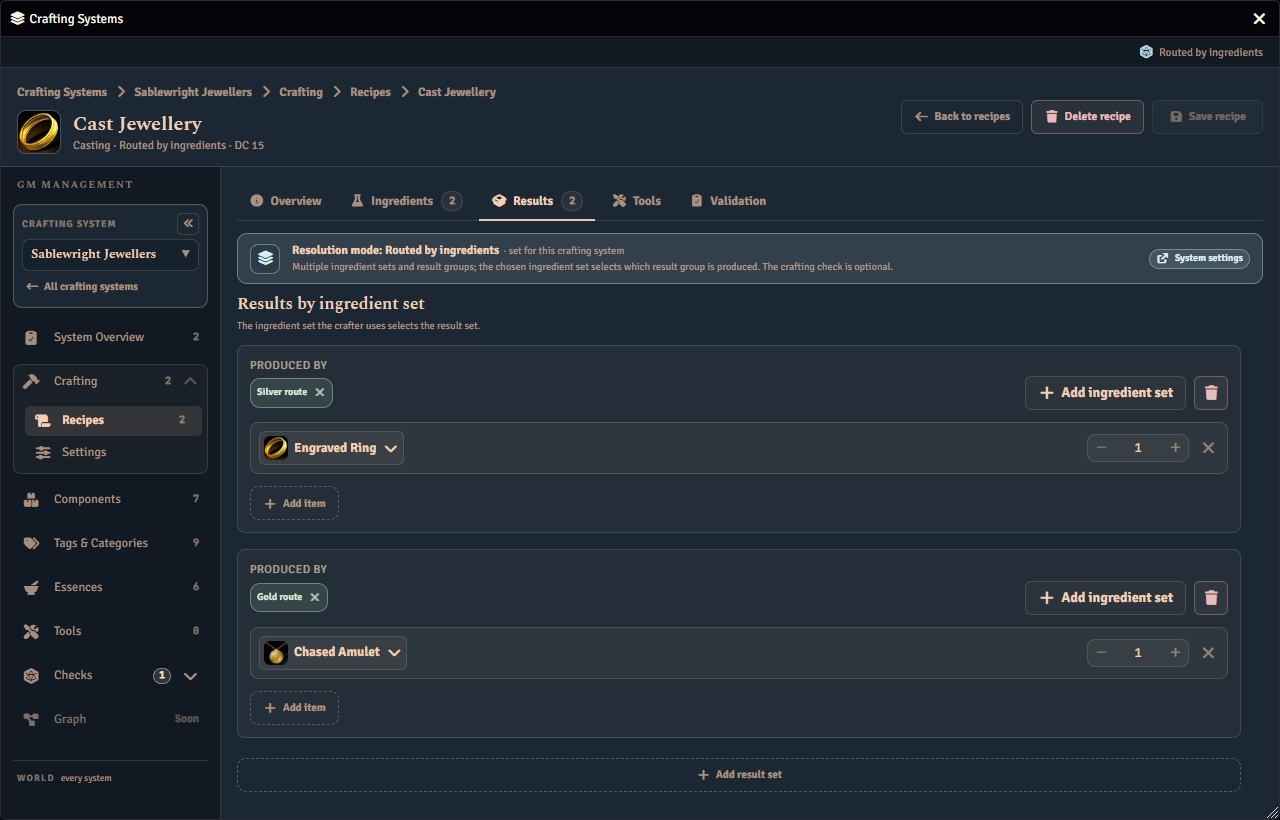
When a recipe has a single result set, you do not need to tie an ingredient set to it. The single result set is produced whenever the recipe is crafted.
A player sees which materials lead to which result before committing to the craft.
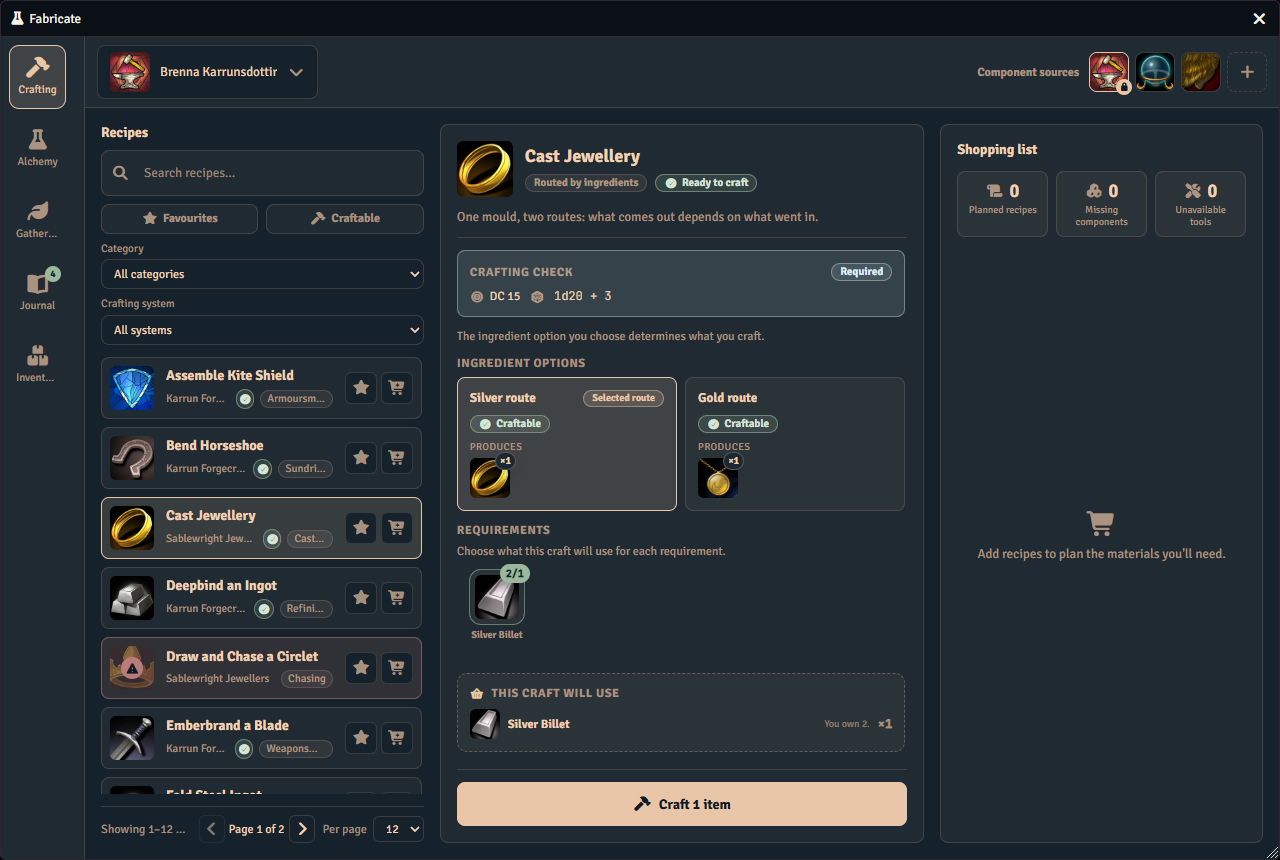
Tying ingredient sets to result sets
In the recipe editor, every ingredient set and every result set is a card. Each card is headed by a small label for its kind, Ingredient set or Result set, and a name you can edit in place. An ingredient set card has a menu at the end of its heading with Duplicate set and Remove set. A result set card’s menu has Remove result set.
A result set’s Produced by line names the ingredient sets that lead to it. Choose Assign to open a searchable list of every ingredient set in the recipe. A set that already leads to another result set shows where it goes today, for example “now → Plain blade”. Choosing it moves it to this result set, and a set leads to one result set at a time. Choosing a set you have already assigned to this result set takes it off.
An ingredient set you have not assigned anywhere still reaches the recipe’s first result set, and the line marks it default. A default set has no remove button, because there is nothing assigned to remove. When more than one ingredient set leads to a result set, a note on the card says how many. Editing that result set’s results changes what each of those ingredient sets awards.
A result set that no ingredient set leads to shows Nothing — unreachable on its line, and its border turns to a warning color. It is never produced until you assign an ingredient set to it. If the recipe has no ingredient sets yet, the line asks you to add one first. The recipe’s Validation tab also warns about such a result set. See Checking your routing in the editor. The Routing card on the Overview tab lists every ingredient set beside the result set it produces. See The routing overview.
Routed by check
A crafting check is rolled at the moment of crafting, and its outcome decides the result. A crafting check is required in this mode.
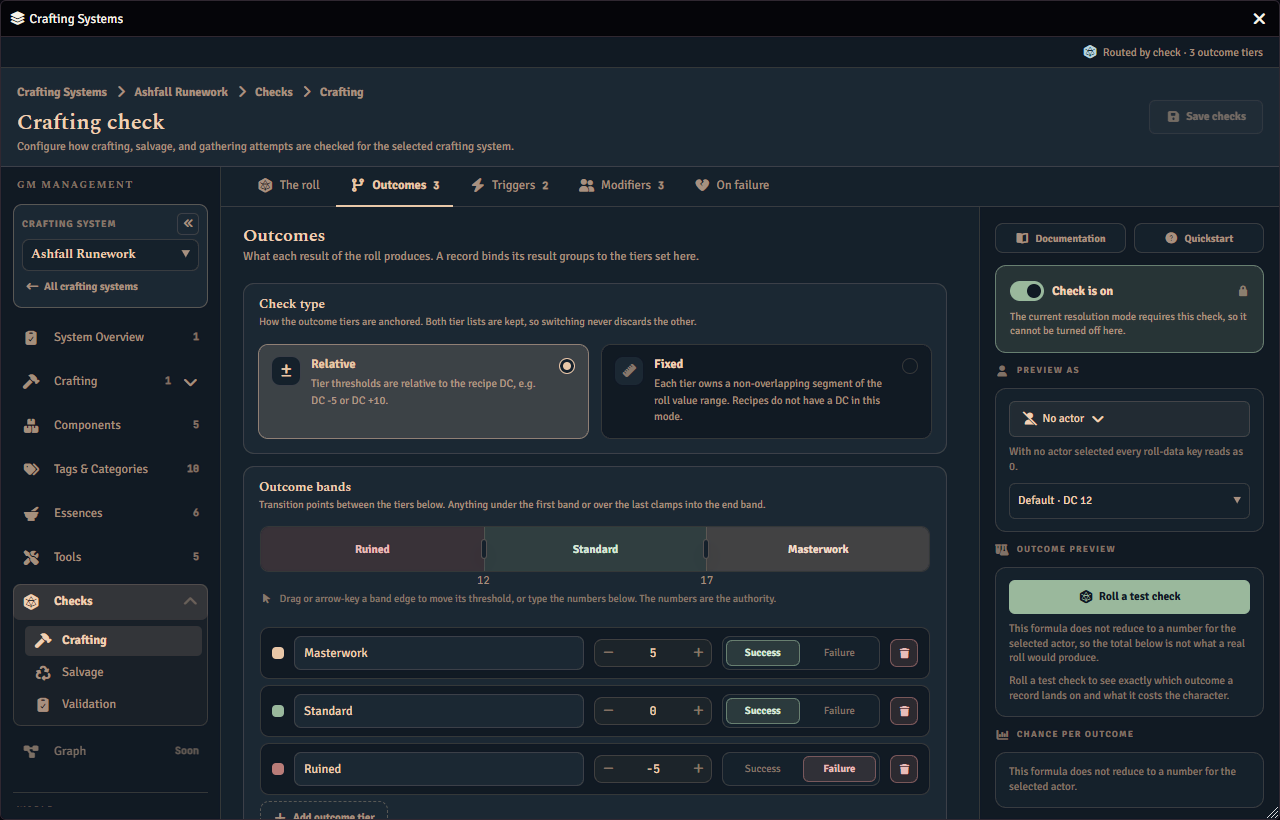
The check rolls the routed crafting check you configured on the system, then maps the roll to one of the named outcome tiers you defined there. The matched tier’s name is the outcome that selects the result. How the roll maps to a tier depends on whether the check’s tiers are relative or fixed.
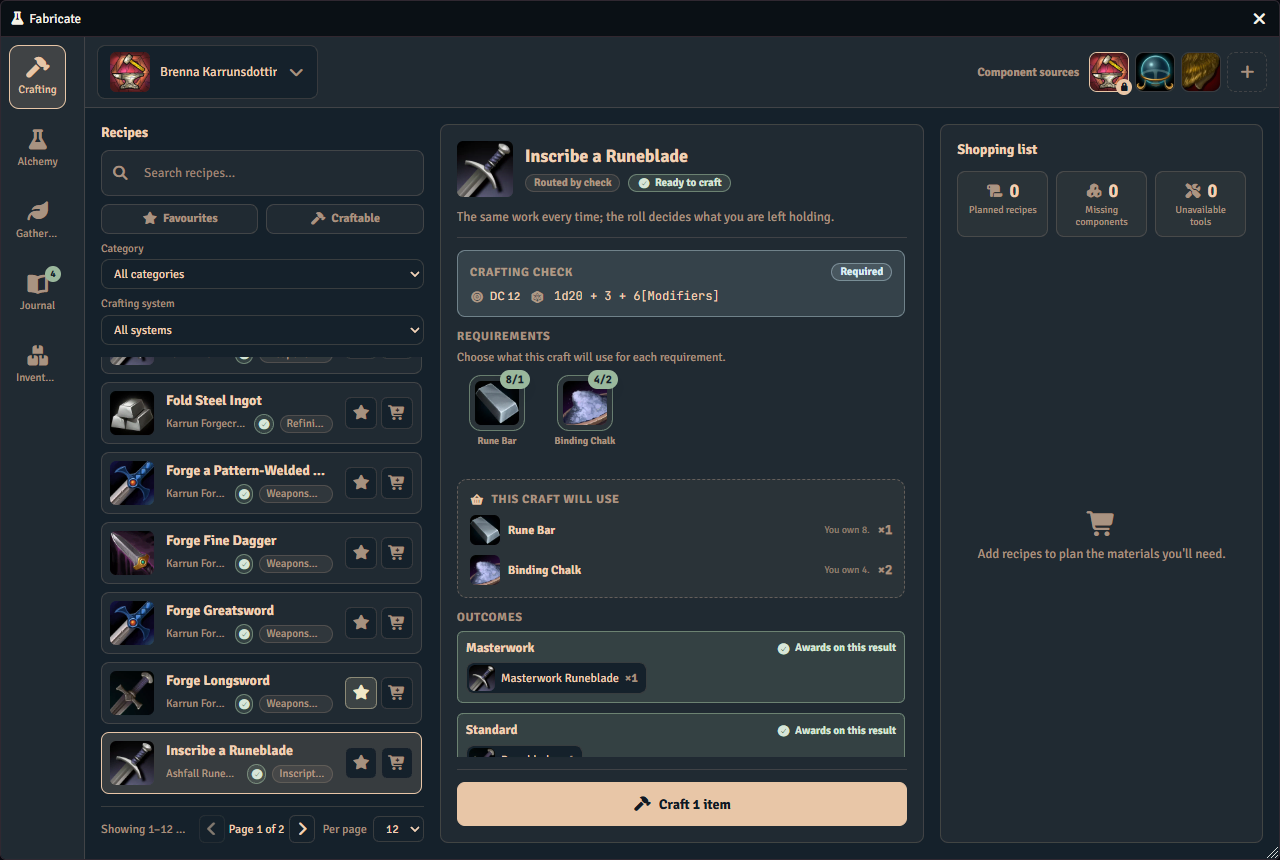
Once you have crafted with a successful roll, the tier your roll reached is marked Your roll. A failed roll marks no tier, and a roll you could not see (a secret or blind roll) marks none either.
See Relative and fixed tiers for the difference.
With relative tiers, the base difficulty comes from the recipe’s selected tier, or from a dynamic difficulty if you set one up, the same way a simple check resolves its difficulty. A recipe tier or dynamic difficulty shifts every outcome threshold up or down together. A roll that falls below every tier still lands your lowest tier, so raising the difficulty never leaves a craft with no outcome at all.
With fixed tiers, each tier owns a fixed segment of the roll value range and the roll is matched by range. A fixed check has no DC, so the recipe tier and dynamic difficulty do not change it. A recipe can still carry its own difficulty on a fixed check by requiring a minimum success tier, described below.
Use this when the quality of the result should depend on a roll. For example, a forging recipe might give a Masterwork Longsword on a great roll, a plain Longsword on an average one, and a Bent Blade on a poor one.
Because every recipe in this mode routes by the check, the routed crafting check is needed for the whole system to work. A system in Routed by check mode with no routed crafting check roll formula is a system blocker, and players cannot craft any of its recipes until you configure one. See System Overview.
How outcomes match results
You can tie each result set to a specific outcome tier. In the recipe editor, the result set’s Produced by line names the outcome tiers that lead to it. Assign opens a searchable list of the outcome tiers from the routed crafting check that can route. The success tiers are always listed. A tier you have marked as a failure is listed too, but only while the check’s Produce a result on a failed check setting permits results on a failed check. See On failure for the setting.
A tier that already leads to another result set, by assignment or by name, shows where it goes today, for example “now → Plain blade”. Choosing it moves it to this result set, and a tier leads to one result set at a time. Choosing a tier you have already assigned to this result set takes it off. A tier that reaches a result set by name, or because it is the recipe’s only result set, shows on the line marked default and has no remove button, because there is nothing assigned to remove. Until any result set lists a tier, the list warns that assigning one stops the other tiers reaching a result set by default.
A tier you have marked as a failure while the setting is Never is not offered. An assignment you already made to one stays saved but stops routing. Fabricate keeps showing such an assignment on the line, struck through, with a note that it does not route and a button to remove it. The same happens to a tier that another result set lists first, and a tier that was deleted from the check, which reads Deleted outcome tier. Result sets and ingredient sets can be renamed on their cards in this mode too. When a result set is assigned to an outcome tier this way, a craft that rolls that tier produces that result set. This explicit assignment takes priority over name matching.
When a recipe does not assign any result set to an outcome tier, the outcome name is matched to a result by name instead. Upper and lower case and surrounding spaces are ignored, so each result needs a name that is unique once case is ignored.
A few names are reserved so a recipe can fail or come up empty without a separate check. These reserved names cannot be used as a result name.
| Reserved name | What happens |
|---|---|
| fail, failed, failure, f | The craft takes the failure path |
| hazard, danger, complication, trap, oops | The craft takes the failure path |
| miss, missed, m, nothing, none, whiff, whiffed | The craft produces nothing |
If an outcome is neither a reserved name nor one of your result names, the craft stops and reports a setup problem rather than treating it as a player failure.
A single result set needs no mapping
When a recipe has exactly one result set, you do not need to map outcomes to results at all. The single result set is produced on any non-failure outcome, and nothing is produced when the outcome is a reserved failure name. This mirrors the single-result-set rule in Routed by ingredients. A craft that succeeds in this case never reports a setup problem, and the recipe editor raises no routing warnings for it. The exemption holds only while no result set lists an outcome tier. Once the single result set lists a tier, a craft that rolls any other success tier reports a setup problem, and the recipe editor warns that the tier produces nothing.
In a multi-step recipe, each step is checked on its own. A step with a single result set that lists no tier uses the no-mapping rule, while a step with several result sets, or one whose result set lists a tier, needs each success outcome routed to a result.
Minimum success tier for fixed routed checks
Fixed outcome tiers are shared by every recipe in the system. A recipe can raise its own difficulty on top of that shared check by requiring a minimum success tier.
Set it with the Minimum success tier dropdown on the recipe editor’s Overview tab. The dropdown appears only when the system uses a Routed by check crafting check with fixed tiers. It lists the check’s success tiers from lowest to highest, and it defaults to No override (use final tier).
While the default is selected, the recipe uses whichever tier the attempt ends on, the same as any other recipe. When you pick a minimum tier, a roll that lands below it fails the craft outright. The craft takes its normal failure path, so ingredients are consumed and no result is produced, exactly as a failed check would. A roll that lands on the chosen tier or higher produces its result as usual.
This lets recipes that share one fixed check carry different difficulty. An easy recipe can leave the override off, while a demanding one can require a higher tier before it succeeds. The setting has no effect on relative checks or in Routed by ingredients mode, which is why the control is hidden there.
The routing overview
The recipe editor’s Overview tab ends with a Routing card in both routed modes. It answers what the recipe does on one screen, so you do not have to open each card on the Results tab. The card is not drawn in the other resolution modes.
Each row names a source and the result set it produces. Under Routed by ingredients the source is an ingredient set, followed by a short summary of what it asks for. Under Routed by check the source is an outcome tier, followed by the roll range it owns when the check’s tiers are fixed. A row shows the result set it effectively produces, so a source that reaches a result set only by default still names it.
Choose another result set from a row’s dropdown to re-point it in place. This makes the same assignment as Assign on the result set’s card, and it is saved with the rest of the recipe. The dropdown lists every result set in that step, including one you have just added with the Result set button. A row with no result set shows Not routed. Under Routed by ingredients the Ingredient set button adds a new ingredient set row.
Two markers sit at the end of a row.
- default means the row reaches its result set because nothing is assigned. Choosing that same result set from the dropdown assigns it explicitly.
- shared · N means N sources produce that result set, so editing its results changes what each of them awards.
A recipe without steps has one list, labelled Routing. A multi-step recipe has one list per step, each under a heading with the step’s name. While the Multi-Step Recipes feature is off, a multi-step recipe shows the list for its final step. A step with no result sets of its own, in a recipe that has result sets, shows the recipe’s result sets, read-only, as a craft would award them. A note on the step explains that the recipe cannot be enabled until the step has its own result set. Adding one with Result set gives the step its own list.
Rows under Routed by check
The card states that the outcome tiers belong to the system and that the recipe chooses the result set each one produces. An Edit outcome tiers button opens the system’s crafting check, where the tiers are authored. A fixed check lists its tiers best first, and a relative check keeps the order you authored.
Some rows have no dropdown.
- A failure tier that the check’s Produce a result on a failed check setting does not permit reads routing not permitted by this system.
- A success tier below the recipe’s minimum success tier reads below this recipe’s minimum success tier.
- A Gap row names the roll values that no tier claims, with an Edit outcome tiers button beside it. A roll in a gap matches no tier, so the row is a prompt to fix the tiers.
A failure tier that the setting does permit can be routed, and its dropdown reads Awards nothing until you choose a result set. Where a fixed check’s recipe sets a minimum success tier, every such failure tier is marked only on a forced failure. A roll that lands below the minimum fails the craft outright and awards nothing, and a check trigger that forces a failure skips the minimum and lands on the lowest-ranked failure tier, so that is the only failure tier whose result set such a craft awards. See On failure for the setting.
While no result set in a step lists an outcome tier and more than one success tier is offered, a Routed by default note warns that assigning a tier stops the other tiers reaching a result set by default. The note goes as soon as any result set lists a tier.
Checking your routing in the editor
When a recipe is in Routed by check mode and has more than one result set, or a result set that lists an outcome tier, the recipe editor’s Validation tab checks the wiring between outcome tiers and result sets and warns about two common gaps.
- A result set that is not assigned to any check outcome. It will never be produced, so a check that succeeds can silently make nothing. Assign the result set to an outcome tier, or give it a name that matches an outcome. This warning also appears when a result set is only assigned to an outcome tier that has since been deleted. That tier shows struck through as Deleted outcome tier on the result set’s Produced by line, where you can remove it.
- A success outcome tier that no result set produces. A craft that rolls that tier resolves to nothing. Add a result set for that outcome, or remove the tier from the routed crafting check if you no longer need it.
These are warnings, not blockers. The recipe still saves, but the gaps are worth closing before players craft it.
A recipe with a single result set that lists no outcome tier never raises these warnings, because it needs no mapping.
In Routed by ingredients mode the Validation tab warns about a different gap. A result set that no ingredient set leads to, by assignment or by default, is never produced. Assign an ingredient set to it, or remove it. The warning is not a blocker, and a result set that is reached by default raises nothing. The same warning appears in the system’s Overview, which lists the validation issues across the whole system. See System Overview.
Choosing a mode
Pick Routed by ingredients when the materials a player brings should determine the output, with no roll required. Pick Routed by check when result quality should depend on a roll and you want distinct named outcomes rather than just pass or fail.
If you change the system’s resolution mode later, Fabricate keeps your recipes and adapts them to the new mode wherever it can. Switching between the two routed modes never deletes a recipe. Routing data that no longer fits the new mode is kept and flagged in the System Overview so you can re-author it, rather than being silently mis-routed. See Changing the resolution mode.
Fabricate also carries your crafting check across when you switch modes. Routed by ingredients uses the same pass or fail check as Simple and Alchemy, while Routed by check uses named outcome tiers instead. When you switch a system between Routed by ingredients and Routed by check, Fabricate moves the check’s roll formula and DC into the new mode’s editor on Checks › Crafting, as long as you have not already set one up there. One case needs your attention. If a Routed by ingredients check used a dynamic difficulty, switching into Routed by check drops the dynamic difficulty, because Routed by check does not support one. Re-author the DC in The roll section of Checks › Crafting after switching into Routed by check so the tier check uses the difficulty you intend.
You author routed recipes in the recipe editor in the Crafting Admin panel, and the public API can create them too. See the Recipe Manager API reference for those methods.
See Also
- Simple Mode: one set of ingredients and one result, with an optional pass or fail check.
- Progressive Mode: a skill-check value buys results in difficulty order.
- Crafting Checks: how crafting checks are configured.