Journal
The Journal is the player-facing home for keeping track of the runs your characters have started. It is a tab in the unified Fabricate window, alongside Crafting, Gathering, and the other player tabs. Open it the same way you open the other player tabs, then pick a character you own in the actor-selection bar at the top.
The Journal brings crafting, alchemy, gathering, and salvage runs together and offers the actions each run supports. It does not start new runs. Begin in the relevant activity tab, then return here to continue a run or review its results. New crafting and gathering runs use manual completion by default.
When no character is selected the Journal shows a short prompt: “Select a character to see their crafting, gathering, and salvage runs.”
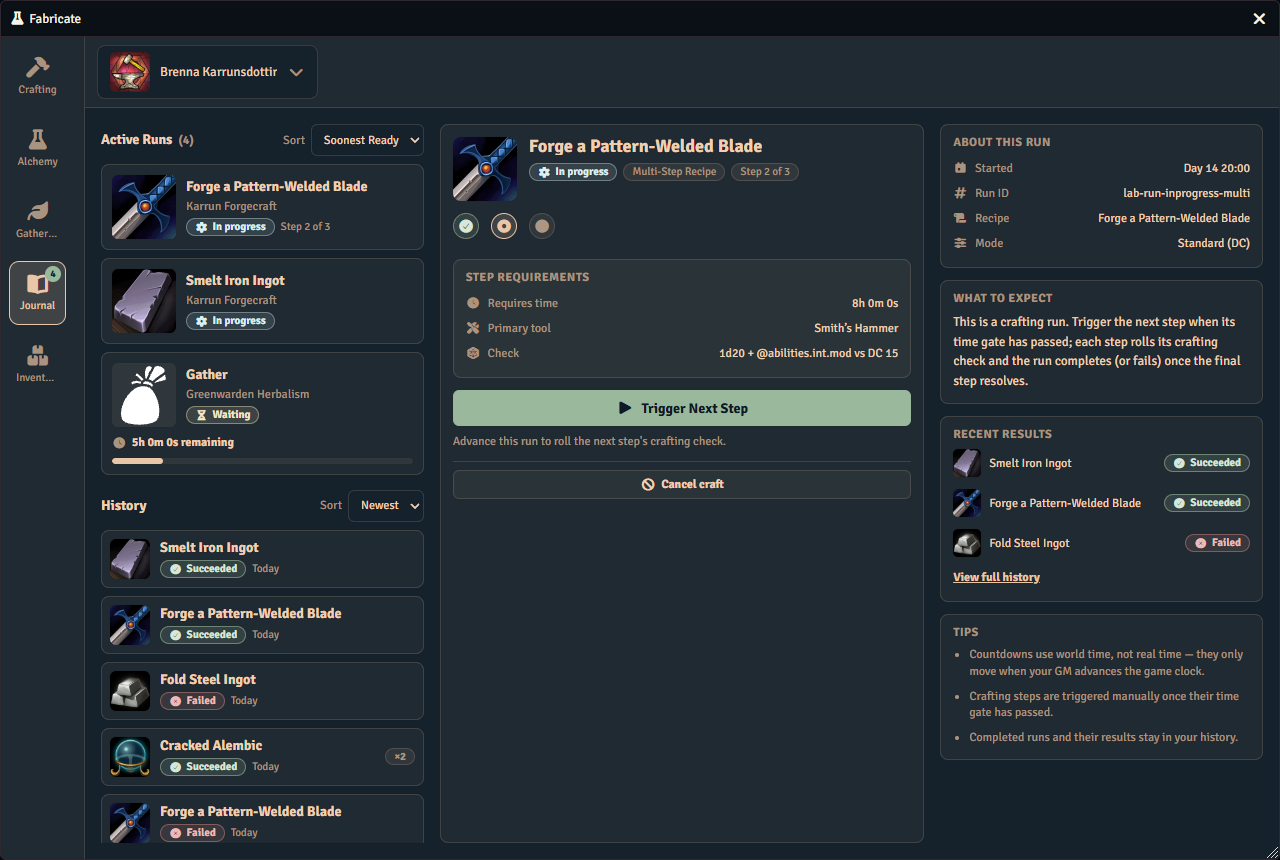
Browse Active and Finished
Active lists the selected character’s unfinished runs. Finished is the history browser for completed, failed, and cancelled runs. Select a row in either list to read its detail. The lists and selected detail scroll independently, with sort controls kept outside the scrolling lists. In a narrow window they stack in the order Active, Finished, then detail.
Use Search runs and the Run types filter to narrow both lists. The filter sits under the search field as a menu button that names your choice, such as “Crafting, Salvage”, “All run types”, or “No run types”. Open it to see Crafting, Gathering, Salvage, and Alchemy, each with a checkbox and its count of runs. Any combination is allowed, and each tick applies immediately and returns both lists to their first page. Show all run types clears the filter, and is disabled when every type is already shown. All run types start shown each time the window opens. The Active status filter selects one of All, Ready, In progress, or Paused. Its counts describe the run types shown before search or paging, so a search can show fewer rows than the status count.
Both lists start with four runs per page and have independent page sizes and page controls. You can choose 4, 6, 12, or 25 runs per page. Each compact pager keeps its range, arrows, and page-size choice on one row. It closes its list’s section as a full-width footer. Changing one list’s page does not move the other list’s page. The list sections keep their space when a page is short or empty, and an empty-state panel fills the available list area. Your selected detail stays open even when its row is on another page or hidden by a filter, including a search with no matches. Removing or dismissing the selected run lets the Journal select another entry.
Runs that are still waiting on the game clock show a countdown to when they will be ready. The status badge tells you where a run stands:
- Ready means the time gate has passed. Check the action’s availability too, because missing materials, a required decision, or unavailable GM authority can still prevent execution.
- In progress means the run is underway and not paused. It covers both a run counting the game clock down and one sitting between its stages with no wait running.
- Paused means the run’s remaining wait is frozen until you resume it.
A multi-step run keeps a progress bar between its stages, so you can see how far through it is even when no countdown is running. A single-stage run has no such bar: a lone track has nothing to compare against.
Where a run needs something from you, a second badge sits beside the status and says what:
- Needs your go-ahead. Nothing is missing, and the run is waiting for you to start its next stage.
- Needs your choice. A route, an option, or an essence allocation has not been made yet.
- Needs materials, Needs essences, Needs payment, Needs tools. The stage is short of something you have to acquire. Needs tools clears while a tool station you activated supplies the missing tool, and returns when that station is no longer active. A gathering run shows it too, when its task needs a tool you have no working copy of, and its ready action stays unavailable until you have one or a station supplies it.
A small bolt before the status badge, labelled Finishes this stage as time passes, means the run’s current stage will complete on its own once its wait is over. It shows only for a run that is set to complete as time passes, is not paused, and is still waiting on its time gate. It also needs the run to owe no reward pick and to have nothing that would stop it, such as missing materials, tools, or a player check. Crafting runs show it; gathering runs do not yet. A later stage may still stop and wait for you. For a crafting run with no check, a step completes on its own when the run is set to, and otherwise you can complete it by hand.
You can sort the active list by Soonest Ready or by Newest. Soonest Ready puts the runs you can act on first, then the ones that will be ready soonest.
A live count badge on the corner of the Journal icon in the window’s left rail shows how many active runs the selected character has. The badge stays accurate even while the Journal tab is closed, and it disappears when there are no active runs. It also keeps pace when another player or your GM starts, advances, or finishes a run for that character, so the count and the run lists update on their own once that character’s data reaches your client, with no need to reload the window.
Finished history and hiding entries
A finished row uses an outcome icon for Succeeded, Failed, or Cancelled. An unrecognized outcome stays Outcome unknown, and settlement or recovery takes precedence over a success indication. Sort Finished by Newest or Oldest, then use its pages to browse history. The selected detail distinguishes what the run required, what was actually spent, its recorded checks, and what was actually received. An upcoming or unexecuted stage is not marked completed just because the run ended.
Failed alchemy brews appear here too. An alchemy attempt that matched no recipe is listed as a generic Failed alchemy attempt that never names a recipe, so it cannot reveal an undiscovered recipe. For an alchemy system, whether players see these failed attempts is controlled by the GM’s Show attempt history to players option. The GM always sees them.
Use a finished row’s Hide … from this Journal control to dismiss it from your view. This does not delete the character’s history or hide it from another user. Dismissal is remembered for your user in this world across browsers and devices. It does not carry into other worlds, and active runs cannot be dismissed.
Run detail
An active run opens with its identity, available actions, and relevant notices. For the current crafting stage, progress and stage navigation lead into the stage’s purpose, Produces, and its materials. Before you begin the stage, the materials section reads This run consumes and is where you make your choices. Once you begin the stage, that section becomes Consumed, a record of what was actually taken rather than a control you can still edit. The current stage’s Time and Check summaries follow. Protected or unknown check details are not described as No check.
The compact This run section shows the start time, the closed time for a finished run, and recorded pause timing where applicable. An untitled guidance callout at the bottom explains the selected state. Its advice changes when you browse another stage, open finished history, or encounter a blocker or recovery requirement.
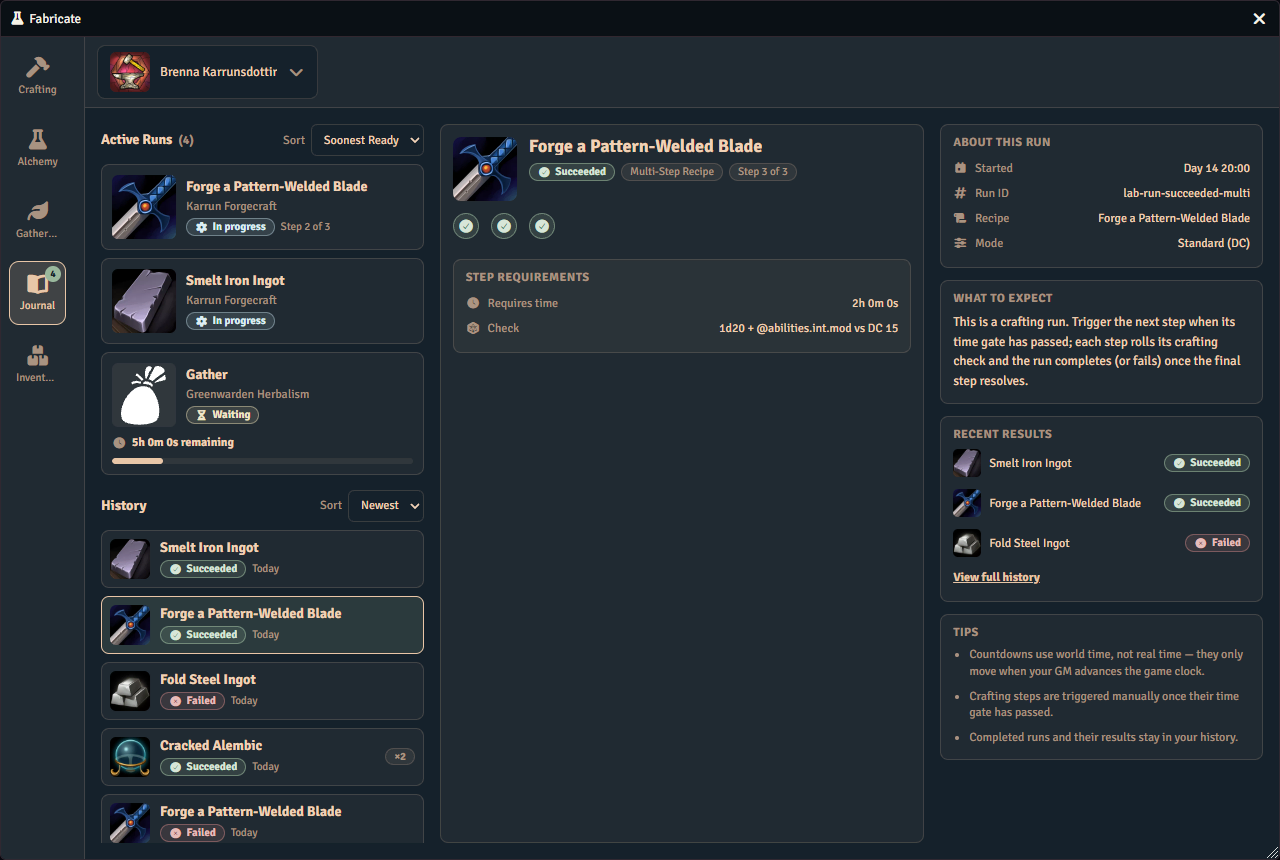
Stage choices and essence carriers
For a multi-stage craft, use the stage navigator to inspect past and upcoming stages, then Return to current stage to continue your work. Viewing another stage never advances the run. Past stages pair their recorded Consumed and Produced evidence with recorded checks and routes. Upcoming stages pair Will consume and Will produce previews, including the permitted alternatives and ingredient routes. These views are read-only and omit the current stage’s countdown and separate Time and Check summaries. Previewing an option does not select it or reserve materials. Its choices become available when that stage becomes current. Only the current stage can offer editable material controls, and only before you begin it. Beginning the stage locks its route, ingredient, and essence choices for good, so there is nothing left to edit once its countdown or its resolution is underway. A single-stage recipe omits the redundant stage navigator.
Where a recipe offers an Ingredient route, select the route you want to use. Changing route replaces the previous route’s ingredient choices and shared essence allocation. Open an ingredient choice to compare each candidate’s held, needed, and spare amounts. A missing or stale choice needs an explicit replacement, even if only one option remains. You can repair several choices one at a time, but the whole stage must be valid before you begin it.
Shared essence allocation counts physical units of carrier items. One carrier unit can contribute every applicable essence it carries while being spent only once. Fixed ingredients, alternative ingredients, and essence carriers share the same available stock, so one physical unit cannot also pay a second ingredient requirement. Repeated requirements for the same essence add together. For example, two requirements of two Fire each need four Fire in total. Extra contribution appears below the carrier list as overshoot.
Possible yields and actual results
Possible yields describe what the authored activity could produce. They are previews, not items already awarded to your character. After execution, history reports actual awards as Crafted, Brought back, or Recovered, according to the activity.
- Direct gathering previews its result set without a yield roll.
- d100 gathering compares one shared roll against the item drop chances. It does not roll separately for each item. Higher effective rolls clear the displayed thresholds. Some older recorded runs did roll separately for each item, and their history shows what was actually recorded.
- Check gathering shows the outcome ladder, including failure. The preview ladder explains outcomes and does not let you select one.
- Existing Progressive gathering uses its accumulated yield budget and ordered component costs. Those costs are not drop chances or outcome tiers.
A result whose amount is rolled shows its dice expression rather than a plain number while it is still only a preview, because no preview can know what the roll will be. Once the run has actually awarded it, the same result states the roll that produced it beside the quantity delivered, such as “Rolled 1d6 = 4”, and a roll of zero or lower states that nothing was produced rather than showing an empty quantity.
A recipe’s result can also pay out currency or teach a recipe’s knowledge instead of producing an item. A currency result shows its amount with the unit’s name, such as “2d6 gp” in a preview and the rolled amount once awarded. A knowledge result shows as Recipe knowledge, and once awarded the history states that the recipe was learned, or that it was already known. A recipe you are not entitled to see is named Unknown recipe rather than by its real name. A currency result shows the name the GM gave it, such as “Finder’s fee”, and the reason they wrote, in place of the unit’s name. The GM sets these on the recipe’s Results tab; see Result Kinds.
Choosing a reward
A recipe’s result can be a group of alternatives from which the player chooses. The recipe preview shows it as “You choose one of…” or “You choose up to N of…”. A group that the dice decide shows as “One of these, by roll”, and you have nothing to pick.
When a run reaches a result that you choose, the run owes you a pick and nothing from that result is yours until you make it. The run shows Choose your reward and waits. Pick the alternatives you want in the run’s detail in the Journal. A line above the tiles states the ceiling, such as “Choose up to 2 rewards”.
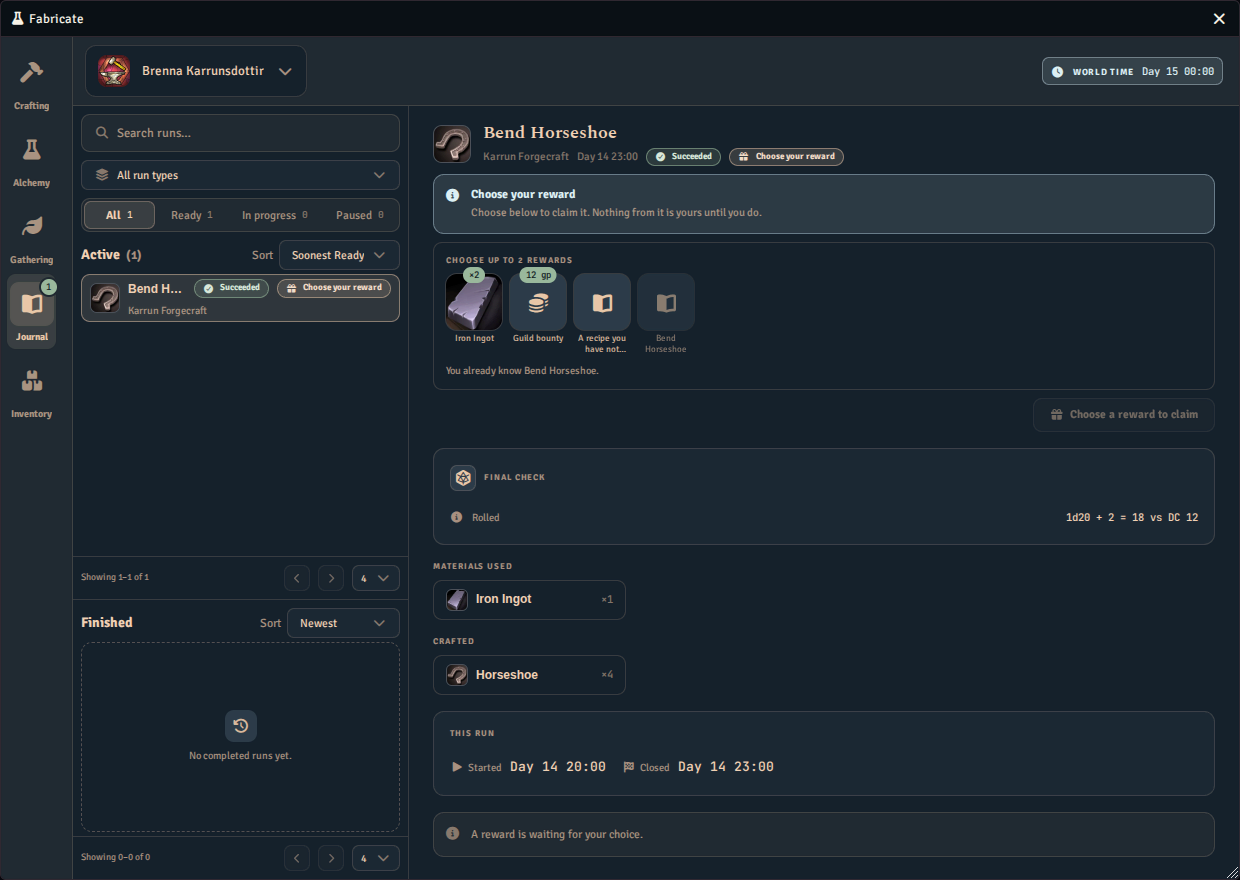
You may tick fewer, and unticking one frees a slot for another. Then use the claim button, such as Claim 2 rewards, to take what you ticked.
An alternative you cannot claim is shown as a disabled tile with the reason beside it. Examples are “You already know Bend Horseshoe.” for a recipe you have learned, or a note that a component or currency is no longer available. When nothing in the group can be claimed, the only action left is Close without a reward. It awards nothing and moves the run to Finished.
A pending reward is signalled in several places so it is hard to miss:
- The run’s row in the Journal list reads Choose your reward and is ranked ahead of other active runs. A viewer who cannot make the pick sees Reward pending instead.
- The run’s notice in the detail repeats Choose your reward.
- The crafting outcome says “Pick it there to claim it.” and offers Open in Journal.
- The chat card says “A reward is waiting to be chosen in the Journal”.
The owner of the character and the GM can settle the pick. Another player is told this character’s owner or the GM chooses it. A player who is not entitled to see the run’s evidence is told “Your GM can choose this reward for you.” Only one settle runs at a time for a run. If a reload interrupts a settle, Fabricate resolves it for you on the next load.
Reading a closed run
Finished history is a read-only account of what happened. It has no active actions, progress bar, stage navigation, editable materials, or Time and Check pair.
A successful single-stage craft with a recorded check starts with Final check. A confirmed no-check resolution shows Resolution instead. A failed checked single-stage craft puts its roll in the failure verdict without a second check summary. Missing check evidence remains Not recorded rather than becoming proof that no check was needed.
When more than one stage was attempted, How each stage went presents them together in order, with each stage’s check and actual consumed and produced items. An initialized next stage is not an attempt by itself. Cancelling before execution leaves timing and cancellation guidance, while cancelling after completed stages retains their actual earlier spending and awards.
Materials used, Crafted, and Tools used use compact image cards in four columns. Long names are shortened visually, with the full text available in the tooltip. Tools used groups repeated uses only when the history identifies the same physical item. Each use retains its stage, recorded quantity, and any recorded broken, virtual, spared, or immune state. Repeated use is not a total of tools consumed, and missing breakage evidence does not mean a tool was intact. Matching names or images alone do not combine separate tools.
Material, essence-carrier, currency, and award receipts describe recorded spending or delivery, not the recipe’s planned amounts. A carrier’s recorded contributions can include several essences even though that physical unit was consumed once. History tells five different situations apart, row by row and field by field, and never trades one for another. Not recorded means nothing was captured for that fact. A run whose identity or details you are not entitled to see is withheld from you rather than missing, and it is shown as a hidden entry instead of an empty one. Not applicable means the run genuinely never attempted that fact, such as materials for a failure that consumes nothing. An explicitly recorded empty receipt, or a recorded zero amount, is a decided nothing rather than an absence. An effect that was started and never confirmed stays unsettled: its confirmed part is shown, the rest is reported as still settling or needing reconciliation, and the run is never repeated to find out. A displayed zero quantity is never a positive award, and a missing amount is never shown as zero. Missing item details can appear as Unknown material or Not recorded. Where a name or image was missing, the Journal may recover it from another record of the same physical item that you are entitled to see. That recovery only ever fills in a name or an image, never a quantity. Later recipe edits do not rewrite captured stage purpose or executed resolution evidence.
Direct gathering shows Resolution with No roll and its Brought back items. D100 history keeps the recorded roll, high-roll thresholds, cleared or missed rows, and attributable awarded quantities together on one scale. Older runs that recorded a separate roll for each row show each row’s own roll and no shared cut, because there was never one roll to draw a cut from. A run that recorded a shared roll still shows its single cut. Two rows recording the same value does not make a run a shared-roll run, and a missing shared roll is never filled in from the first row. If an actual award cannot be attributed to individual rows, their amounts remain Not recorded and the award appears once with an explanation. Check-based gathering records How the check landed, rather than repeating the preview ladder. The recorded run status and actual awards are separate facts. An absence of drops does not by itself mean failure, and a permitted failure award does not turn a failed run into a success.
Immediately after resolution, a result notice may show the selected run’s summary and receipts. Reselecting the run restores its ordinary history layout. The bottom guidance describes a closed record, distinguishing delivered results, confirmed no awards, missing evidence, cancellation, and recovery. It does not invite another execution of the finished run.
Continue, pause, or cancel
New crafting, alchemy, and gathering runs use the current run lifecycle. A crafting stage locks its choices and consumes its materials the moment it begins, whether that is the recipe’s first stage, started from its own activity tab, or a later stage of a multi-stage craft, begun here. For a later stage, make its route, option, and essence choices, then use Begin step to commit to them. Begin step locks those choices, consumes the materials it lists, and starts the stage’s clock, in one action that cannot be undone. A stage with no time requirement begins and resolves together, so completing it does both in the same click, with no separate Begin step. Beginning a stage only succeeds once you hold everything it needs, so nothing is taken from you while a choice, a material, an essence, a cost, or a tool is still missing. When a stage is underway or ready, use Complete stage, Complete, Brew, or Collect to resolve it, as appropriate to the selected run. An available check action says Roll check, while an untimed d100 gather says Roll a d100. An untimed d100 gather prompts as soon as it starts, so this action appears for it only after you dismiss the prompt. A timed d100 gather does not prompt, so once its time has passed its action says Collect. A check cannot be rolled until every other requirement for the stage is met, including its elapsed time. Any required player check stays manual. The action explains why it is unavailable when the run cannot proceed. You must own the crafting character and its material-source characters, or ask your GM to act. When a crafting stage is already ready and all its choices are supplied, the starting action can execute it immediately through the same active-GM authority. Manual completion does not require an extra Journal visit for that fully supplied case.
Gathering keeps its existing start-time costs and reservations, including stamina and node use, so waiting to collect does not postpone those costs.
Use Pause on an eligible waiting run to freeze its remaining world time. Choices are retained while paused. Resume starts that remaining wait from the current world time, rather than counting time that passed during the pause. A paused run cannot execute or complete automatically, but it can still be cancelled when otherwise permitted.
The cancel control opens a confirmation in the action bar. Read the consequence, then choose Yes, cancel or Keep crafting. While that decision is open, the other actions are replaced by those confirmation controls. The confirmation states whether cancelling returns what the run has already consumed, which depends on your GM’s crafting system settings. For a current-lifecycle run, cancellation always forfeits elapsed time and keeps awards already delivered. A stage you have not yet begun has nothing consumed to return.
When ready
During an active countdown without a player check, When ready offers Ask me and Complete. A timed d100 gathering run needs no check, so it offers the choice; a timed routed or progressive gathering run asks for one and does not. Ask me is the default and leaves the ready run waiting for your action. Complete allows eligible stages to complete when world time advances.
The preference may be visible even while materials or choices remain unresolved. Its visibility does not mean the run is eligible to execute automatically. Automatic crafting does not begin a stage, and so does not spend anything, when the stage needs materials, an ingredient choice, currency, essence allocation, a Tool, or a player check, or when validation fails. Choosing materials in advance does not authorize automatic material spending. The preference is retained when blocked, and eligible stages needing no further input can complete automatically.
GM authority and recovery
Current-lifecycle run changes require an active GM and a single private authority ledger. Fabricate creates that ledger for you. The active GM’s client provisions it on load and again before the first run change, so there is no setup step and nothing to click. If two GM sessions start at the same moment, Fabricate keeps one ledger and removes the unused duplicate. Two ledgers that both hold records are left alone and reported, because only a person can decide which one to keep. While the authority is unavailable for any other reason, such as no GM online, an interrupted operation, or a held execution claim, the Journal and the Crafting tab state that reason instead of offering an action.
If an operation stops after an effect may have happened, the Journal can show This run needs GM attention. Its evidence distinguishes confirmed effects with recorded receipts, an uncertain effect that must not be repeated, and effects not started. A planned quantity is not proof of spending or an award. Ordinary execution and cancellation remain unavailable for a run requiring recovery.
An unresolved execution claim can also block other current-lifecycle runs. The active GM must inspect the recorded receipts and the uncertain boundary, then manually record a reconciliation or abandonment. Reconciliation is a separate procedure and is deliberately manual. No part of it happens automatically. That releases the matching claim only. It never retries the uncertain effect, makes the old request replayable, or automatically rolls anything back. The uncertain run remains marked as requiring recovery.
When a GM can see that a claim is no longer live, meaning no other operation is still working, Fabricate offers Release claim… on any run the claim is blocking, not only the run that originally ran into it. The prompt explains what releasing it does and does not do, then asks the GM to record whether they checked the actor’s items and currency first or are abandoning that check, before releasing the claim. While a claim is still live, meaning another operation is genuinely in progress, the Journal asks you to wait instead of offering the control.
Hidden identity and private checks
A hidden crafting recipe or blind gathering task keeps its protected details out of your Journal view. The owner still has the actions the run’s lifecycle permits, subject to the same timing, authority, and recovery restrictions as other runs. The GM can see permitted secret previews. Anonymous gathering entries use a generic pouch image, while an entitled GM preview can retain the task’s own image. Owning the character does not by itself reveal protected historical materials, tools, or results.
For a secret check, the player receives a generic prompt and the GM evaluates and privately posts the roll. Secret roll details are not handed back for player-side posting or dice animation. For an entitled non-secret check, the initiating client can post the already evaluated roll without rolling again. Foundry’s private-roll and whisper visibility is a presentation rule, not a confidentiality guarantee. A missing chat message is not a reason to repeat spending or awards.
Older runs and salvage
Runs created under the older lifecycle keep their original behavior. Older crafting runs still advance manually and retain their existing cancellation and refund rules. Older timed gathering and salvage resolve automatically as world time advances. Salvage has not moved to the new pause and manual-collection lifecycle.
A run created with an unsupported lifecycle remains available as a read-only record. Fabricate does not reinterpret it as an older run or allow ordinary mutations.
Times use world time
Every countdown, timestamp, and “ready” state in the Journal is measured in the game world’s time, not real time. A countdown only moves when your GM advances the game clock. The world clock is read-only in the Journal. The clock and recorded times use the world’s existing calendar formatting and fallback. Pausing one run does not pause the world’s clock.
See Also
- Quickstart walks through creating systems, gathering, and trying Fabricate as a player.
- Crafting Checks explains the checks a crafting step rolls.
- Salvage covers how components break down into salvage results.
- Gathering Environments covers gathering, where gathering runs begin.