Essences
Requires the Essences feature to be enabled on the crafting system.
Essences are abstract properties you assign to components, so a recipe can ask for a total amount of a quality instead of one specific item. For example, an item might contain “3 units of Fire essence and 1 unit of Arcane essence”.
Consider a Dragon Scale that radiates heat and hums with faint magical energy, or a Frost Crystal that chills anything it touches. Rather than treating these as unrelated ingredients, essences let you tag each component with the qualities it carries. Three units of Fire and one of Arcane on the scale, four units of Frost on the crystal. When a recipe calls for “at least 3 Fire and 2 Arcane”, players can mix and match any combination of components whose essence totals meet the threshold, opening up creative flexibility at the crafting table.
An essence can also drive automatic effect transfer and an optional property macro, so a sword forged from fire-heavy ingredients can inherit flame-related properties, or have its properties rewritten as it is created.
Open the Essence Studio
Open the Crafting System Manager and select a crafting system. Choose the top-level Essence Rules entry.
When the library opens without a current choice, Fabricate selects the first visible essence that belongs to the system.
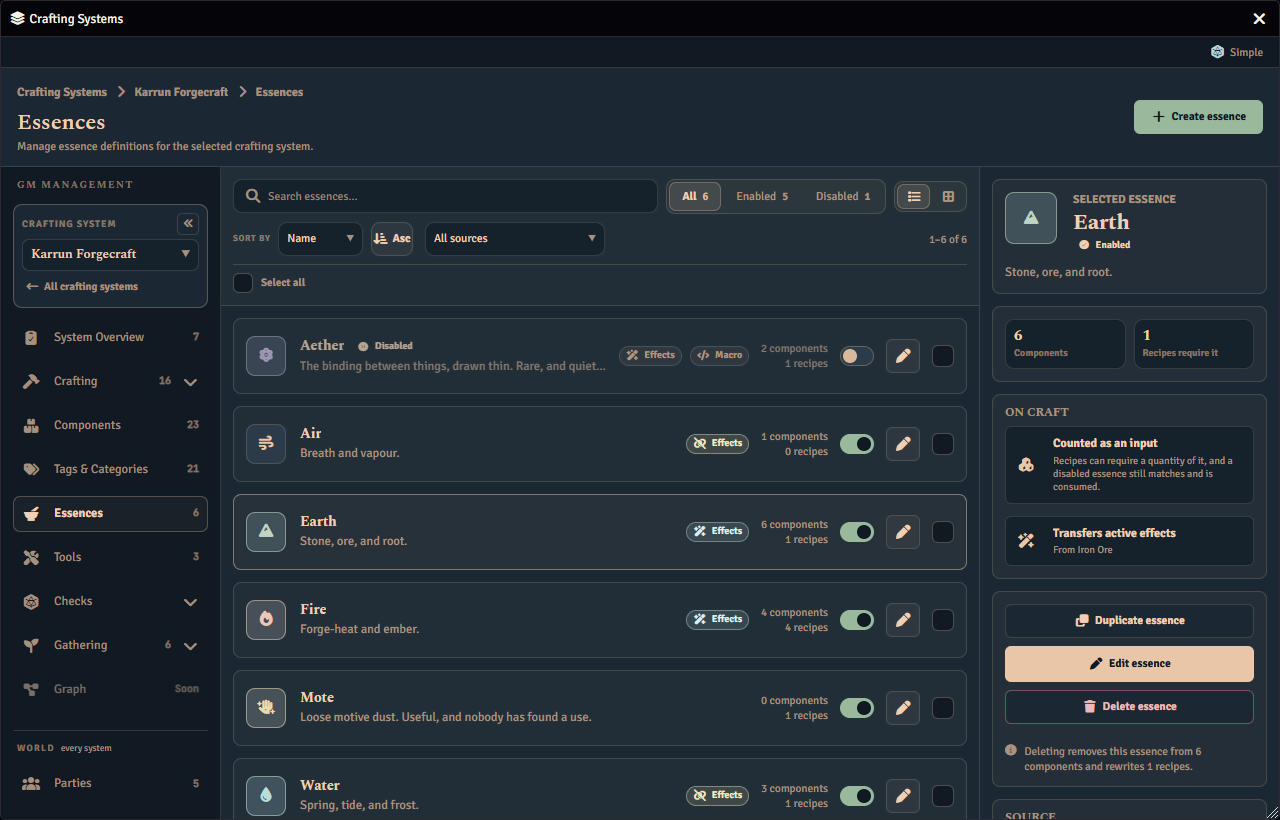
Each library row shows the essence’s icon, name, colour, an Effects pill and a Macro pill for the behaviours it carries, a Disabled marker when it is turned off, how many components carry it, how many recipes require it, and a per-row enable/disable switch. A component that carries this essence only because it inherits the value from the world Component catalogue counts here too, alongside one that authors it directly in this system. Choose List or Grid to change how the library is presented, search or filter by status to narrow it, and select a row to inspect it in the panel on the right. The inspector’s system roster uses Rules links to open another system. Essences are not created here; a new essence starts in the World Essence Catalogue. Choose Edit to open the essence editor.
Your search, filters, presentation choice, page position, and selected essence all survive opening the editor and coming back.
Edit an essence’s rules
Choose Edit rules on a row to open its editor. The Essence Rules screen has no create button, because a crafting system only uses essences that already exist in the world.
An essence’s name, icon, colour and description are shared by every crafting system that has it, so they are not edited here. The editor opens with a card naming that shared definition, and Edit shared definition takes you to the Essence Catalogue entry that owns those fields. What this screen holds is what the essence does in this crafting system.
The editor has two tabs:
- Essence rules carries the shared-definition card, an Enabled in system switch, an Active effect source card and a Macro on craft card, and a Reuse these rules action that copies both behaviours into another system. See Effect Transfer via Essences and The Essence Property Macro below.
- Validation lists anything unfinished, such as a missing description or a macro that no longer resolves. Selecting an issue’s View button jumps to Essence rules and highlights the part of it the issue is about.
Each behaviour card carries its own switch saying whether this system inherits the world default or overrides it. While a section is inherited the value below it is read-only, because it belongs to the shared definition; turning the switch off is what makes it this system’s to change.
A live preview panel shows how the essence appears and what it currently does, updating as you edit.
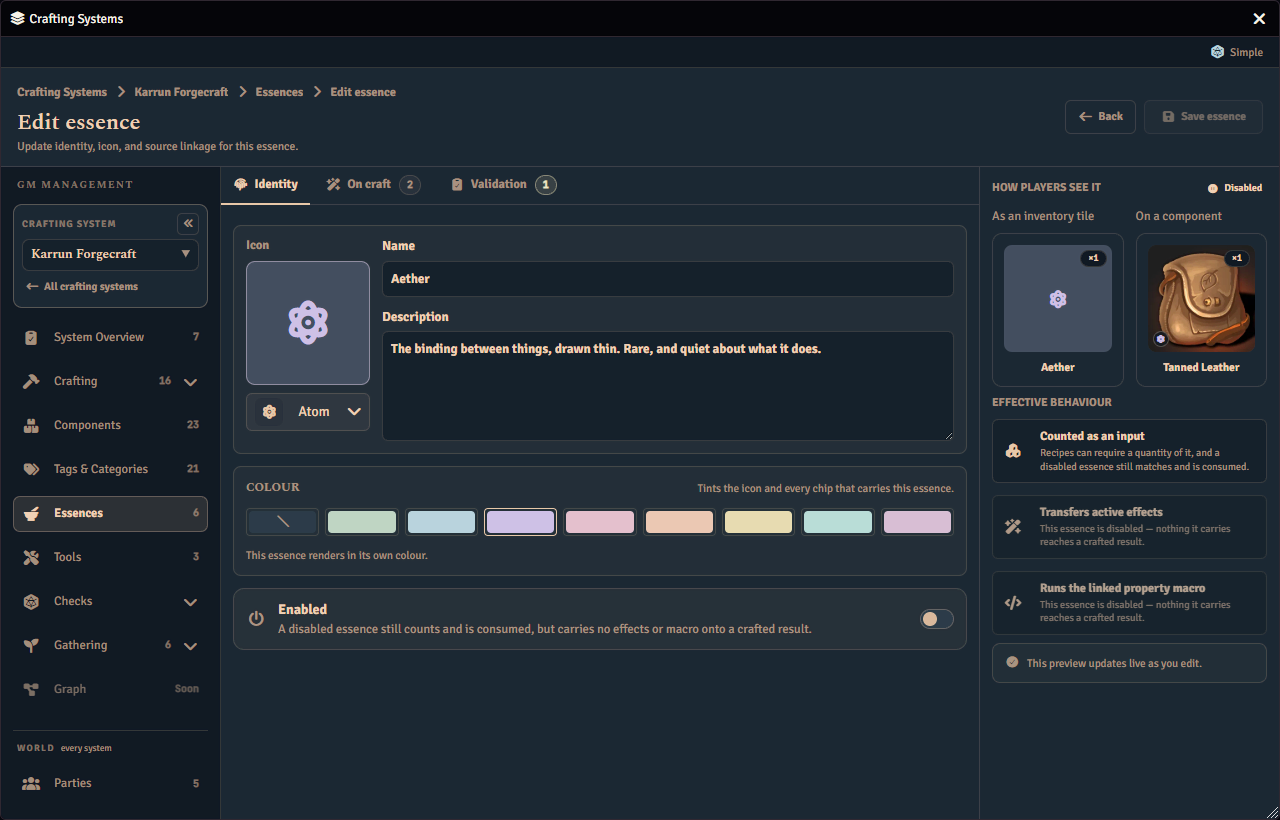
Choose Save rules when you are done. An essence always saves, even with warnings, unless it has a blocking issue such as a missing name or icon.
If the essence is removed from the system while you are editing it, Fabricate returns you to the essence library instead of opening a blank form.
Example essences
| Essence | Description |
|---|---|
| Fire | The raw energy of flame |
| Frost | The biting cold of winter |
| Arcane | Pure magical energy |
| Nature | The vitality of the natural world |
One shared essence per behaviour
Open the Crafting System Manager and choose Essence Catalogue in the World section of the rail. It holds one record per essence. When the catalogue opens without a current choice, Fabricate selects its first visible essence. Two crafting systems that both use Fire point at that one record, so its name, icon, colour and description are authored once in the catalogue rather than once per system. What each system keeps for itself is what the essence does on craft there: its enabled switch, its active effect source, and its macro on craft.
Select an essence in the catalogue, then choose Open definition. The Systems using this essence card lists every crafting system. Choose View system rules beside a system that uses the essence to open that system’s essence rules, including its Enabled in system switch.
Fabricate treats two systems as meaning the same essence on three things only. The name, the macro on craft, and the active effect source. The name is compared without regard to case, so Iron and iron are the same name. A colour, an icon and a description are presentation, so they never decide whether two essences are the same.
Fabricate does not join essences together by name as you author them. Two essences you create separately in the catalogue stay separate, even if both are called Fire, and nothing merges them. The one time Fabricate consolidates essences for you is the upgrade below.
Upgrading from a version before 1.34.0
Until this version the catalogue held a separate record for every system’s copy of the same essence. Three systems with Iron gave you three Iron records. On first load after upgrading, Fabricate makes each set of matching essences one shared essence, rewrites every reference to the records it retires, and posts a standing notice describing what it did. The notice is short, and the full explanation is in the browser console, which you open with F12.
Six things are worth knowing.
- The merge cannot be undone. Each retired record is deleted along with the icon, colour and description it held in the catalogue, and rolling Fabricate back does not bring those back. Rolling back is otherwise lossless, so going back costs you nothing further. It simply does not undo the merge.
- No system changes behaviour. Wherever a system was following the world record it is leaving, Fabricate writes that system’s current active effect source and macro on craft down as its own, so the essence goes on doing exactly what it did. Each system also keeps the name, icon and description it gave its own copy, so what you see inside a system may not change at all. Where two component essence values land on the same essence, they are added together rather than one replacing the other.
- Fabricate refuses rather than guesses. Where a merge cannot be proved safe, the whole set is left exactly as it was and named in the notice. Two cases reach this: two matching essences inside one crafting system, and an active effect source Fabricate cannot prove names the same component in both systems. Nothing changes for those essences, and the refusal is not retried on a later load. To merge a refused set yourself, delete the duplicate essence from the offending system’s Essence Rules screen.
- Essences your systems disagree about are left alone. Where the systems using one record disagree about its macro on craft or its active effect source, Fabricate cannot tell whether they are one essence or several. It changes nothing and names them for you to review in the Essence Catalogue.
- Fabricate may start telling you its shared world record is out of date. Because each system keeps the name, icon, colour and description it authored, those can now differ from the merged record’s, and Fabricate says so once per session. That notice says in the same breath that each crafting system’s own copy is what everything reads, so nothing is wrong and nothing has been changed. It covers names, images, descriptions and source links only, never behaviour.
- An individual item that carries its own essence values may not have been updated. Fabricate reaches the items your characters are carrying. It does not reach a world item, an item in a compendium, or a token copy that was never saved as a world actor. See An item stopped contributing an essence after updating.
Where an essence comes from
The world defines an essence and each crafting system decides how it uses it. The World Essence Catalogue owns the essence’s identity: its name, description, icon and colour. A crafting system’s membership of that essence owns the enabled switch and any overrides of what the essence does on craft there.
The catalogue is the only place an essence is created. Open Essence Catalogue in the World section of the rail and choose + New essence.
Any essence that a crafting system saves is registered in the catalogue automatically. This covers an essence that arrives by importing a system, by a module or macro that edits a system, or by any other save. If the catalogue already holds that essence, the system adopts it. Otherwise Fabricate adds it to the catalogue under the same id. Fabricate never matches an essence by name, and never changes an essence’s id to make it fit.
Rows that cannot be linked
Occasionally a system holds an essence that Fabricate cannot link to the catalogue, because the id was retired by the 1.34.0 merge above. That essence keeps working in that system only, and nothing is deleted. The save still succeeds. After the save, Fabricate shows one warning for each affected system, naming up to five essences and counting the rest, and warns about each essence only once per session; the full list, with the reason, is in the browser console. A retired id is never reused, so to bring such an essence back into the catalogue, create it there with + New essence, choose Add to this system, and assign the new essence on the components and recipes that used the old one.
Upgrading to 1.36.0
Older versions let a crafting system hold an essence the catalogue knew nothing about. On first load after upgrading to 1.36.0, Fabricate registers each of those in the catalogue and reports what it did. The notice is for GMs only, and the full detail is in the browser console. Nothing is deleted, renamed, re-keyed or merged, and running it again changes nothing.
The notice covers essences and Tools together and lists up to seven groups.
- Created are essences that were added to the catalogue.
- Adopted are essences that already existed in the catalogue and are now linked to the system that held a copy.
- Could not be linked are essences whose id was retired by the 1.34.0 merge, and Tools a world Tool already claims, which keep working in their own system only.
- Ambiguous are Tools whose source Item matches more than one world Tool, so Fabricate would not guess. An essence is never ambiguous.
- Memberships with no matching row are links to essences their system no longer holds, which are reported and kept.
- Memberships of a deleted system are links that name a crafting system that no longer exists, which are reported and kept.
- Look like the same essence are essences in different systems that appear to be one essence but were kept separate. Review them under World › Essences if you want to join them yourself.
The notice is a brief information message when it only created or adopted essences and Tools, or found links to a crafting system that no longer exists. Otherwise it stays on screen until you dismiss it.
Assigning Essences to Components
In the Items tab of the GM admin, each component can have essences assigned with quantities:
| Item | Fire | Frost | Arcane |
|---|---|---|---|
| Dragon Scale | 3 | 0 | 1 |
| Frost Crystal | 0 | 4 | 0 |
| Arcane Dust | 0 | 0 | 2 |
| Phoenix Feather | 5 | 0 | 2 |
Enabling and disabling an essence
Every essence has an Enabled switch, both on its library row and on its Identity tab. Disabling an essence never deletes anything. Every component that carries it, and every recipe that requires it, keeps that reference and keeps rendering it, marked Disabled.
Disabling only suppresses what the essence does to a crafted result.
- A disabled essence’s active effect transfer does not run.
- A disabled essence’s property macro does not run.
Disabling an essence does not stop it counting. A disabled essence still matches an ingredient requirement, still accumulates across the items you hold, and is still consumed by a craft, exactly as before. Only its behaviour on the crafted result is suppressed, never its quantity. This is deliberate. Toggling an essence mid-session must not change what an item you already hold is worth.
A disabled essence blocks recipe activation
A recipe cannot be enabled while it requires a disabled essence. Disabling an essence does not retroactively disable a recipe that is already enabled, but Fabricate warns you how many currently-enabled recipes can no longer be re-enabled while the essence stays disabled.
Re-enabling the essence clears the block, with no other change to the recipes it had blocked.
Using Essences in Recipes
An essence amount is a first-class ingredient option, matched the same way as a component or a tag. When a player crafts, the essences from their chosen ingredients are totalled and compared against the amount the option asks for.
For example, an option requiring “3 Fire essence” is satisfied by any combination of held items whose Fire essence totals at least 3:
- 1x Dragon Scale (3 Fire) meets it outright.
- 3x Ember Shard (1 Fire each) also meets it.
When two requirements on the same recipe both ask for essences, the player fills one shared pool rather than two separate ones.
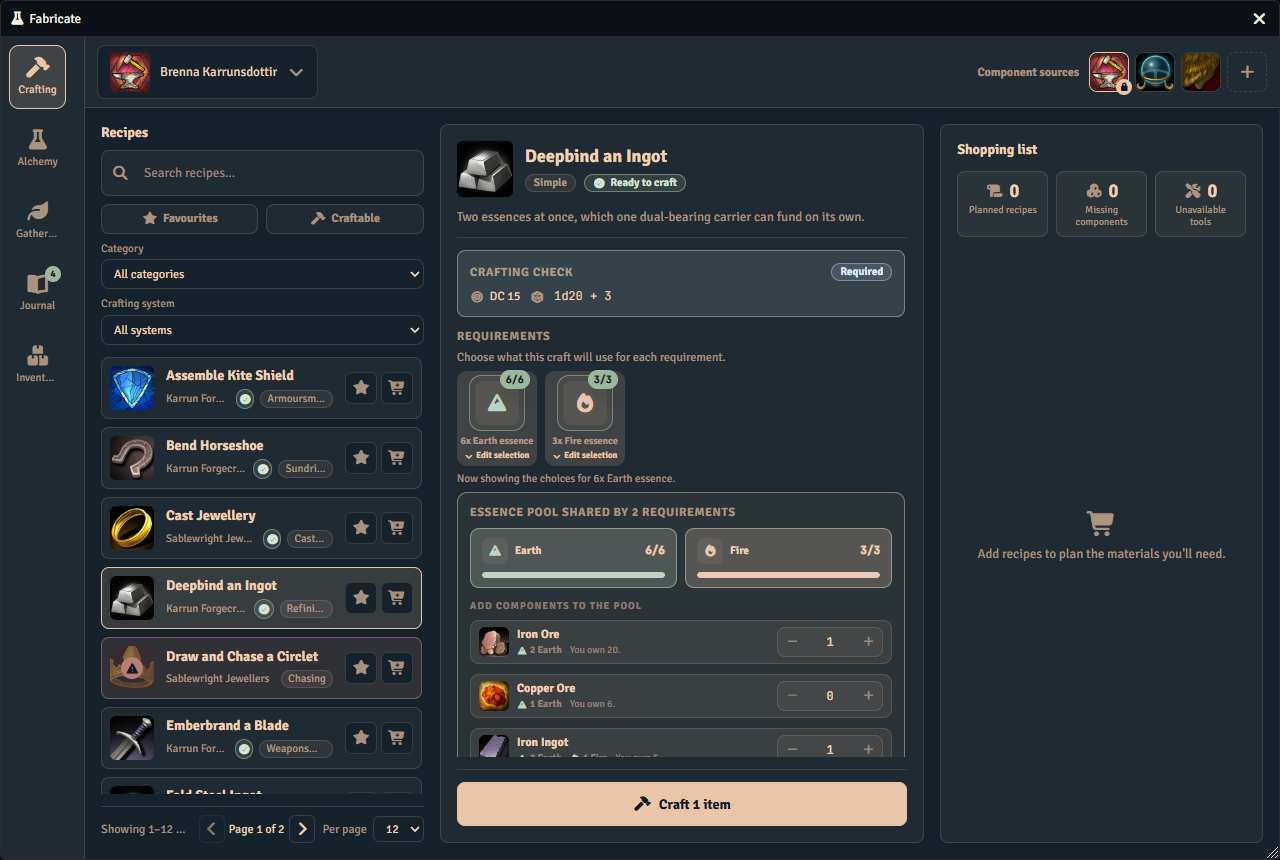
Because an essence is an option like any other, it can sit inside a group as one of several Accept instead alternatives on the recipe editor’s Ingredients tab, or stand alone in its own group as a hard requirement. A group holding only a single essence option is a required essence, meaning the crafter must supply that essence amount in addition to the recipe’s other groups.
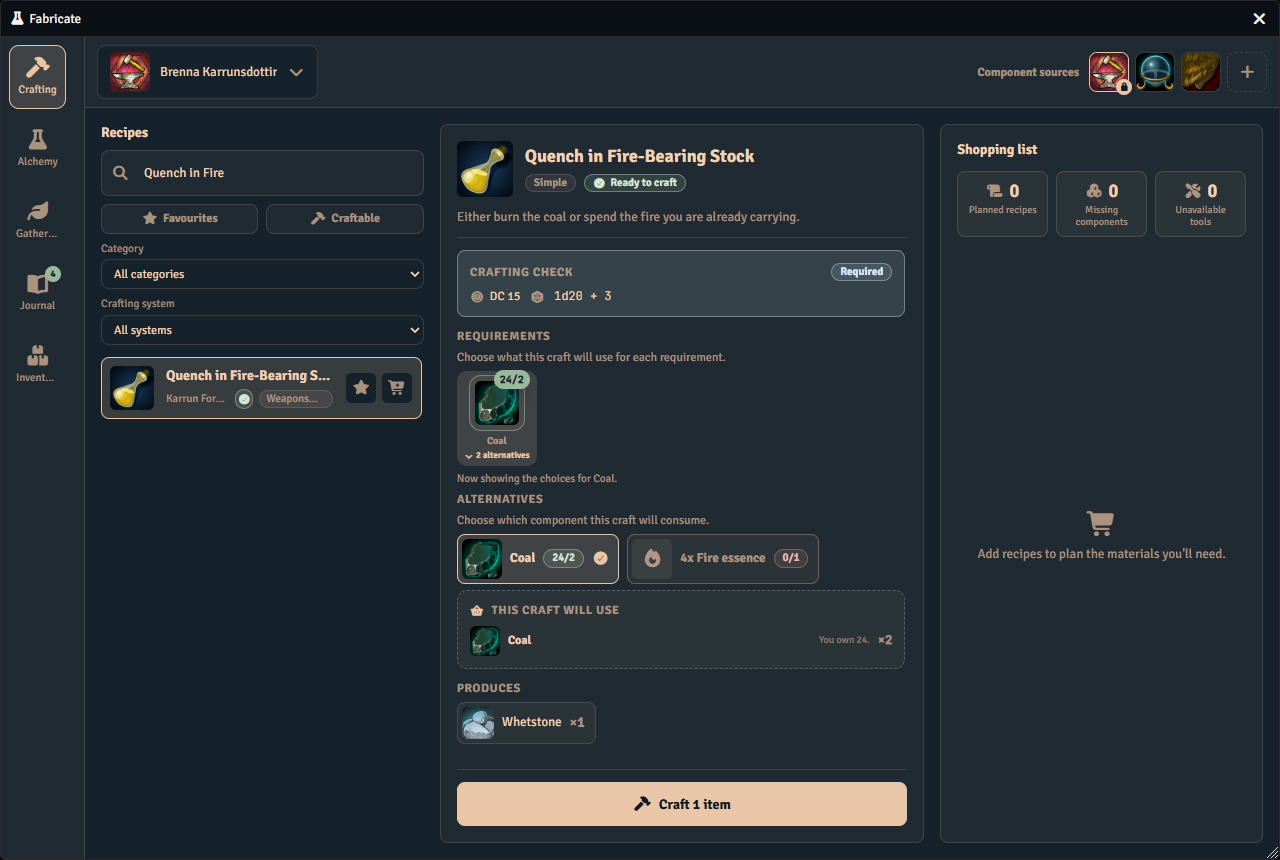
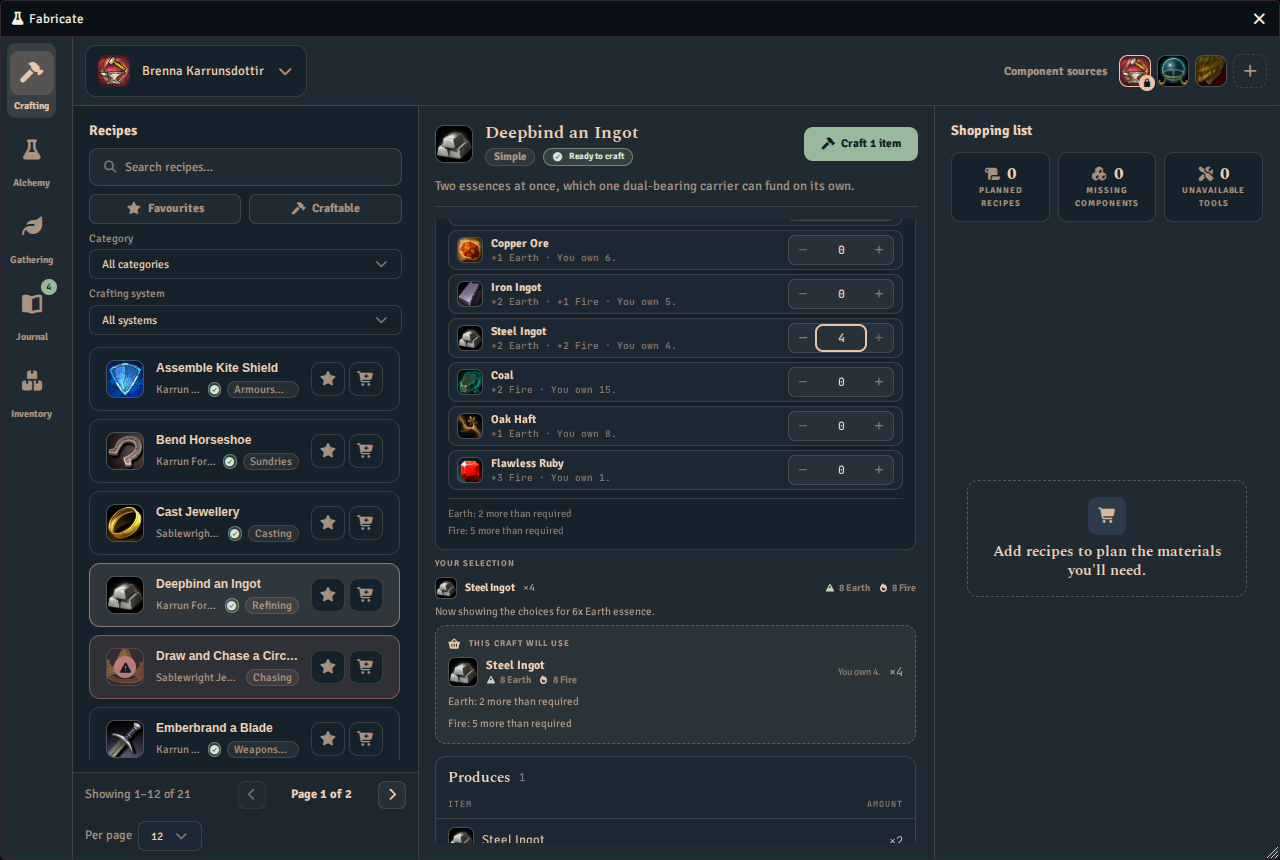
On the Crafting tab, a group with an essence alternative shows it alongside its other alternatives, with a card that reports how much of that essence the player’s items carry against the amount the recipe needs. Choosing it opens the essence pool beneath the alternatives, where the player picks which items fund it. The player can switch back to another alternative at any time.
The essence pool shows one meter for each essence the recipe needs, labelled with how much the selected carriers supply against how much is needed. When the selection overshoots, the meter adds a surplus sentence, such as “Earth: 2 more than required”. Only items that contribute an essence the recipe needs are listed as carriers. Each listed carrier has a stepper that stops at the number of units the player owns, shown as “You own N”. A Your selection recap beneath lists every carrier the player has allocated, with a chip for each essence it yields. Essences the recipe does not need appear muted in those chips. Fractional essence amounts are rounded to 12 significant digits.
A disabled essence is withheld only from the add new picker in the recipe and component editors. Anywhere it is already referenced, such as an existing recipe requirement or an existing component quantity, it keeps showing, marked Disabled, and you can still edit or clear it.
Earlier versions attached essence requirements to the whole ingredient set through a separate essence map. That per-set map is superseded by first-class essence options. Fabricate migrates existing recipes automatically, rewriting each former requirement into a required single-option essence group so the original behaviour is preserved.
Effect Transfer via Essences
When effect transfer is enabled on a recipe and essences are active, Fabricate can transfer active effects from an essence’s source item to crafted results. See Effect Transfer for the full feature, including how to link a source item to an essence.
A disabled essence never transfers effects, even when the recipe and both feature toggles are on.
The essence property macro
Turn on Property macros in the crafting system’s feature toggles, then drop a macro onto an essence’s On craft tab to give that essence the ability to rewrite a crafted result’s data before it is created.
The macro receives the recipe, the crafting system, the crafting character, every ingredient and tool involved, every essence the craft resolved and how much of each was used, which essence is invoking it and how much of that one was used, the check result, the step, and which of the recipe’s results is being created. Knowing which essence is invoking it, and how much of it was used, lets one shared macro answer differently for different essences, such as adding damage per unit of Fire.
The macro should return the set of property changes to make to the item being created. When more than one essence on a crafted result carries a property macro, they run one at a time, in the order the essences are listed in the crafting system, before the result’s own property macro runs last. If one essence’s macro fails, only that essence’s changes are skipped. Every other essence’s macro, and the result’s own macro, still runs.
Fabricate only runs a script macro from an essence. A chat macro, which is what a newly created Foundry macro defaults to, is refused with a warning when you drop it onto the essence, and is refused again, silently, at craft time if one somehow reaches an essence anyway, for example through an imported crafting system. Change the macro’s type to Script before linking it.
A macro stored in a compendium pack works for you as the GM, but a player crafting with that essence needs permission to read the pack the macro lives in. Without it, the macro quietly does nothing for that player while it keeps working for you.
Bulk edit and bulk delete
Select more than one essence in the library, using the checkbox on each row, to open the bulk edit panel in place of the single-essence inspector.
From there you can:
- stage an icon, a colour, or an enabled/disabled status across every selected essence, leaving anything you do not touch unchanged
- see how many essences are currently selected before you apply
The colour control is withheld, with a note in its place, whenever one or more of the selected essences already belongs to the world Essence Catalogue. Colour is authored once on the world essence, and this system’s own copy is not what any screen draws, so the axis is offered only when every selected essence is one the world does not hold. To colour world essences in bulk, use the world Essence Catalogue’s bulk edit, described below. Staging a colour and then adding a world-known essence to the selection clears the staged colour along with the control, so nothing you can no longer see is still applied.
Names, descriptions, linked source items, and property macros are never touched by a bulk edit. Edit those on the essence itself.
The world Essence Catalogue has its own bulk edit. Tick essences there to open a panel with Icon and Colour in place of the single-essence inspector. Each starts as Leave unchanged, and Colour can also be cleared with No colour. Apply, in the dock at the foot of the inspector, writes the staged fields to the world essences one at a time, then clears the selection. The colour shows on every manager screen that tints essences, but not on the recipe editor’s essence choices or on player screens. The icon shows on the world catalogue and entry and on the shared-definition callout and header, but a crafting system’s own essence row keeps the icon it has. If any essence cannot be updated, a notice names up to three of them and says how many more, and the rest are still applied. Names, descriptions, effect sources and macros, enabled state, and adding an essence to a system or removing it stay per essence, and the panel has no bulk delete. Delete an essence from its own page.
The Apply button sits at the foot of the inspector, and the delete sits directly under it, so both stay in view while you scroll the staged changes. Delete selected essences states its impact before you can confirm it, how many essence definitions will be deleted, how many components carry one or more of them, and how many recipes will be rewritten to drop them. An essence in use is never excluded: deleting it removes it from every component that carries it and rewrites every recipe that requires it. A component that only inherits the essence from the world Component catalogue is counted in this impact too, so the confirmation states the delete’s full reach rather than only the components that author the essence themselves. Deleting a single essence from its inspector warns you the same way, stating how many components it is removed from and how many recipes are rewritten before you confirm.
Deleting is a two-step action. The first click arms the Delete button, and a second click confirms it. Click elsewhere to back out instead.
See Also
- Effect Transfer. Configure the effect transfer pipeline that uses essence source items.
- Recipes overview. See how essence requirements work inside ingredient sets.
- Recipe Manager API. Create and manage recipes with essence-based ingredients programmatically.