Recipes
A recipe defines what ingredients are needed and what results are produced. Recipes belong to a crafting system and follow that system’s resolution mode. GMs author them in the Crafting Admin panel, and the public API can create them too.
What a Recipe Contains
Every recipe brings together a few things.
- A name and a piece of flavour text that describe it.
- An optional category that helps you organise recipes, when your crafting system groups recipes by category.
- The ingredients it needs, made up of one or more sets of required materials.
- The results it produces, made up of one or more sets of items.
- Any reusable tools it requires, such as a forge or a cauldron.
- Whether active effects carried by the ingredients are copied onto the results.
- Whether the recipe is enabled, which controls if it can be crafted.
- Whether the recipe is locked, which lets players see it exists but stops anyone other than the GM from crafting it.
- Who can see it, which is set by the crafting system’s visibility settings.
- For a recipe that teaches itself through an in-world item, the item that unlocks it for knowledge-based visibility.
- In a routed system, the result sets it can produce when more than one outcome is possible.
For multi-step recipes, the ingredients and results are defined on each individual step rather than on the recipe as a whole. See Multi-Step Recipes for details.
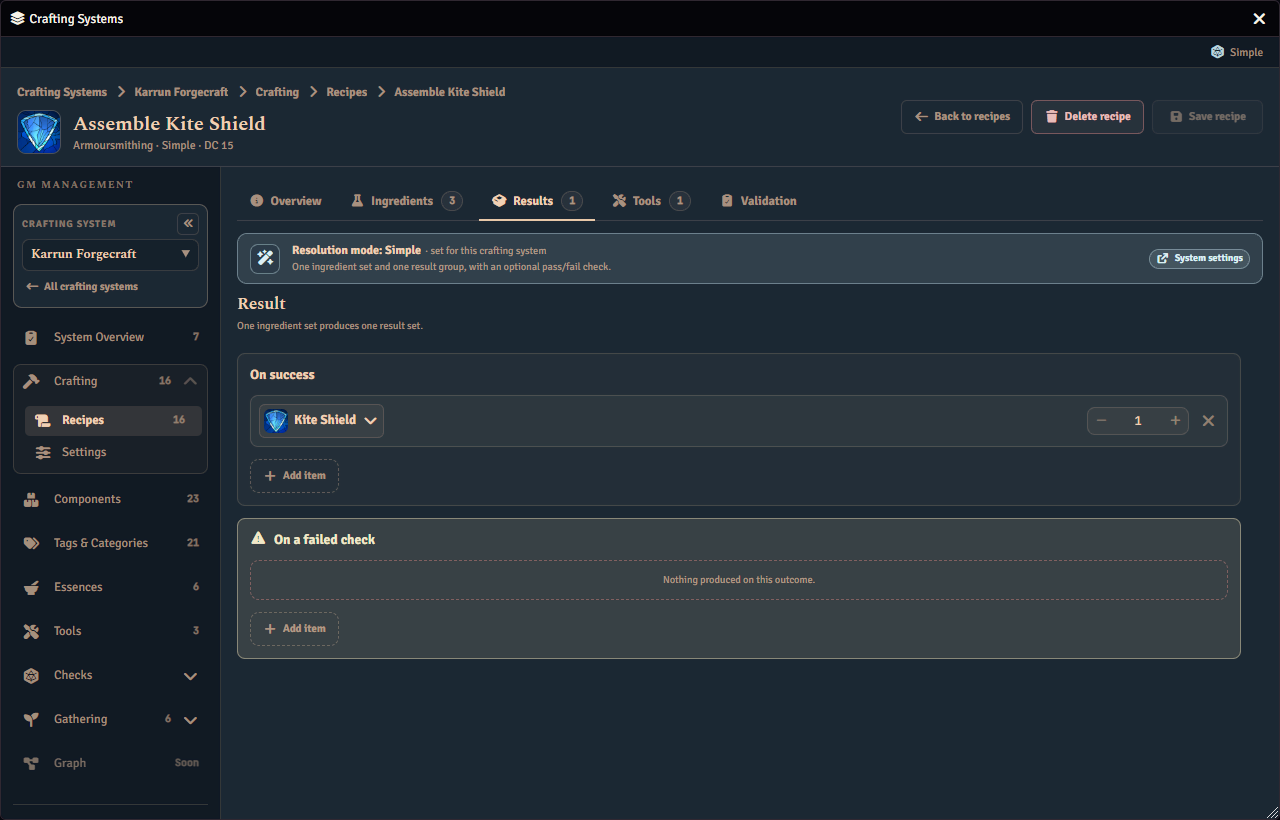
The results a recipe produces are chosen on their own tab.
Result Amounts: Fixed or Rolled
Each result row on the Results tab has a Fixed and Rolled choice beside its amount. A fixed amount is a plain number, set with the stepper. A rolled amount is a dice expression such as 1d4+1, resolved fresh each time the result is awarded. Switching a row to Rolled swaps the stepper for an expression field. Switching back to Fixed keeps the number you set, and switching to Rolled again restores the expression you typed. A Rolled row left empty saves as Fixed.
A rolled amount uses the same expression syntax as everywhere else in Fabricate, including an optional reference to the crafting character’s own data. It is resolved once, at the moment the result is awarded, against the character doing the crafting. A character value the character does not have counts as 0.
A rolled amount can come up as zero. When it does, nothing is created, and the crafting or salvage chat card names the roll and states that nothing was produced, rather than leaving the result off the card. Fabricate refuses to save a rolled amount that could never produce anything at all, such as an expression with no dice and no character reference that can only ever total zero or less. An expression that reads the crafting character’s own data is accepted as long as it can be rolled at all, because no value can be known in advance without a character to roll it against.
An expression that cannot be rolled, or that can never award a positive amount, is marked on its row with a message, and the save is refused until you fix or clear it.
A craft is also refused, before anything is consumed, when its rolled amount cannot be rolled for the crafting character. Examples are an expression that reads a text value from the character, or one that divides by a value that is zero for that character. The player sees the craft refused, and their ingredients stay where they are.
A progressive recipe has no amount on its stage rows, because a progressive award drops every formula. Any rolled amount on a progressive recipe is ignored.
A component result row names its component and cannot be cleared. To change a result, remove the row and add another. A progressive stage is the exception, because it can swap its component in place and so keep its place in the order. Adding a component that a result set already produces raises that row’s quantity. If that row is rolled, a second row is added instead. A progressive recipe always adds a new stage, so repeat a component there to produce it again.
Result Kinds: Items, Currency and Recipe Knowledge
A result does not have to be an item. The + Result button at the end of a result set opens a menu headed Add a result. It offers each kind of result the set can hold, adds an empty row of the kind you pick, and puts the cursor in that row’s name field.
- Component awards an item, as every result did before.
- Currency pays the crafting character an amount of one of the world’s currency units. It is offered only while the system takes part in currency and the world has at least one unit.
- Recipe knowledge teaches the crafting character a recipe. It is offered only while the system can show a player a recipe they have learned.
When only one kind is available, + Result adds that row straight away, with no menu. A progressive recipe’s stages can only be components, so its adder offers nothing else.
Currency results
Search for the currency unit in the row’s name field, then set the amount with the Fixed and Rolled choice described above. A fixed currency amount must be a whole number, and a row with a fraction is marked until you fix it. The unit’s abbreviation shows beside the amount, and a long one is cut off to fit. Once a unit is named, two optional fields open beneath the row.
| Field | What it does |
|---|---|
| Call it | Replaces the unit’s name when the player reads the result, so “Reward” or “Finder’s fee” instead of “gp”. |
| Why they get it | A short reason, shown after the name. |
A closing line under the fields shows what the player will read, such as “The player sees: Finder’s fee · for the safe return of the cargo”. When both fields are empty it says that the player just sees the unit’s name. The fields are optional, so a currency row is complete without them.
Recipe knowledge results
Search for the recipe to teach in the row’s name field. Any recipe in the crafting system can be chosen, including the recipe being edited. A knowledge row has no amount, because a recipe is either known or not.
A help line under the row says what a player sees. Players see the taught recipe’s name in the results only if they could already see that recipe. Otherwise they see Unknown recipe.
Rows the system cannot honour
A row stays in the recipe, but turns read-only, when its system cannot honour it. A currency row shows Currency off when the system’s currency is switched off. A knowledge row shows Learning off when players on the system never see a learned recipe, because its visibility mode does not reveal learned recipes. Each says why in place of its usual help, keeps its value on show, and can still be removed. Turn the setting back on, or choose a visibility mode that reveals learned recipes, and the row is editable again. See Knowledge for what a character has learned.
A taught recipe that is gone
If a recipe a row teaches is deleted, the row shows Missing recipe in place of the recipe’s name. No craft can award it, so the recipe cannot be enabled until you remove the row or choose another recipe. The recipe’s validation tab lists this as a blocking issue.
Rewards the Player Chooses
A result choice group offers one reward, or up to a set number, from several alternatives. You decide whether the dice or the player choose. When the player chooses, the craft pauses at that result until the player picks. They settle it in the Journal’s run detail, where the Journal page describes the pick. The GM can always settle a pick for a player. A rolled group needs no pick, because the roll decides.
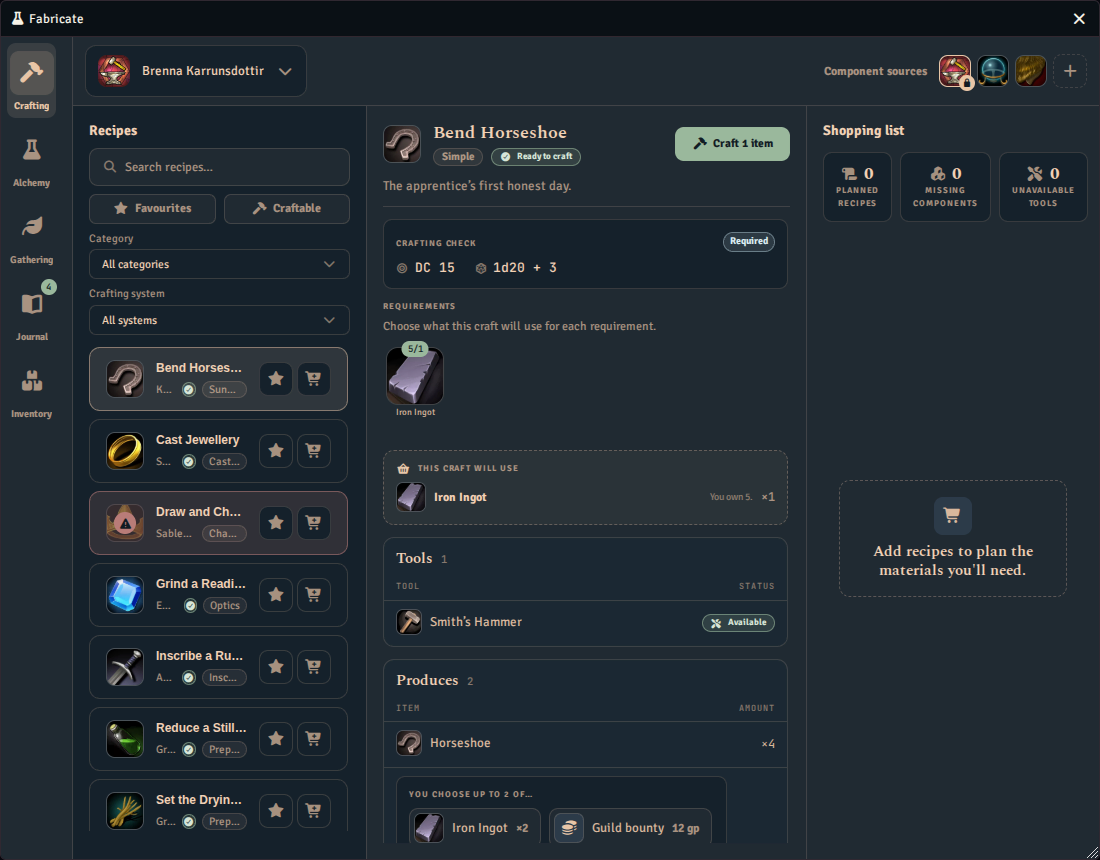
A reward the player chooses needs a run on the current lifecycle. A run on the older lifecycle refuses to award one.
Making a row a choice group
There is no button that creates an empty group. A reward row becomes one, in place, when you select its or… control (Add an alternative). The row stays where it is and gains a second, empty alternative beside it. A group has one dashed Alternative adder. It opens a menu headed Add an alternative that offers the result kinds, so an alternative can be an item, a currency amount or a recipe the character learns. Choosing a kind adds the row and moves focus to its name field. Remove alternatives until only one is left and the group turns back into a plain row. A line under the group’s header says in plain words what the group does.
The group header
| Setting | What it does |
|---|---|
| How many it awards | Any one of awards a single alternative. Up to N of awards up to N, where N is at least 2. |
| Who chooses | Player chooses hands the pick to the player. Rolled lets a roll decide. |
For Up to N of, N is either a fixed whole number or a roll, and the roll must be one that can total more than 0.
Rolled groups
When the roll chooses, the header gains a Selection roll expression. It is rolled against the crafting character once for each award. Every alternative then shows a range cell with the lowest and highest roll that selects it. Ranges are whole numbers and may not overlap, but they may leave gaps. A roll that lands in a gap selects the alternative whose range starts highest below it, and a roll below every range selects the lowest, so a roll always selects an alternative. Fabricate marks a range that runs backwards, is a fraction or overlaps another alternative until you fix it.
An Up to N of group that is rolled also offers Unique and Repeats allowed. Unique awards each alternative at most once. Repeats allowed lets the same alternative come up more than once.
Settings the group is not using
A setting that the current choices do not use is kept while you edit, so switching Who chooses back and forth does not lose your ranges. For example, ranges are kept when the player chooses. Saving the recipe drops the settings that are not in use.
Progressive recipes
A progressive recipe’s stages offer no choice. The roll-budget strip in the Results tab says so, and a stage has no or… control.
Moving a World Back to an Older Version
Currency results, recipe-knowledge results and result choice groups (one reward offered from several alternatives) need the Fabricate release that introduced them, or a later one. An older version expects every result to name a component, so a recipe carrying any of them fails its validation there and cannot be crafted until you remove that result. An older version also ignores a craft’s record of a reward still waiting for the player’s choice, so that reward can no longer be claimed. Back up your world before moving it to an older version, and settle any waiting rewards first.
Enabling and Disabling Recipes
Whether a recipe is enabled controls whether it can be crafted. A disabled recipe is hidden from players, but it remains available through the API.
Why disable rather than delete? Disabling is non-destructive. You can hide a recipe from players while you are still configuring it, or temporarily remove it from circulation without losing its ingredient and result configuration.
Programmatically. You can switch a recipe between enabled and disabled through the API. See the Recipe Manager API reference for the method that updates a recipe.
Ingredient Semantics
Ingredients are organised in a three-level hierarchy:
- Ingredient Sets (OR, any one set satisfies the recipe)
- Ingredient Groups (AND, all groups in the set must be satisfied)
- Options (OR, any one option satisfies the group)
- Ingredient Groups (AND, all groups in the set must be satisfied)
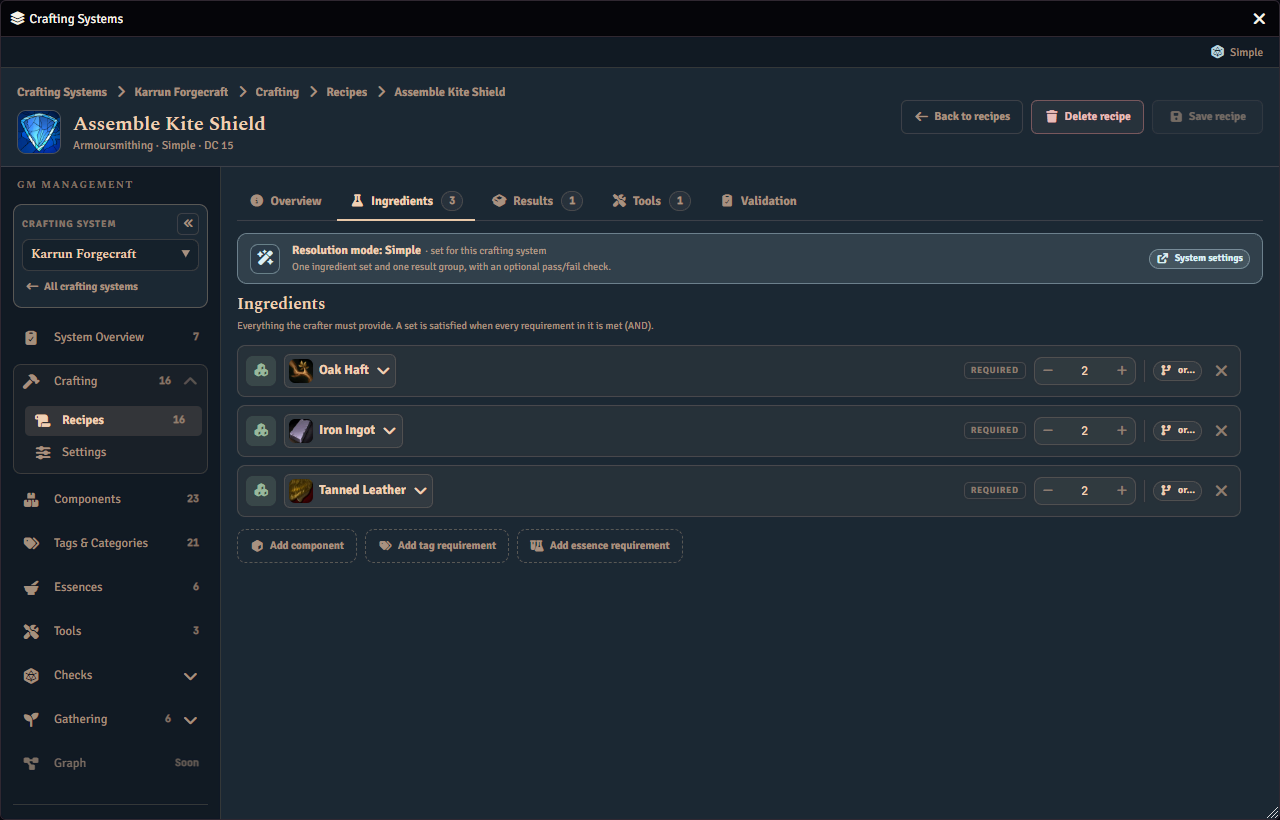
Example: A sword recipe might accept either iron or steel:
- Ingredient Set “Metal Sword”
- Group “Metal” (need any one of):
- Option: 3x Iron Ingot
- Option: 2x Steel Ingot
- Group “Handle” (need any one of):
- Option: 1x Oak Wood
- Option: 1x Leather Wrap
- Group “Metal” (need any one of):
The recipe is craftable if the player has materials to satisfy all groups in at least one set.
Ingredient Matching
Each ingredient option decides how it is matched against the items a player is carrying. An ingredient set adds a requirement through one dashed Ingredient adder, which opens a menu headed Add an ingredient offering Component, Tag, Essence and Currency. The menu leaves out essence and currency while the system has them turned off. On a requirement’s bare row, or… opens the same kinds in a menu headed Accept instead; once a requirement holds alternatives, its box has one dashed Alternative adder that opens that same menu.
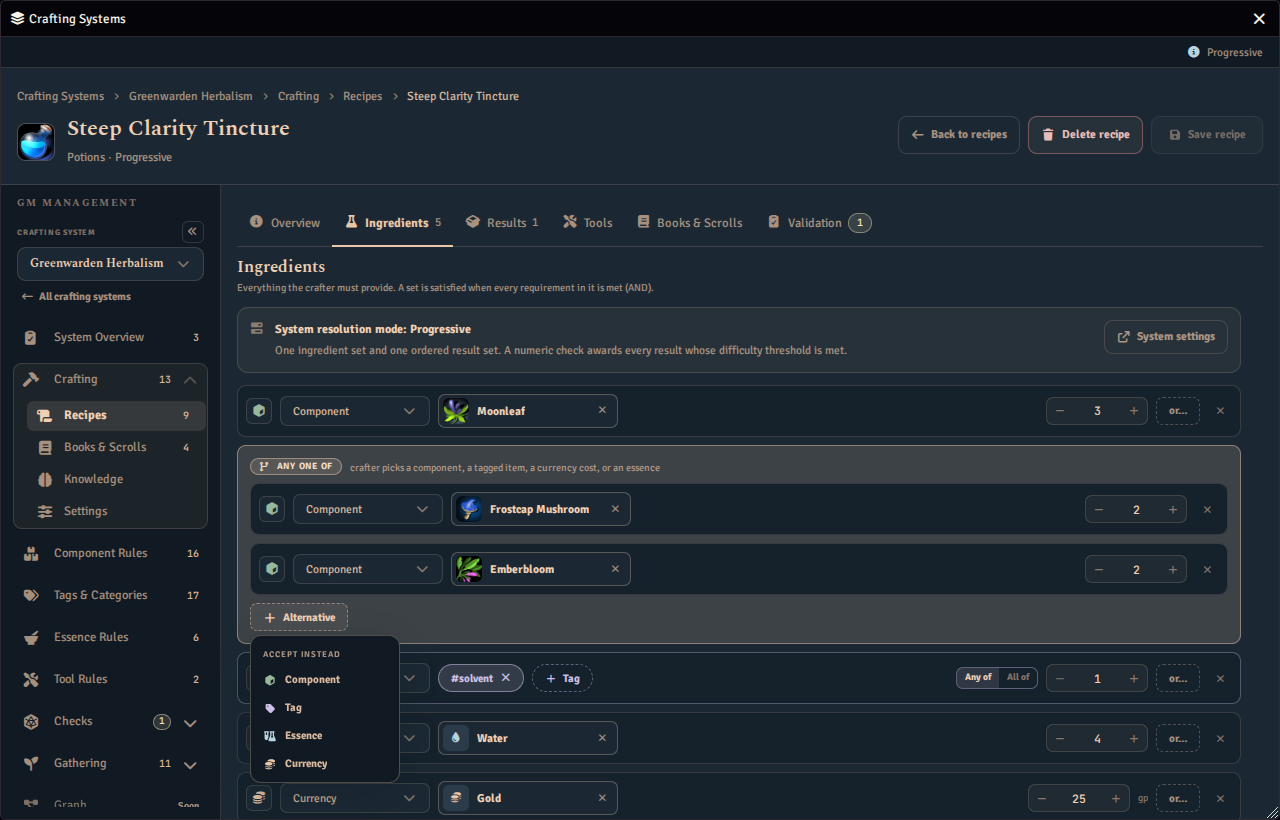
- Match a specific component managed by the crafting system.
- Match any item that carries a given set of tags. The row shows each tag in a chip as a
#followed by the tag as it is stored, such as#solvent, and the adder’s list reads the same way. The#is only for display and is not part of the tag. The tag adder lists the system’s tags with how many components carry each, marks the row’s tags as selected, and choosing one again removes it. Type a tag the system does not have yet, and the adder offers New tag “name”, showing the name trimmed, in lowercase and without a leading#, as it will be saved. Typing#brinetherefore adds the tagbrine. Choosing it adds the tag to the system’s tags right away and checks it on the row. The new tag is saved with the system at once, not with the recipe’s Save, so Discard leaves it in the system’s tags with no components carrying it. If the tag cannot be saved, it comes back off the row and the message “Tag could not be added.” appears. - Match an essence amount, satisfied by any combination of items whose totalled essence reaches the amount.
- Match a currency cost, paid from the crafter’s coins rather than consumed items. The unit’s abbreviation shows beside the amount, as on a currency result.
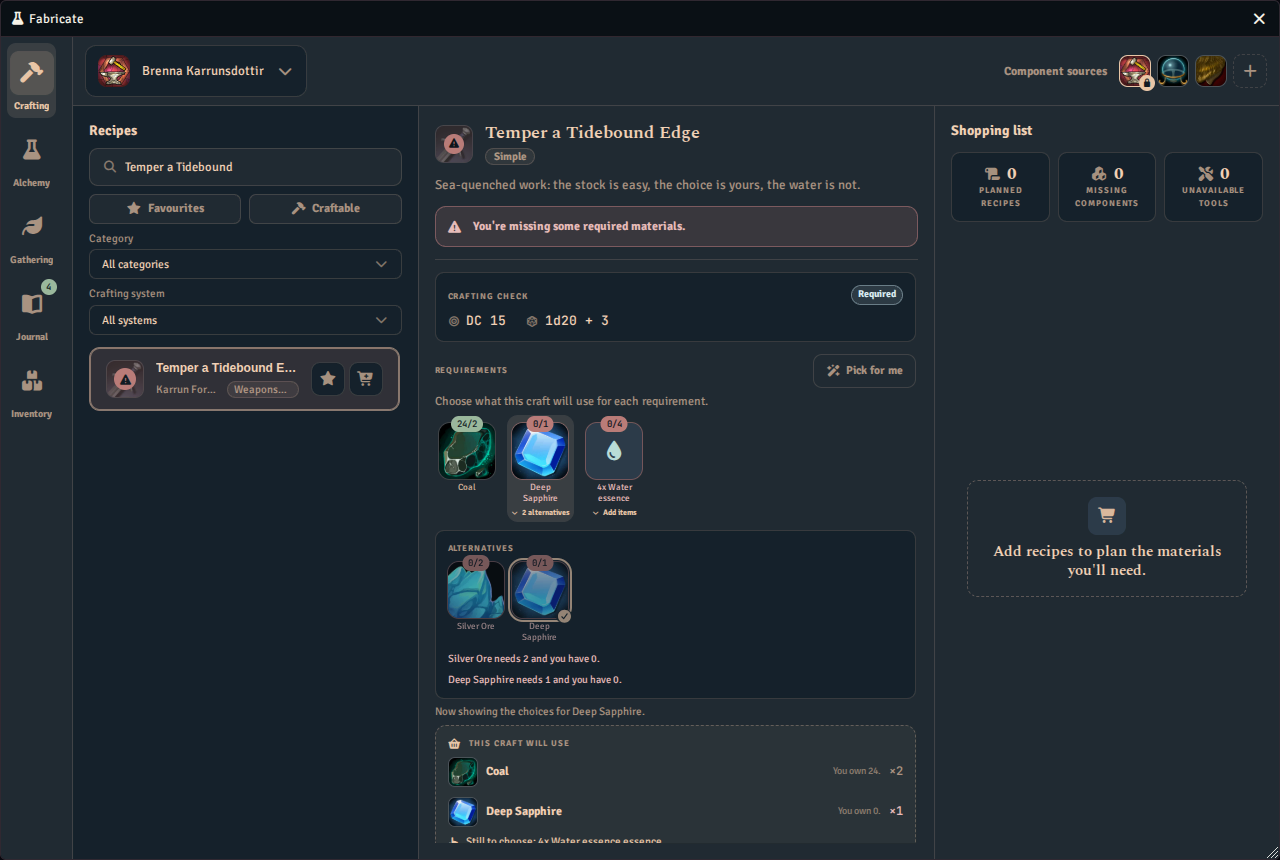
An essence is a first-class option like any other, so it can sit inside a group as one of several Accept instead alternatives. For example, a group might accept either 2x Iron Ingot or 3 units of Fire essence, and either one satisfies the group. See Using Essences in Recipes for how the Crafting tab presents an essence alternative chosen this way.
Earlier versions attached a separate essence requirement to the whole ingredient set. That per-set essence map is superseded: each former essence requirement is now a single-option essence group, kept required (AND) alongside the set’s other groups. Fabricate migrates existing recipes automatically, so authored behaviour is preserved.
Resolution Modes
The resolution mode determines how ingredients map to results:
| Mode | Sets | Result Sets | Check Required | Use When |
|---|---|---|---|---|
| Simple | 1 | 1 | Optional | Basic A + B = C crafting |
| Routed by ingredients | 1+ | 1+ | Optional | The ingredients used select the result |
| Routed by check | 1+ | 1+ | Yes | A skill-check outcome selects the result |
| Progressive | 1 | 1 (ordered) | Yes | Skill check value “buys” results in order |
| Alchemy | 1 | 1+ | Set by check mode | Players experiment with ingredients. Recipe names are hidden |
Multi-Step Recipes
When multi-step recipes are enabled, recipes can have several sequential steps. Each step has its own ingredients, results, required tools, and an optional time requirement. An ingredient inside a step can still offer a currency cost as an alternative to its items, the same as in a single-step recipe. Conceptually, each step is a separate recipe that is part of a larger recipe. You could achieve the same outcome using multiple recipes.
See Multi-Step Recipes for details.
Tools
Tools are reusable items required for crafting, such as a blacksmith’s forge, an alchemist’s cauldron, or a wizard’s staff. A recipe can require Tools for the whole recipe or for a single step. In Routed by ingredients, each named ingredient set can also require its own Tools. Each set’s Tools card carries the set’s name, and you can rename the set there. An ingredient set needs a name to carry Tools, so clearing the name is refused and a note explains why. The Tool references on an unnamed set are inert. They stay saved and apply again once the set is named.
See Tools for source linking, prerequisites, breakage, and usage tracking.
Tool behavior
The recipe Tools tab selects required Tools; it does not configure how they behave. Tool Studio owns each Tool’s prerequisites, bonus, wear, breakage, and on-break action. Crafting System check settings own check-driven breakage.
Fabricate adds every distinct eligible Tool bonus to crafting and salvage checks. A Tool whose prerequisites use Bonus is withheld contributes nothing when those prerequisites fail, but it still satisfies the Tool requirement. A Tool whose prerequisites use Tool is unusable blocks crafting when those prerequisites fail. Gathering applies no numeric Tool bonus.
Authoring and Crafting Surfaces
GMs author recipes in the Crafting Admin panel. The recipe editor has dedicated tabs for the recipe’s overview, ingredients, results, tools, and validation, with an access or books and scrolls tab appearing according to the system’s recipe visibility mode. The Overview tab edits identity (name, description, image, and whether it is on or off) and links a recipe item.
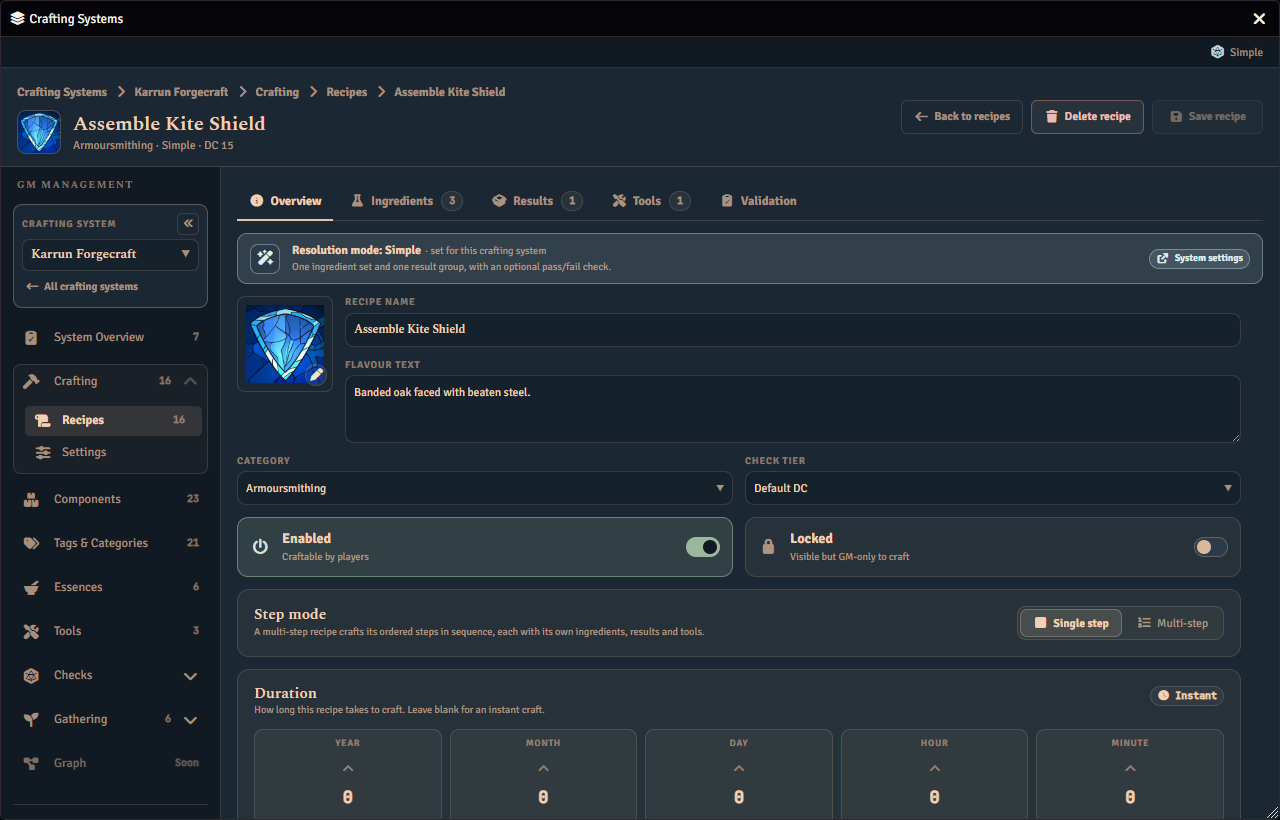
When the system is in player mode, the Overview tab can also restrict a recipe to specific players. When the system uses a fixed Routed by check crafting check, the Overview tab also offers a per-recipe minimum success tier. See Minimum success tier for fixed routed checks. In both routed modes the Overview tab ends with a Routing card that lists each ingredient set or outcome tier beside the result set it produces. See The routing overview. When the system has a Modifiers library and its combination rule is By recipe, the Overview tab also lets the recipe pick which of those modifiers apply to it, up to the system’s pick limit. The combination rule itself is always the system’s, and no other rule offers a recipe a control. See Check modifiers.
Players craft in the Crafting tab of the unified Fabricate window. They browse the recipes their character can see, choose which owned actors supply the materials, roll any crafting check, and craft.
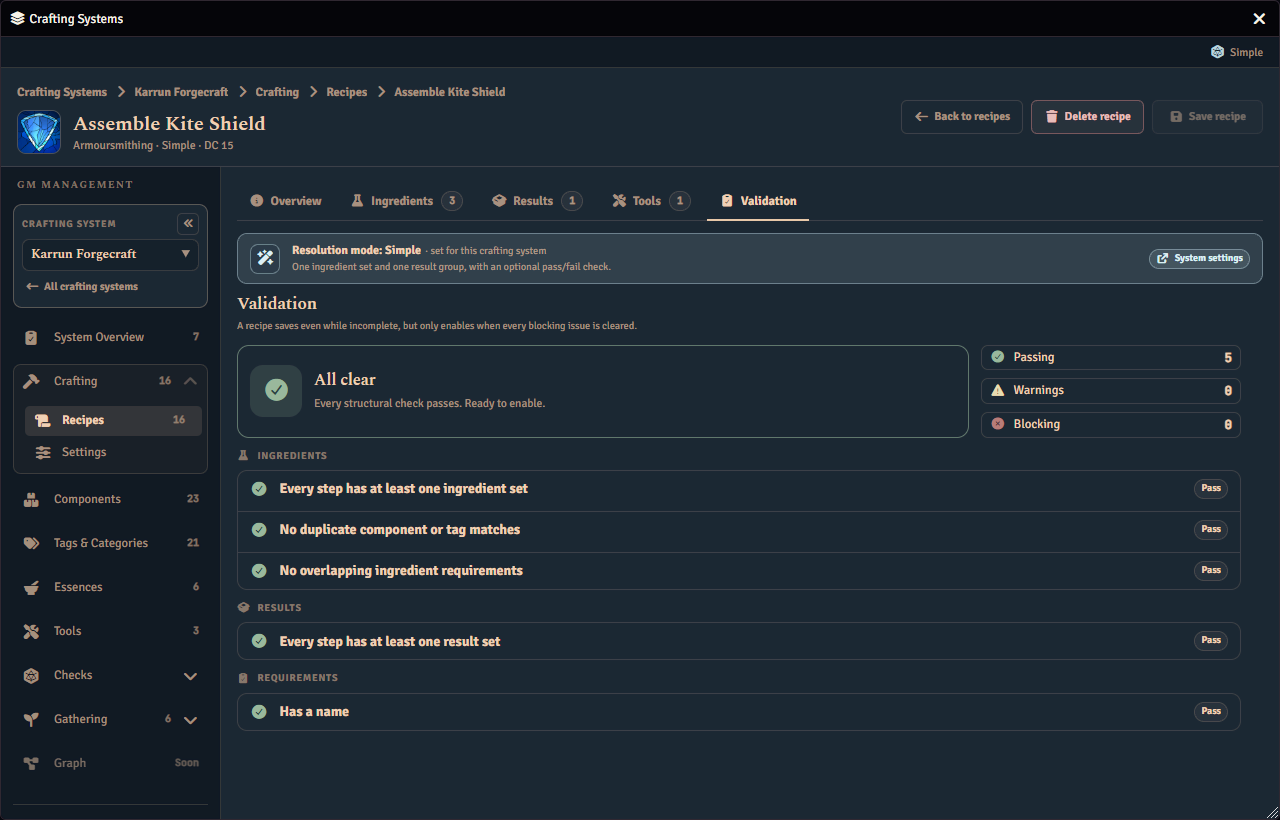
The Validation tab lists anything that would stop the recipe being crafted. Selecting an issue’s View button jumps to the tab it concerns and highlights the part of it the issue is about. For rewards the player chooses, it reports a group with fewer than two alternatives. It also reports a rolled group with no selection roll, or one that cannot be rolled, and a rolled group whose ranges are missing, backwards, fractional or overlapping. It reports an Up to N of group whose count is not a positive whole number or a rollable roll, and a group with a chooser or award rule Fabricate does not recognise. A group inside a progressive system is reported too. It also reports a result entered twice in the same recipe or step.
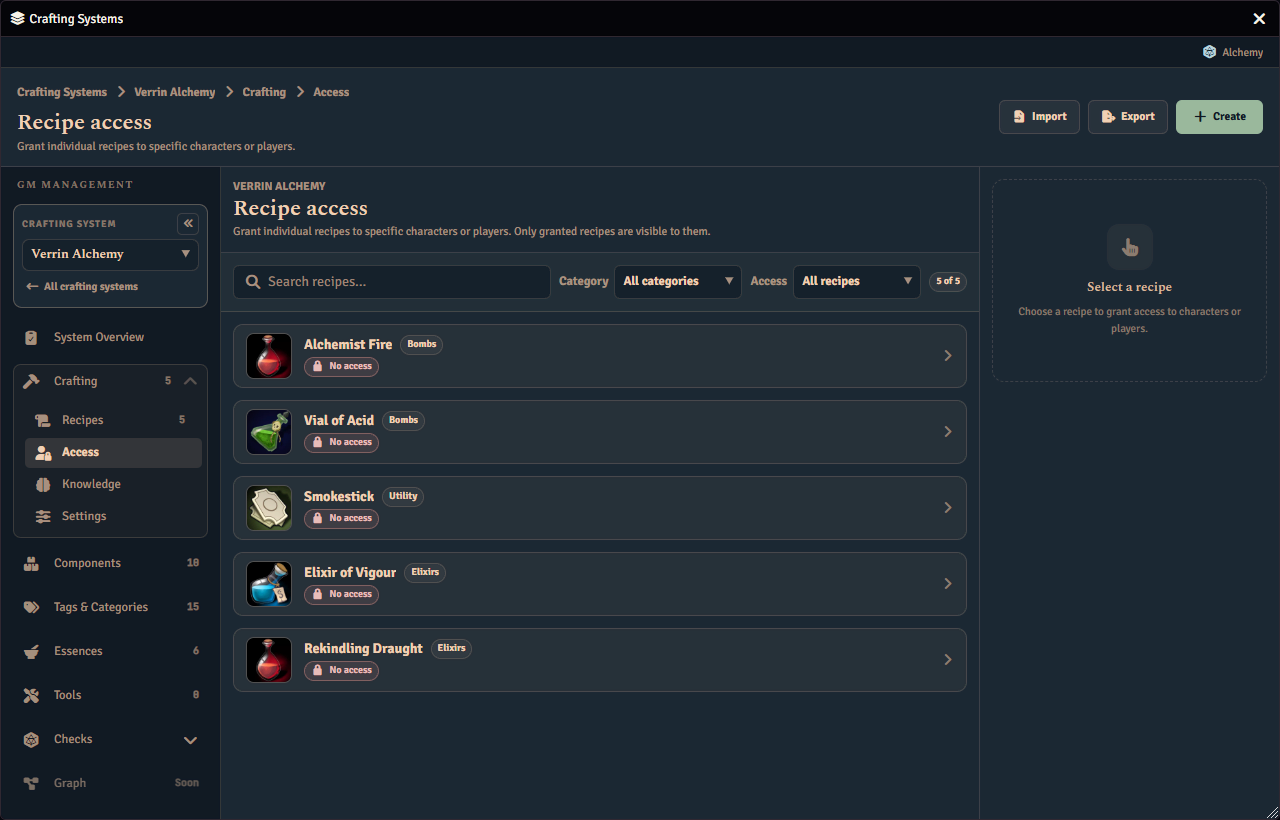
In a system that restricts recipes, the Access page grants individual recipes to named characters and players.
Recipe authoring and runtime crafting are also available through the public API. See the Crafting Engine API reference and the Recipe Manager API reference for the methods that create recipes, check craftability, and run a craft.