Books & Scrolls
Books & Scrolls appears in the Crafting menu only while the system’s visibility mode is Item or Knowledge. See Settings for the difference between the two.
“Books & Scrolls” is the name of the screen; it manages every recipe item in the system, whatever its Foundry item type.
Recipe Items
A recipe item is a regular Foundry item linked to a recipe. Think of it as a “recipe scroll” or “crafting manual”.
A recipe can belong to more than one recipe item at once. The same recipe can appear in several books or scrolls, and a single book or scroll can teach many recipes. You manage which recipes a book contains on the book’s own page in Books & Scrolls.
Linking Recipes to a Book
You link recipes to a book from the book’s own page in Books & Scrolls, not from the recipe editor. Open a recipe item, then use its Contents tab to build the list of recipes the book teaches.
- The recipes already in the book appear as read-only chips. When there are too many to show, the overflow reads +N more and opens the picker.
- Use Edit recipes to open a searchable panel of the crafting system’s recipes. Type to find one by name, then tick a recipe to add it or untick a linked one to remove it.
- The panel footer states the pending change, for example “1 to add · 1 to remove”. Clear all resets your choices.
- Apply links each addition and unlinks each removal in a single change. Pressing Escape, clicking outside the panel, or pressing Edit recipes again discards your staged choices.
- A book with no recipes yet says so until you add the first one.
Because membership works this way, the same recipe can be linked from more than one book, and a single book can teach many recipes. The book is backed by a game-world item that sets its name, image, and description. If that backing item can no longer be found, the recipe item shows an unresolved state and keeps the reference so you can repoint it.
How Matching Works
An item a player owns counts as the recipe’s linked item when it is the linked item itself, or when it is a copy of that item. When a player drags an item out of a compendium onto a sheet, Foundry makes a fresh copy and remembers where it came from. Fabricate recognises both the original item and any copy made from it, across all supported Foundry versions. This means recipe scrolls work whether a player picks up the item directly or copies it out of a compendium.
Tip: If a player owns a recipe scroll that was copied from a compendium but the recipe still shows as unknown, the copy may have lost track of the item it came from. Re-importing the recipe item from the compendium restores the link. A GM can also reconcile already-distributed copies in bulk with Repair Item Data.
Duplicating a Book or Scroll
Duplicating an item is a fully supported way to author a new book or scroll. Each book or scroll you register is given its own durable identity, so a player’s owned copies always resolve back to the right one.
To build a second book from an existing one, right-click the book in the Items sidebar, choose Duplicate, then change the copy’s name, art, and the recipes it links. Register that copy as its own book, and give it its own limits and contents. The copy becomes a separate book and does not collide with, or overwrite, the original, even when the original was imported from a compendium.
This means a common authoring pattern works cleanly. You can keep a large “master” tome that teaches many recipes freely, duplicate it into a short scroll that teaches only a few recipes with a strict learn cap, and hand each out independently. A player holding the scroll learns only the scroll’s recipes, and a player holding the tome learns only the tome’s.
This durable identity was added in a later version of Fabricate. A copy that was duplicated and handed to a player before you updated may still be labelled as the item it was copied from. A GM can reconcile those copies in bulk with Repair Item Data.
Limited Uses
Recipe items can have limited uses. You set these limits per item on its own page in Books & Scrolls, not once for the whole system.
- You can turn on use tracking for the item.
- You can set the maximum number of times the item grants access.
- You can have the item be deleted once its uses run out.
Each owned copy keeps its own count of how many times it has been used. Once an item reaches its maximum number of uses, it no longer grants access to the recipe.
Which Item Is Used
When a player owns more than one item that matches the same recipe, Fabricate always picks the same one in a predictable order. It prefers the item that has already been used the most, so usage stays consolidated on a single item. If items are still tied, it favours the crafting actor’s own items before items held by other actors, and then uses the order the items appear on the actor.
Learning Recipes
When a system grants access through learning, players can explicitly learn recipes.
Learn Flow
Learning happens from an owned recipe item. A recipe can be learned when it has a linked recipe item, the player owns a matching item, and the recipe has not already been learned. When a recipe is learned, Fabricate records it on the actor along with when it was learned and which item taught it.
A book can also require prior knowledge. When you add Required Knowledge to a book, a player must have already learned all of those recipes before they can learn from the book. A player who has not is refused with a message telling them to learn the required recipes first. This only applies while the book’s Limited learning is on. See Limiting Recipes Learned Per Book.
Players learn from the Inventory tab of the Fabricate window. See Learning From the Inventory Tab. Recipe items can also auto-learn when dropped on an actor. See Drag-and-Drop Learning.
Consume on Learn
When a recipe item is dropped on an actor and its recipes are learned that way, the book is consumed (deleted) by default. This is what makes a one-time-use “recipe scroll”.
Consume on learn applies only to drag-and-drop learning. Learning one recipe at a time from the Inventory tab never consumes the book.
Limiting Recipes Learned Per Book
A recipe item can link to several recipes, which makes it a “recipe book”. By default a book teaches every recipe it links at once. You can instead cap how many recipes a player may learn from a single book.
The cap belongs to each book, not to the whole system, so two books in one system can differ. One book might be a single-recipe scroll while another is a three-recipe tome. To set the cap, open the book’s own page in Books & Scrolls and go to its Limits tab. Turn on Limited learning, then set Recipes allowed to the number of recipes the book may teach.
Choosing the scope. When the cap is on, Limit applies lets you choose whether it counts Per copy or Across all copies.
- Per copy gives each physical copy of the book its own budget. Two copies of the same book each teach the full number of recipes, and a copy’s budget stays with that copy.
- Across all copies shares one budget across every copy of the book in the world. Recipes learned from any copy, by any player, all draw down the same remaining budget.
Once a book’s budget is spent, no further recipe can be learned from it. A per-copy budget follows its copy, and a shared budget is not reset when a copy changes hands or owners.
Requiring prior knowledge. With Limited learning on, the detail block also shows a Required Knowledge field. Search for and add any recipes a player must have already learned before they may learn from this book; each shows as a removable pill. A player who has not learned all of them is refused with a message telling them to learn the required recipes first. Turning Limited learning off removes this requirement (and the character Learning prerequisites beside it) entirely — the book then teaches freely.
Learning From the Inventory Tab
Players learn recipes from the Inventory tab of the Fabricate window. Recipe items the player owns appear there alongside components, and the Recipe items filter narrows the list to just books.
Selecting a book shows its detail on the right. The book’s limits appear at the top. If the book has learning requirements — Required Knowledge (recipes you must already know) or Learning prerequisites (character conditions) — they appear beside the access badge as Needs: <name> chips: green when you already meet the requirement, red when you don’t. These chips only appear while the book’s Limited learning is on; an unmet requirement also disables the recipe’s Learn button. Recipes learned (for example “2 recipes remaining”) appears when the book can be learned from and has a learn cap. Crafting uses (for example “3 uses remaining”) appears when the book grants crafting access by being held and has a use cap. A learn-only book never shows a use limit, and an item-only book never shows a learn limit. A book that both grants access by being held and can be learned from can show both.
The book’s recipes are listed below its limits. On a book you learn from, the header holds a Read & learn button (for example “Read & learn all 5 recipes”) that learns every recipe you have not yet learned in one press. It appears only when you can learn the whole book: no learn cap stops you short, the cap’s budget is not spent, and at least one recipe is still unlearned.
A book with a single recipe shows that recipe’s name, description, and its action button. A book with several recipes lists them in an accordion: each row has the recipe’s icon, name, and its action button, and expands to reveal the description. Once a book teaches more than six recipes, a search box appears and the list paginates (six, nine, or twelve per page).
On a book you learn from, each recipe row has a Learn button. Clicking Learn on a recipe learns it. A learned recipe shows a Learned marker instead of a button. When a learn cap’s budget is spent, the remaining Learn buttons are disabled.
An item-only book grants crafting access by being held rather than by learning. It still appears in the Inventory tab and lists the recipes it grants access to, along with its use limit. In place of Learn, each recipe row has a Craft button that opens that recipe so the player can craft it directly.
Drag-and-Drop Learning
Dragging a recipe item onto a crafting actor’s sheet is one of the ways players learn recipes. When a valid recipe item is dropped onto an actor, Fabricate automatically learns every matched recipe whose own crafting system has auto-learn turned on. No button click is required for that auto-learning subset.
Only actor-bound drop targets are considered for learning. If the drop target cannot be resolved to an actor, or the current user lacks permission to update that actor, the learning path is skipped silently.
How Matching Works for Dropped Items
A dropped item is matched against all recipes in the crafting system. A recipe matches when the dropped item is its linked recipe item, or a copy of that item. This means items dragged directly from the world and items originally copied from a compendium are both recognised, across all supported Foundry versions.
Recipe Book Items
A single dropped item can match more than one recipe. When this happens, the actor learns every matched recipe in a single operation. This makes it straightforward to create “recipe book” items. One Alchemist’s Compendium, for example, might unlock Healing Salve, Antitoxin, and Smokestick all at once.
This learn-all-on-drop behaviour applies to books without a learn cap. A book with a learn cap is not learned on drop. Its recipes are chosen one at a time from the Inventory tab instead. See Learning From the Inventory Tab.
Mixed-System Behavior
Learning from a recipe item is decided one recipe at a time, not once for the item as a whole. In a world with multiple crafting systems:
- Recipes from systems with auto-learn turned on are learned when the item is dropped onto the actor.
- Recipes from systems with auto-learn turned off are left out of auto-learning, even if the same owned item matches them.
This means the same owned item can auto-learn some recipes immediately and still offer manual learning, from the Inventory tab, for other matched recipes from differently configured systems.
Notifications
After a drag-and-drop learn attempt, Fabricate shows notifications for successful outcomes and stays silent for ignored outcomes:
| Outcome | Notification shown |
|---|---|
| Success | Lists each recipe learned and the actor that learned them. |
| Partial success | When some matched recipes were already known, only the newly learned recipes are listed. If all matches were already known, the player is notified that nothing new was learned. |
| No match | The drop is silently ignored for learning purposes. No notification is shown. The item is still added to the actor’s inventory as normal. |
| Precondition failure | When the system’s visibility mode does not support learning (for example, Item mode, where access comes from holding the item), nothing is learned and no notification is shown. |
The Books & Scrolls screen
Books & Scrolls is a GM management surface that gathers every recipe item in a crafting system into one place. It appears in the Crafting menu whenever the system is in Item or Knowledge visibility mode.
Despite the name, Books & Scrolls manages every recipe item regardless of its Foundry item type. A ring, a wand, a gem, or a plain note that is linked to a recipe all appear here alongside books and scrolls. “Books & Scrolls” is only the display name of the surface, not a filter on item type.
Opening Books & Scrolls
The Crafting Admin panel’s left menu shows an expandable Crafting group whenever a crafting system is selected. Expand the group and open Books & Scrolls from it. Books & Scrolls appears in the group only while the system is in Item or Knowledge visibility mode, which are the modes that use recipe items. See The Crafting Menu for the rest of the group.
What It Shows
The surface lists every recipe item in the selected system. Each item shows its image and name, and the recipes it teaches under Linked recipes. An item with no linked recipes yet says so, and the whole surface shows an empty state when the system has no recipe items at all. A search field above the list narrows it to items whose name matches what you type.
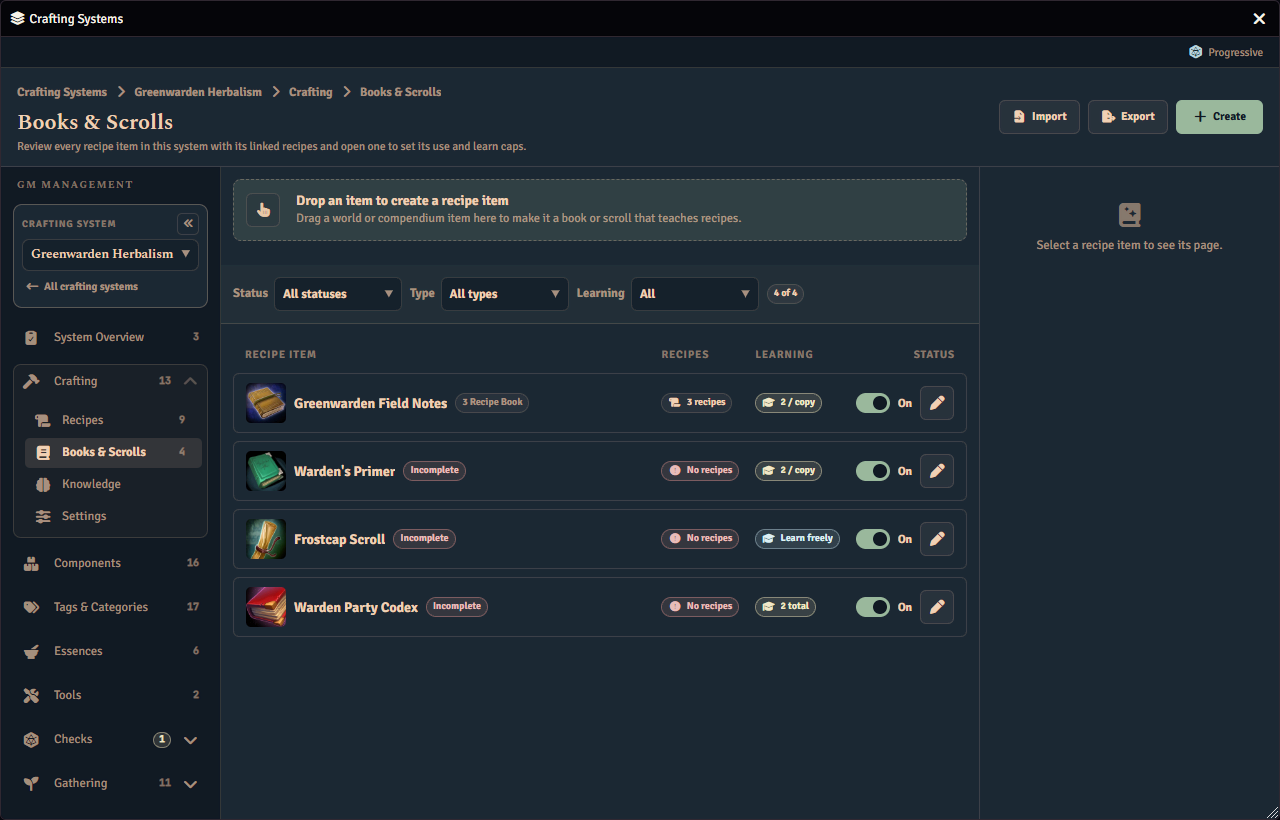
Each item also shows its own use and learn caps as chips:
- A Use cap chip shows how many times the item grants crafting access, or Unlimited uses when use tracking is off.
- A Learn cap chip shows how many recipes a player may learn from the item, or Learn all when there is no learn cap.
Setting an Item’s Caps
The limits belong to each recipe item, not to the whole system. Two books in one system can differ, so a one-recipe scroll can sit beside a three-recipe tome.
Click a row to open that item’s own page. The breadcrumb reads Crafting then Books & Scrolls then the item’s name, and the page’s Limits tab is where you set the caps. The Limits tab depends on the system’s visibility mode.
- In Item mode it shows a Uses card: turn on Limited use, set Uses per copy, and choose what happens When the last use is spent (Destroyed or Becomes inert).
- In Knowledge mode it shows a Learning card: turn on Limited learning, choose whether the limit applies Per copy or Across all copies, set Recipes allowed, and optionally add Required Knowledge (recipes the reader must already know) and Learning prerequisites (character conditions) — both hidden, and not enforced, while Limited learning is off.
The same page has a Contents tab where you link and remove the recipes the book teaches. Every change applies immediately, so there is no separate save step. The chips on the list update to match once you go back.