Parties
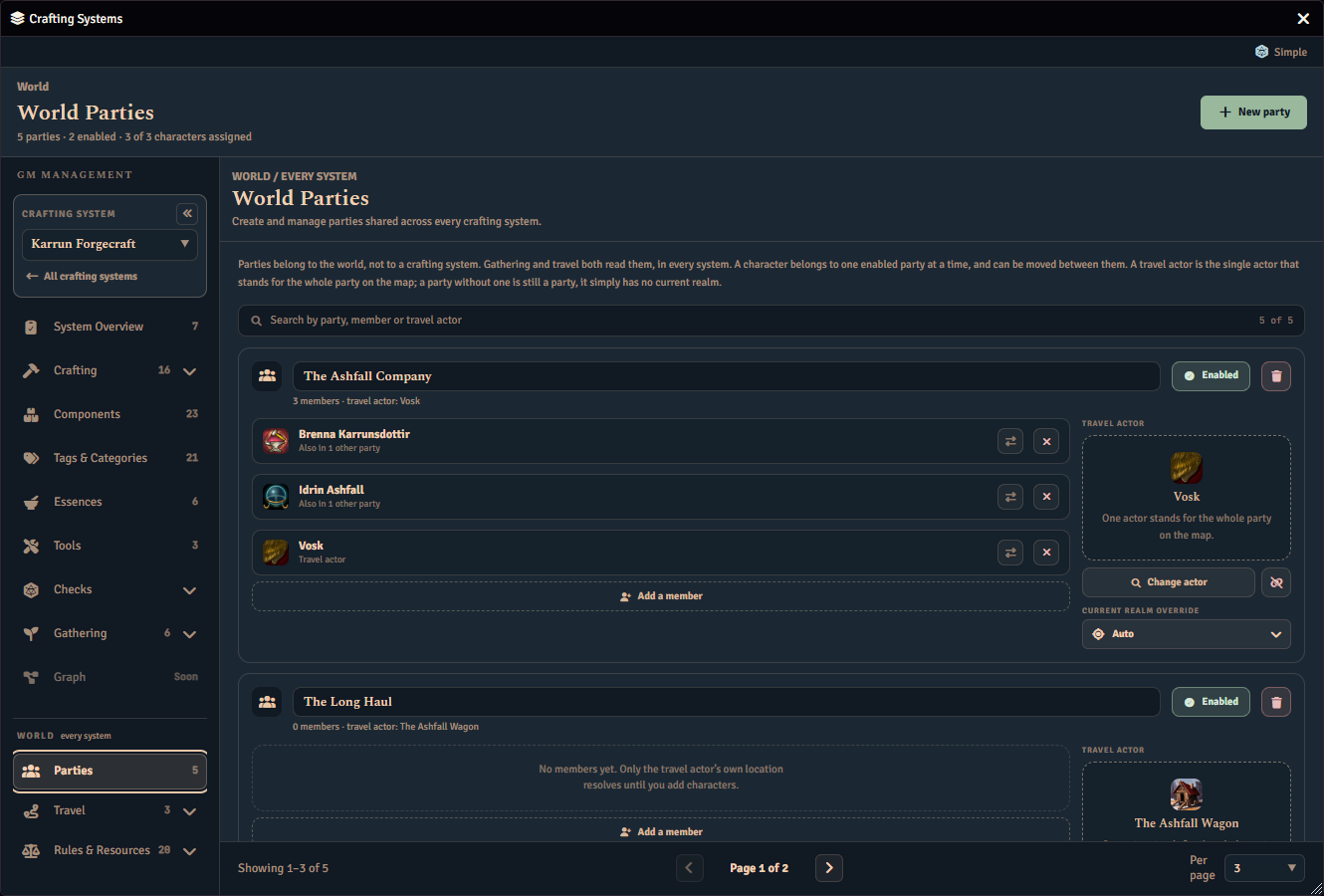
Choose World > Parties at any time for the world party list and editor (name, enabled state, members, and travel actor), including when no crafting system is selected. Each party is a fully expanded card in a full-width content area, so its editing controls are available without selecting the party first. When the list has more than one page, the pagination controls stay below the scrolling party cards and do not cover them. When no parties exist yet, the panel shows a simple No parties yet empty state.
Parties are world-level records shared across every crafting system. A party stores a name, an enabled flag, member actor UUIDs, one optional travel actor UUID, and one current-realm override. The override is single because a party is one set of tokens standing in one place: it used to be keyed by crafting system, which modelled a party as being in several places at once.
- Members can be added through the searchable picker, removed, or moved to another party. A move is a single persisted update, so a member never momentarily belongs to two parties mid-move.
- Travel actor is the actor that represents the party on a campaign map (for example, a banner or caravan actor whose token sits on an overworld or hexcrawl scene). Fabricate senses the party’s realm presence from that actor’s placed token and the selected system’s map links. Set or clear it from World > Parties. The picker offers only actors whose type is listed under Player Character Actor Types in the module settings, which by default is the “Character” type alone. To pick a banner, caravan or group actor from the list, add its actor type there — noting that doing so also makes actors of that type eligible party members. Alternatively, drag the actor straight onto the travel-actor panel: a drop assigns any actor regardless of its type. An actor already assigned as a travel actor stays assigned and stays visible in the picker even if its type is not listed.
- Enabling a party does not require a travel actor. A party without one resolves to no current realm, which leaves its members exactly where an actor in no party stands: ungated environments stay open and location-gated ones stay out of reach. Assign a travel actor when you want that party’s realm to resolve from its token on the map.
- One enabled party per actor means an actor may be associated with at most one enabled party in total, whether as a member, as the travel actor, or both (and when both, the same party). Disabled parties never count toward this limit. Violations are rejected at save time and shown inline next to the control that caused them.
- Deleting a party removes its members, travel actor, and current-realm overrides for every crafting system, after confirmation.
Stale references
Members or travel actors whose actor no longer exists, and override realm ids whose realm was deleted, are preserved verbatim rather than silently dropped. A stale member’s row is labeled Stale member and keeps its remove control. A stale travel actor is labeled Stale travel actor on its tile and keeps its unlink control. A stale override realm shows as Unknown realm on the override control until you choose Auto or a different realm.
Setting A Party’s Current Realm
A party’s current realm is resolved per crafting system, in this order:
- GM manual override is set from World > Parties.
- Travel actor token sensing checks the travel actor’s placed tokens against realm Scene Region mappings and reports the Travel actor source label when it resolves.
- Unresolved means no current realm.
To set the override, choose a realm from the Current realm override picker on the party’s card. The picker’s leading Auto option clears the override again and hands the party back to travel-actor sensing. The control is available only while a Gathering-enabled crafting system is selected and Enable Travel & Realms is on. Otherwise the party card explains the missing prerequisite in place of the picker and does not write an override. Setting an override and clearing it back to Auto are both stamped with the updating user and time. A disabled realm can still be chosen and still resolves, marked as disabled in the picker, and an override id whose realm was deleted surfaces as stale repair evidence and does not resolve.
The picker sits beneath the travel-actor panel in the right-hand column of each party card.